If you own a Ford F250 Super Duty, you know how important your tire pressure monitoring system (TPMS) is for safety and performance. But what happens when your TPMS light stays on or needs resetting?
It can be frustrating, especially if you’re not sure how to do it right. This guide will walk you through the exact TPMS reset procedure for your Ford F250 Super Duty, year by year. By the end, you’ll have the confidence to reset your TPMS quickly and get back on the road safely.
Keep reading to discover the simple steps tailored for your specific model year.
Tpms Basics For Ford F250 Super Duty
The Tire Pressure Monitoring System (TPMS) in the Ford F250 Super Duty helps keep you safe on the road. It watches your tire pressure and alerts you if there is a problem. Knowing the basics of TPMS can help you understand why it matters and how to fix common issues.
This system is important for your truck’s performance and your safety. It helps improve fuel efficiency and extends tire life by keeping the pressure right. Learning how TPMS works will help you maintain your Ford F250 better.
How Tpms Works
TPMS uses sensors inside each tire to check the air pressure. These sensors send data to the truck’s computer. If the pressure is too low or too high, the system triggers a warning light on the dashboard. This lets you know to check your tires soon.
Importance Of Tpms
Proper tire pressure improves fuel economy and driving safety. Low pressure can cause tire damage or blowouts. TPMS alerts help you fix problems early. This keeps your truck running smoothly and reduces repair costs.
Common Tpms Issues
Sometimes, TPMS sensors can fail or lose connection. Dead batteries in sensors cause warning lights to stay on. Incorrect tire pressure or sensor damage also triggers alerts. Resetting or replacing sensors often solves these problems.
Reset Methods For 2011-2014 Models
The Ford F250 Super Duty models from 2011 to 2014 have specific ways to reset the Tire Pressure Monitoring System (TPMS). Resetting TPMS helps keep your tires in good condition and improves safety. Each method is simple and can be done at home.
Understanding these reset steps saves time and avoids unnecessary trips to the mechanic. The process varies slightly depending on the model year and the reset option you choose. Below are clear instructions for manual reset, using the instrument panel, and performing a drive cycle reset.
Manual Reset Steps
Start the vehicle and turn the ignition to the “On” position without starting the engine.
Locate the TPMS reset button, usually under the steering wheel or near the glove box.
Press and hold the reset button until the TPMS light blinks three times.
Release the button and wait for the light to turn off, signaling the reset is complete.
Using The Instrument Panel
Turn on the ignition without starting the engine.
Use the arrow buttons on the steering wheel to navigate the menu on the instrument panel.
Select the “Settings” or “Vehicle” menu, then find the “TPMS Reset” option.
Press “OK” or “Reset” to start the process.
Wait for the confirmation message that the TPMS has been reset.
Drive Cycle Reset
After inflating tires to the correct pressure, start driving the truck.
Maintain a steady speed of 50 mph or higher for about 10 minutes.
The TPMS will automatically detect the new tire pressures during this drive.
Once complete, the TPMS warning light should turn off.
Reset Steps For 2015-2017 Models
The Ford F250 Super Duty models from 2015 to 2017 come with a tire pressure monitoring system (TPMS) that needs resetting after tire changes or pressure adjustments. Resetting the TPMS helps keep the system accurate and your truck safe on the road. The process is simple and uses the vehicle’s onboard systems. Follow these steps to reset your TPMS properly.
Accessing The Tpms Menu
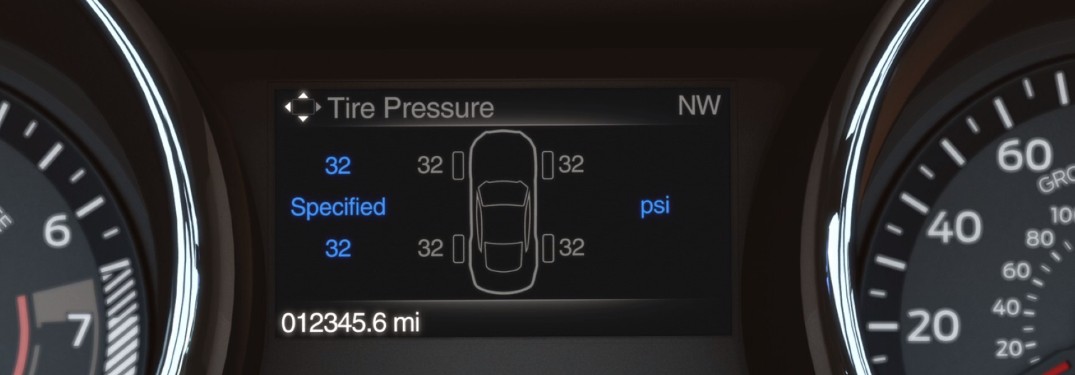
Start by turning the ignition to the “on” position without starting the engine. Use the steering wheel controls to navigate the dashboard menu. Look for the “Settings” option and select it. Then find the “Tire Pressure” or “TPMS” menu. This menu lets you check and reset the tire sensors.
Using The Sync System
Press the “Menu” button on your Sync system screen. Scroll to “Vehicle Settings” and select it. Choose “Tire Pressure Monitoring” or a similar option. The screen will show tire pressure data. Select “Reset” or “Relearn” to start the process. The system will ask for confirmation. Confirm and wait for the reset to complete.
Relearn Procedure
After resetting, drive the truck at 25 mph or higher. Keep driving for about 10 minutes. This allows the sensors to relearn the tire pressures. The TPMS light should turn off once the relearn is successful. If the light stays on, repeat the steps or check tire pressures manually.
Credit: www.akinsford.com
Reset Instructions For 2018-2020 Models
The Ford F250 Super Duty models from 2018 to 2020 have a specific process to reset the Tire Pressure Monitoring System (TPMS). This system alerts you if a tire’s pressure is low. Resetting the TPMS ensures the alerts work correctly after tire changes or pressure adjustments.
This guide covers easy steps to reset the TPMS using the vehicle’s touchscreen. It also explains how to reprogram TPMS sensors and how to fix common reset problems. Follow these instructions carefully to keep your F250 running safely.
Touchscreen Interface Reset
Start the engine and keep the truck in park. Access the main menu on the touchscreen. Select the “Settings” option, then find “Vehicle.”
Choose “Tire Pressure” or “TPMS.” Tap “Reset” or “Calibrate” to begin the process. Wait for the system to confirm the reset. Drive the truck for 10 minutes at 20 mph or higher.
The TPMS light should turn off if the reset is successful. If it stays on, try the reset again or check the sensors.
Tpms Sensor Reprogramming
Sometimes, sensors need reprogramming after replacement. Use a TPMS tool designed for Ford trucks. Turn the ignition on without starting the engine.
Hold the tool near the valve stem of each tire. Follow the tool’s instructions to read and program each sensor. Confirm the tool shows the sensors’ IDs correctly.
Turn off the ignition and start the engine. The TPMS light should reset. Drive the vehicle to complete the sensor reprogramming.
Troubleshooting Reset Failures
If the TPMS light stays on, check tire pressures first. Inflate all tires to the recommended levels. Inspect sensors for damage or corrosion.
Try resetting again using the touchscreen or TPMS tool. If issues persist, a sensor battery might be dead. Visit a service center to replace faulty sensors.
Ensure your TPMS tool is compatible with the 2018-2020 F250 models. Incorrect tools may fail to program sensors properly.
Reset Tips For 2021 And Newer Models
Resetting the Tire Pressure Monitoring System (TPMS) on Ford F250 Super Duty trucks from 2021 and newer is easier than before. These models use updated technology that helps keep track of tire pressure more accurately. Knowing the right steps to reset the system saves time and keeps your truck running safely.
This section covers simple tips for resetting the TPMS in these newer models. Each method matches the technology in your truck for the best results.
Using Fordpass App
The FordPass app offers a quick way to reset the TPMS. Connect your phone to your truck via Bluetooth. Open the app and find the TPMS reset option in the vehicle settings. Follow the on-screen instructions to complete the reset. This method works well for many drivers and avoids manual steps.
Advanced Sensor Calibration
Newer Ford F250 models need sensor calibration after a tire change or pressure fix. Drive your truck at 50 mph for about 10 minutes. This action helps sensors recalibrate automatically. Make sure tire pressures are correct before driving. Calibration ensures the TPMS reads accurate data.
When To Visit A Dealer
Sometimes, the TPMS reset does not work properly. If warning lights stay on or sensors do not respond, visit a dealer. They have special tools for diagnosing and fixing sensor problems. Professional help ensures your system works well and keeps you safe on the road.

Credit: www.akinsford.com
Common Tpms Reset Mistakes
Resetting the TPMS on a Ford F250 Super Duty can seem simple. Many drivers make common mistakes that cause frustration and errors. These mistakes often lead to incorrect tire pressure readings or warning lights that won’t turn off. Understanding these errors helps keep your truck safe and your tires in good shape.
Ignoring Tire Pressure Warnings
Some drivers ignore the tire pressure warning light. This light signals low pressure, which affects safety and fuel efficiency. Ignoring it can cause tire damage or accidents. Always check and fix tire pressure as soon as the warning appears.
Incorrect Reset Procedures
Reset steps vary by year and model. Using the wrong reset method stops the TPMS from recalibrating. Not following the exact procedure keeps the warning light on. Always consult the owner’s manual or trusted guides for your truck’s year.
Battery And Sensor Issues
Dead batteries in sensors cause false warnings. Sensors can also fail from damage or wear. Replacing sensor batteries or faulty sensors is key. Otherwise, resetting the TPMS will not work properly.
Maintaining Your Tpms System
Maintaining your Ford F250 Super Duty TPMS system helps keep your tires safe. A well-maintained TPMS alerts you to low tire pressure early. This prevents tire damage and improves fuel efficiency. Proper care ensures your TPMS works correctly for years.
Regular Tire Pressure Checks
Check your tire pressure at least once a month. Use a reliable tire pressure gauge for accuracy. Keep tires inflated to the recommended PSI found in your owner’s manual. Proper pressure keeps your tires healthy and your TPMS accurate.
Sensor Battery Replacement
TPMS sensors run on small batteries that wear out over time. Replace sensor batteries every 5 to 7 years or as needed. Weak batteries cause false warnings or sensor failure. Visit a professional to replace batteries safely and correctly.
Professional Inspections
Have your TPMS checked by a mechanic during regular vehicle service. Experts can spot sensor issues you might miss. They can also reset or recalibrate the system after tire changes. Regular inspections keep your TPMS reliable and your driving safe.

Credit: www.youtube.com
Frequently Asked Questions
How Do I Reset Tpms On Ford F250 Super Duty 2015?
To reset TPMS on a 2015 Ford F250, drive at 50 mph for 10 minutes. The system recalibrates automatically after this drive. If it doesn’t reset, use the TPMS reset button inside the vehicle or consult the owner’s manual for exact steps.
Can I Reset Tpms Without A Scan Tool?
Yes, many Ford F250 models allow TPMS reset without a scan tool. You can reset it by driving at a steady speed or using the in-vehicle reset button. However, some newer models may require a professional scan tool for reset.
Why Won’t My Ford F250 Tpms Reset?
If your Ford F250 TPMS won’t reset, check tire pressures first. Incorrect pressures or a faulty sensor can cause reset failure. Also, ensure the vehicle has been driven long enough at proper speeds to trigger the reset process.
Does Tpms Reset Vary By Ford F250 Model Year?
Yes, TPMS reset procedures vary by Ford F250 model year. Older models often reset automatically after driving. Newer models may require manual reset via buttons or scan tools. Always check your specific model year’s owner’s manual for accurate instructions.
Conclusion
Resetting the TPMS on your Ford F250 Super Duty is simple with the right steps. Each model year may have slight differences, but the process stays clear. Keep this guide handy to fix tire pressure warnings quickly. Proper tire pressure helps your truck run safely and save fuel.
Stay confident on the road by maintaining your TPMS regularly. A little effort keeps your Ford working well for years to come.
Disclosure: As an Amazon Associate, I may earn from qualifying purchases at no extra cost to you. Amazon and the Amazon logo are trademarks of Amazon.com, Inc, or its affiliates.
- Amazon, Amazon Prime, the Amazon logo and Amazon Prime logo are trademarks of Amazon. com, Inc. or its affiliates.

I am Sadman, the founder of CarSensorHub.com, where I share my passion for cars and technology. I specialize in writing detailed reviews and helpful guides on car gadgets, accessories, safety tools and many more. My mission is to help car owners discover the best products and tips to improve their driving experience and stay safe on the road.