Oil pressure sensors are the same—even for different Honda Civic years and engines. Double-check your VIN or engine code before buying. OEM (Original Equipment Manufacturer) parts are best for reliability, but high-quality aftermarket sensors can save money. Check reviews and choose trusted brands.
Many auto parts websites let you enter your car’s year, make, and model to find the exact part. If you’re unsure, ask the parts counter at a dealership or reputable auto parts store.
Non-obvious insight: Some online sellers offer very cheap sensors, but these can fail early or give inaccurate readings. Spending a few more dollars on a known brand can prevent repeat repairs and headaches. Always compare the new sensor to your old one before installing—connector shape and thread size must match exactly.
How To Replace The Oil Pressure Sensor In Your Honda Civic
Replacing the oil pressure sensor is a task many DIYers can handle with basic tools. The process is similar for most Civics (1996 to present), though the sensor’s location and engine bay layout may vary. Take your time, keep things clean, and you’ll avoid common mistakes.
Step 1: Prepare Your Workspace
Park your Civic on a flat surface. Let the engine cool fully—hot oil or engine parts can cause burns. Gather all tools and parts before starting. If you need to raise the car, use a floor jack and secure it with jack stands.
Never work under a car supported only by a jack.
Tip: Wear gloves and safety glasses. Oil may drip when you remove the sensor.
Step 2: Locate The Oil Pressure Sensor
Open the hood and find the sensor. In most Civics, the oil pressure sensor is near the oil filter or screwed into the engine block (often on the rear, facing the firewall). It usually has an electrical connector with one or two wires.
If you can’t see it from above, you may need to access it from below the car.
For common Civic engines:
- 1.6L D-series (1996-2000): Sensor is on the rear of the engine block, near the oil filter.
- 1.7L/1.8L/2.0L (2001-2015): Usually behind the engine, close to the oil filter or intake manifold.
- 1.5L Turbo (2016+): Sensor is often on the lower front side of the engine block.
Experience-based tip: Take a photo of the sensor and connector before removal. It helps with reassembly and avoids confusion.
Step 3: Disconnect The Electrical Connector
Gently squeeze or lift the tab on the connector and pull it straight off the sensor. Don’t yank the wires. If the connector is stuck, use a flathead screwdriver to carefully release the clip.
Inspect the connector for oil contamination or corrosion. Clean with electrical contact cleaner if needed. If the connector is broken or melted, it must be replaced for reliable operation.
Step 4: Remove The Old Sensor
Place a shop rag under the sensor to catch drips. Use the correct deep socket and ratchet to loosen the sensor. Turn counterclockwise until it comes out. Some oil may leak out—this is normal.
Check the old sensor for signs of oil leaks, cracks, or damaged threads. If oil was leaking around the sensor, inspect the sensor port (hole in engine block) for damage or debris.
Non-obvious insight: If oil pours out, your car may have been overfilled or the engine was hot. Wipe up any spilled oil to prevent smells or smoke later.
Step 5: Install The New Sensor
If your new sensor requires thread sealant, apply a small amount only to the threads (not the tip). Some sensors come with a pre-applied sealant. Don’t overdo it—excess sealant can block the sensor or get into the oil system.
Hand-thread the new sensor into the port. Then use the socket and ratchet to snug it down. Don’t overtighten—most sensors need only about 15-20 ft-lb of torque. If using a torque wrench, check your service manual for the exact spec.
Replace the crush washer if your model uses one. This helps prevent leaks.
Step 6: Reconnect The Electrical Connector
Snap the connector back onto the sensor until it clicks. Tug gently to make sure it’s secure. Wipe away any spilled oil. Double-check that no wires are pinched or touching hot engine parts.
Practical tip: If the connector is loose or doesn’t “click,” check for bent pins, broken tabs, or dirt inside the connector.
Step 7: Check Oil Level And Test
Before starting the engine, check your oil level using the dipstick. If you lost oil during the sensor swap, add more until it’s at the correct level.
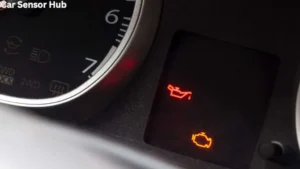
Start the engine and let it idle. Watch the dashboard for warning lights. If the oil pressure light stays off and the engine runs smoothly, you’ve done the job right. Check for leaks around the new sensor. If there’s a drip, shut off the engine and retighten the sensor gently.
Experience-based tip: Let the engine run for a few minutes, then turn it off and check for leaks again. Sometimes small leaks show up after the engine warms up.
Step 8: Reset Warning Lights (if Needed)
If your Civic’s check engine or oil pressure light stays on, you may need to reset the system. Most Civics will clear the warning after a few driving cycles if the sensor is fixed. If not, you can:
- Use an OBD2 scanner to clear codes (available at auto parts stores, or many public libraries lend them for free)
- Disconnect the negative battery cable for 5-10 minutes (radio presets may be lost)
- Visit a mechanic or dealer for a reset
Be sure the problem is fixed before clearing codes. Don’t ignore repeated warnings—they may signal a real oil pressure issue.
Common Mistakes When Replacing A Honda Civic Oil Pressure Sensor
Even a simple job can go wrong if you’re not careful. Here’s how to avoid the most common pitfalls:
- Using the wrong sensor: Not all Civics use the same sensor. Double-check part numbers and compare the old and new sensors before installing.
- Overtightening: A sensor that’s too tight can crack, leak, or strip the threads in your engine block. Use a torque wrench if possible.
- Skipping sealant/crush washer: If your model needs a washer or sealant, don’t skip it. Leaks can cause repeat failures or warning lights.
- Damaging the connector: Don’t force the electrical connector. Broken clips or bent pins cause unreliable readings.
- Ignoring oil leaks: If oil leaks after replacement, stop and fix it. Even small leaks can lower oil pressure over time.
- Not checking oil level: Always check and top up oil after the job. Low oil can trigger warnings even with a new sensor.
- Not cleaning up: Oil spills can smoke and smell. Clean thoroughly to avoid confusion later.
- Misdiagnosing the problem: If warning lights stay on after replacement, don’t assume the sensor was the only issue. Actual low oil pressure, wiring faults, or bad engine computers can cause the same symptoms.
Non-obvious insight: If you see oil inside the electrical connector, the sensor’s internal seal likely failed. Replace the connector if contaminated—oil can travel up the wire and damage the car’s computer.

Credit: evparts4x4.com
Tips For A Smooth Oil Pressure Sensor Replacement
Getting the job done right the first time saves time and stress. Here are some extra pointers for Honda Civic owners:
- Take photos before you disconnect anything. This helps with routing wires and remembering how things fit.
- Label wires with tape if you’re removing more than one connector in a tight engine bay.
- Keep the work area clean. Dirt in the sensor port can get inside your engine and cause wear.
- Have a magnet tool handy in case you drop nuts, bolts, or the sensor itself in tight spaces.
- Don’t rush. Take your time, especially if working in a cramped area or for the first time.
- Test drive after repair. Drive a short distance, then check for warning lights or leaks before considering the job done.
- Use quality parts. Cheap sensors can fail early, costing more in the long run.
- Check service bulletins. Sometimes Honda releases updates for known sensor issues (see [NHTSA](https: //www.nhtsa.gov/recalls) for recalls and bulletins).
Experience-based tip: If replacing the sensor doesn’t solve your warning light, have a mechanic measure actual oil pressure with a manual gauge. This test rules out deeper engine problems.
How To Know If The Problem Is Fixed
After a successful sensor replacement, your Civic should run smoothly, and all warning lights should stay off. Here’s what to check:
- No oil pressure or check engine lights after driving for a few minutes
- No oil leaks around the new sensor or below the engine
- Normal engine sound and feel (no knocking, ticking, or rough idle)
- Stable oil pressure gauge (if equipped)
If any problems return, double-check your work, and review the symptoms. Sometimes, a wiring issue or unrelated engine problem is the real cause.
Non-obvious insight: Some newer Civics store old “ghost” codes in the computer. Even after fixing the sensor, the light may stay on until you clear the code with a scan tool.

Credit: www.youtube.com
When To Get Professional Help
Most DIYers can handle oil pressure sensor replacement, but some situations call for expert help:
- Sensor location is hard to reach: Some newer Civics have sensors deep behind the engine or under intake manifolds.
- You see oil in the wiring harness: This can travel up to the engine computer and needs careful cleaning.
- Warning lights come back immediately: There could be a deeper problem with oil pressure, wiring, or the car’s computer.
- You’re not comfortable with tools or car repairs: It’s better to pay a little now than risk engine damage later.
A good mechanic can diagnose oil pressure problems quickly. They have special tools to check real engine oil pressure (not just the sensor reading) and can spot wiring or computer issues that most DIYers miss.
Final Thoughts
Replacing the oil pressure sensor in your Honda Civic is a valuable skill. It saves money, helps you understand your car better, and keeps your engine safe from hidden damage. With the right tools, clear steps, and a little patience, most owners can do this job at home.
Remember: Always confirm the real cause of any oil pressure warning before replacing parts. Use quality components, double-check your work, and don’t ignore warning lights if they return. If you hit a snag, don’t hesitate to get professional help—protecting your engine is always worth it.
For even more details about Honda Civic maintenance and repairs, visit [Honda’s official owner’s site](https://owners.honda.com/), which offers guides, recalls, and DIY tips tailored to your model and year.
By understanding and caring for your Civic’s oil pressure system, you’re not just avoiding expensive repairs—you’re keeping your car reliable for years to come. Safe driving!

Credit: www.youtube.com
Disclosure: As an Amazon Associate, I may earn from qualifying purchases at no extra cost to you. Amazon and the Amazon logo are trademarks of Amazon.com, Inc, or its affiliates.
- Amazon, Amazon Prime, the Amazon logo and Amazon Prime logo are trademarks of Amazon. com, Inc. or its affiliates.

I am Sadman, the founder of CarSensorHub.com, where I share my passion for cars and technology. I specialize in writing detailed reviews and helpful guides on car gadgets, accessories, safety tools and many more. My mission is to help car owners discover the best products and tips to improve their driving experience and stay safe on the road.