Connecting your Android phone to your car every time you drive can become a daily annoyance. A wireless Android Auto adapter offers a simpler way to access navigation, music, calls, and compatible apps without plugging in your phone each time. Once configured, the adapter can connect your phone automatically when you start your vehicle.
However, choosing the right device is not as simple as buying the cheapest wireless dongle. Some adapters work exclusively with Android Auto, while others support both Android Auto and Apple CarPlay. Compatibility, connection stability, phone switching, firmware updates, and USB connections can all affect your experience.
In this guide, we compare several popular options, including AAWireless TWO, Motorola MA2, Carsifi, Carlinkit 5.0 (2air), Ottocast Mini Cube 3.0, and AAWireless TWO+. We also explain how to check your car before buying, how to install an adapter, and how to troubleshoot common connection problems.
What Is the Best Wireless Android Auto Adapter?
For most Android-only drivers, the AAWireless TWO is a strong starting point because it offers a companion app, firmware updates, phone-switching controls, and standby options.
If you prefer a physical power switch and want to share your car with another Android phone, consider the Motorola MA2. Drivers who need older Android version compatibility may want to investigate Carsifi. For people who use both Android and iPhone, the AAWireless TWO+ or Carlinkit 5.0 (2air) may be more suitable.
The right choice depends on your car’s existing infotainment system. Every standard USB wireless adapter in this guide requires a compatible wired smartphone projection system already installed in the vehicle.
| Adapter | Best for | Platform support | Main feature |
|---|---|---|---|
| AAWireless TWO | Most Android-only drivers | Android Auto | Companion app and configurable button |
| Motorola MA2 | Shared Android vehicles | Android Auto | Physical power switch and two-phone pairing |
| Carsifi | Multi-Android households | Android Auto | Magic Button |
| Carlinkit 5.0 (2air) | Mixed-phone households | Android Auto and CarPlay | Dual-platform support |
| Ottocast Mini Cube 3.0 | Compact dual-platform setup | Android Auto and CarPlay | Small design and 90-degree connector |
| AAWireless TWO+ | Android and iPhone users | Android Auto and CarPlay | Physical phone-switching button |
Important: A wireless Android Auto adapter does not add Android Auto to a car that does not already support wired Android Auto. Check your factory infotainment system before purchasing.
How Does a Wireless Android Auto Adapter Work?
A wireless Android Auto adapter acts as a bridge between your Android smartphone and your car’s infotainment system. It converts an existing wired Android Auto connection into a wireless connection.
Normally, your phone communicates with the car through a USB cable. With a compatible wireless adapter, the initial connection is established using Bluetooth, while Wi-Fi handles the wireless Android Auto data connection.
After the initial setup, the adapter can reconnect to your phone automatically when you start the vehicle, depending on the adapter and your car’s power settings.
What Can You Do With a Wireless Adapter?
- Use Google Maps and other compatible navigation apps.
- Listen to music through Spotify and supported audio apps.
- Access hands-free calling and compatible messaging features.
- Use Google Assistant and supported voice commands.
- Keep your phone in your pocket instead of connecting a USB cable.
What Do You Need Before Buying?
There are three basic requirements:
- A compatible vehicle: Your vehicle must already support wired Android Auto through its factory infotainment system or a compatible aftermarket head unit.
- A compatible Android phone: Check the adapter’s minimum Android version. Many newer products require Android 11 or later.
- A USB data connection: The adapter must connect to a USB port that supports Android Auto data transfer, not just charging.
If your car already has factory wireless Android Auto, you generally do not need a conversion adapter.
Best Wireless Android Auto Adapters in 2026
We selected these products based on their documented platform support, manufacturer specifications, software features, connection options, and intended use cases. This is a specification-based buying guide, not a claim that every product has undergone identical independent laboratory testing by CarSensorHub.
Best Overall for Android Auto
1. AAWireless TWO

The AAWireless TWO is designed specifically for people who want to make their existing wired Android Auto connection wireless. It is a compact adapter with a companion app and a multifunction physical button.
One of its main advantages is the level of control available through the companion app. Users can access firmware updates, troubleshooting tools, button configuration, and other device settings.
The physical button is useful when more than one person drives the same vehicle. You can pair additional phones and switch between them without repeatedly removing and reconnecting the adapter.
Key Features
- Wireless Android Auto connectivity.
- Bluetooth and Wi-Fi communication.
- Multifunction physical button.
- Multiple phone pairing and switching.
- Companion app for firmware updates and troubleshooting.
- Standby and automatic standby options.
- Compact design measuring approximately 5.5 × 3.5 × 1.5 cm.
Compatibility
AAWireless lists Android 11 or newer as the requirement for wireless Android Auto. Your vehicle must already support wired Android Auto. The manufacturer also supports compatible aftermarket head units that provide wired Android Auto.
Pros
- Android Auto-focused design.
- Useful companion app.
- Configurable physical button.
- Firmware update support.
- Multiple phone pairing.
Cons
- Does not support Apple CarPlay.
- Requires Android 11 or newer.
- Availability can vary by region.
- Requires an existing wired Android Auto system.
Who should buy it? Android users who want a compact adapter with software controls and a straightforward setup process.
Check AAWireless TWO on Amazon
Best for Shared Vehicles
2. Motorola MA2 Wireless Android Auto Adapter
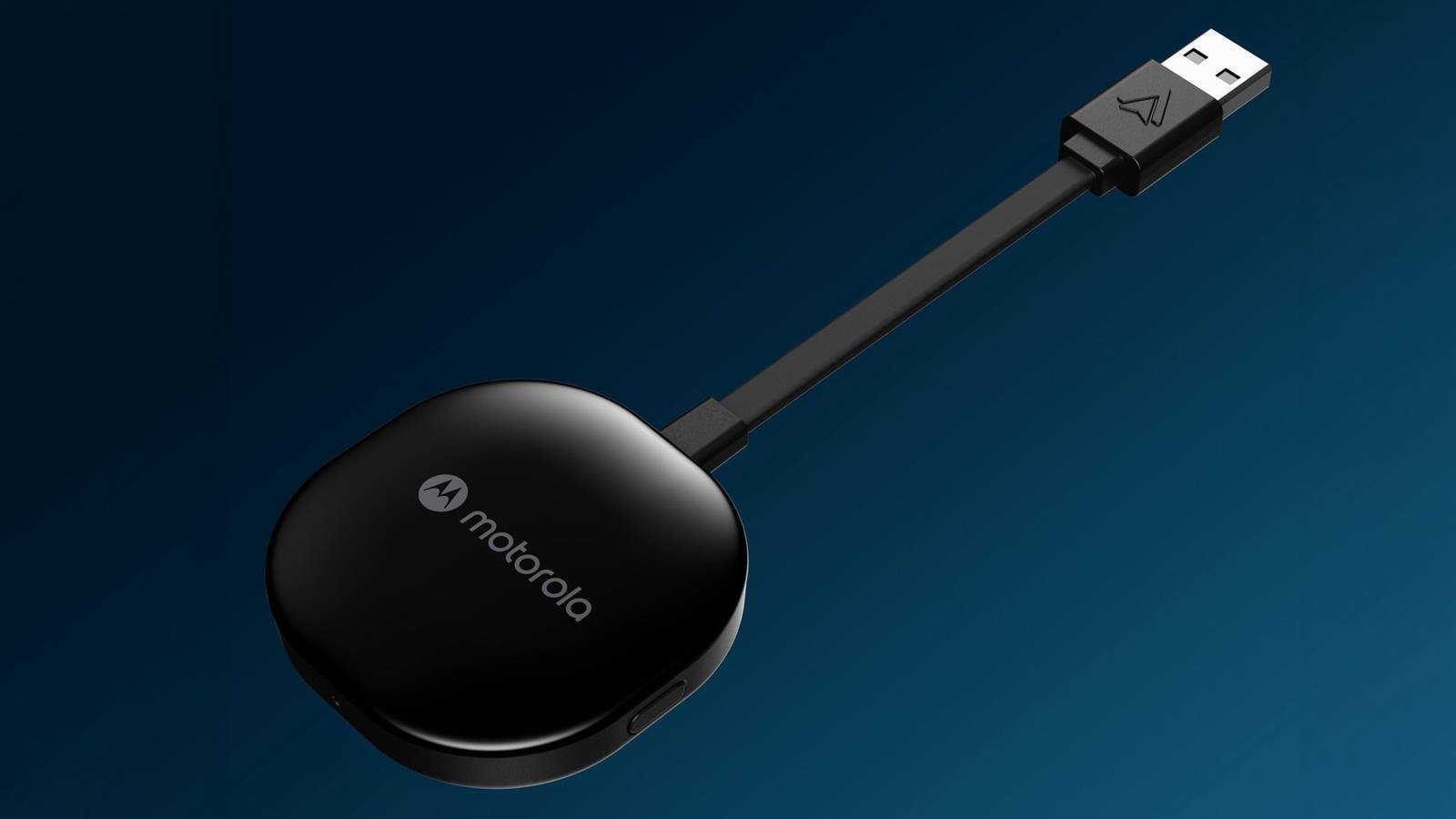
The Motorola MA2 is the successor to the original MA1. It introduces several practical changes aimed at making wireless Android Auto more convenient, particularly in vehicles shared by multiple drivers.
Its most useful addition is multipoint connectivity. Two phones can remain paired with the adapter, and drivers can switch between them using a physical button. This can be helpful for couples or families who use different Android phones in the same vehicle.
Another useful feature is the dedicated power switch. Some vehicles continue supplying power to their USB ports after the engine is turned off. Being able to switch the adapter off manually can help prevent unwanted connections.
Key Features
- Google-licensed Android Auto bridge technology.
- 5 GHz Wi-Fi connectivity.
- Bluetooth pairing and automatic reconnection.
- Multipoint connectivity for two phones.
- Dedicated physical on/off switch.
- USB-A and USB-C connection cables.
- LED connection indicator.
- Updates delivered through the Android Auto app.
Compatibility
Motorola says the MA2 is intended for vehicles with factory-installed USB-only wired Android Auto. The company lists most phones that shipped with Android 11 as compatible, but recommends checking the phone and vehicle requirements.
Vehicle compatibility depends on the automaker’s implementation of Android Auto. Do not assume that every trim level from the same manufacturer will work.
Pros
- Dedicated power switch.
- Two-phone pairing.
- Detachable cable design.
- USB-A and USB-C options.
- Automatic reconnection.
Cons
- Android Auto only.
- No comparable advanced companion app.
- Vehicle compatibility must be checked.
- US stock and delivery can vary.
Who should buy it? Drivers who share a car with another Android user and prefer a physical power switch rather than relying entirely on app settings.
Best for Multiple Android Phones
3. Carsifi Wireless Android Auto Adapter

Carsifi is another option for drivers who want to eliminate the wired Android Auto connection. Its standout feature is the Magic Button, which allows users to switch between paired Android devices.
This physical control can be particularly useful when a vehicle is shared by family members. Instead of going through several phone settings every time another person drives, you can use the adapter’s switching feature.
Carsifi also provides a companion app for setup and configuration. Its published compatibility information includes support for Android 9 and newer without the additional app requirement, while Android 6–8 requires the companion app according to the manufacturer.
Key Features
- Wireless Android Auto conversion.
- Magic Button for phone switching.
- Companion app.
- Bluetooth and Wi-Fi connectivity.
- Compact adapter design.
- Firmware and configuration support.
Compatibility
Carsifi requires a car or compatible head unit that already supports wired Android Auto. The manufacturer’s published Android requirements are broader than those of some newer competitors, but buyers should verify the latest firmware and phone compatibility information before purchasing.
Pros
- Useful Magic Button.
- Multiple Android phone support.
- Published support for older Android versions.
- Companion app.
Cons
- Android Auto only.
- Not designed for Apple CarPlay.
- Current stock and support availability should be verified.
- One phone is active at a time.
Who should buy it? Android users who share a vehicle and value a physical phone-switching feature, especially if they have an older supported Android device.
Best Dual-Platform Alternative
4. Carlinkit 5.0 (2air)
Not every driver uses Android. Some households have one Android phone and one iPhone, which makes a dual-platform adapter a useful option.
The Carlinkit 5.0, also known as CPC200-2air, is designed to convert compatible wired Apple CarPlay and wired Android Auto systems into wireless connections. It is therefore worth considering if you want a single adapter that can serve both platforms.
The adapter uses Bluetooth for initial pairing and Wi-Fi for wireless communication. Carlinkit also advertises firmware updates and automatic connection features.
Key Features
- Wireless Android Auto support.
- Wireless Apple CarPlay support.
- Bluetooth 4.1.
- 2.4 GHz and 5 GHz Wi-Fi support.
- USB-C adapter connection.
- USB-A-to-USB-C and USB-C-to-USB-C cable options in the package.
- Firmware upgrade support.
Compatibility
Carlinkit lists iPhone 6 and newer with iOS 10 or later for CarPlay, and Android 11 or later for Android Auto. Your vehicle must already support the corresponding wired platform.
A CarPlay-only vehicle should not be assumed to gain Android Auto through this adapter. Similarly, an Android Auto-only vehicle does not automatically gain factory CarPlay.
Pros
- Supports both major phone platforms.
- Useful for mixed-phone households.
- USB-A and USB-C cable options.
- Firmware upgrade support.
Cons
- Requires an existing compatible wired system.
- Bluetooth 4.1 is an older specification.
- Compatibility varies by vehicle.
- Firmware configuration may require troubleshooting.
Who should buy it? Drivers who want one adapter for compatible wired Android Auto and wired CarPlay systems.
Best Compact Dual-Platform Option
5. Ottocast Mini Cube 3.0

The Ottocast Mini Cube 3.0 is a compact wireless adapter designed for compatible wired CarPlay and wired Android Auto systems. Its small form factor is a useful consideration for drivers who want to keep their dashboard and center console free from bulky accessories.
Ottocast highlights automatic reconnection, a 90-degree USB connector, plug-and-play installation, and firmware-over-the-air updates.
Key Features
- Wireless Android Auto and CarPlay support.
- Compact cube-style housing.
- 90-degree USB connector design.
- Automatic reconnection.
- Firmware-over-the-air update support.
- Plug-and-play setup.
Compatibility
The Mini Cube 3.0 requires a vehicle that already supports the corresponding wired smartphone projection system. Ottocast lists iOS 10 or newer and Android 11 or newer, with selected Samsung and Google devices also listed for Android 9 support.
Check the exact connector version and the manufacturer’s vehicle exclusions. The company identifies Sony aftermarket head units as unsupported and advises Mitsubishi owners to confirm compatibility before ordering.
Pros
- Compact design.
- Dual-platform support.
- 90-degree connector.
- Automatic reconnection.
- Firmware update capability.
Cons
- Requires wired smartphone projection.
- Connector options may vary.
- Not compatible with every head unit.
- Exact vehicle fit should be verified.
Who should buy it? Drivers looking for a compact dual-platform adapter with a low-profile installation.
Check Ottocast Mini Cube 3.0 on Amazon
Best for Android and iPhone Switching
6. AAWireless TWO+
The AAWireless TWO+ is worth considering if different drivers in your household use Android and iPhone. Unlike the Android-only AAWireless TWO, this version supports both wireless Android Auto and wireless Apple CarPlay.
Its multifunction button helps users pair additional devices and switch between connected phones. The companion app provides device configuration, firmware updates, and troubleshooting support.
For a family car, this flexibility can be more useful than purchasing separate adapters for different phone platforms.
Key Features
- Wireless Android Auto.
- Wireless Apple CarPlay.
- Multifunction physical button.
- Multiple paired phones.
- Companion app.
- Firmware update and troubleshooting options.
Compatibility
AAWireless lists Android 11 or newer for Android Auto and iPhone X or newer for Apple CarPlay. The car must already support the corresponding wired system. To use both platforms, the vehicle must support both wired Android Auto and wired CarPlay.
Pros
- Supports Android and iPhone.
- Convenient physical switching button.
- Companion app.
- Multiple phone pairing.
- Firmware update support.
Cons
- More expensive than some single-platform options.
- Requires compatible wired systems.
- One phone is active at a time.
- Regional stock can vary.
Who should buy it? Families and shared-car drivers who regularly switch between Android and iPhone devices.
Check AAWireless TWO+ on Amazon
Wireless Android Auto Adapter Comparison Table
Use this table to narrow down your choices before visiting the retailer listings.
| Product | Android Auto | CarPlay | Phone switching | App support | Best use |
|---|---|---|---|---|---|
| AAWireless TWO | Yes | No | Yes | Yes | Android-only drivers |
| Motorola MA2 | Yes | No | Two phones | Android Auto app updates | Shared Android cars |
| Carsifi | Yes | No | Magic Button | Yes | Multiple Android phones |
| Carlinkit 5.0 | Yes | Yes | Setup dependent | Firmware support | Mixed-phone households |
| Ottocast Mini Cube 3.0 | Yes | Yes | Check current model | FOTA | Compact setup |
| AAWireless TWO+ | Yes | Yes | Yes | Yes | Android and iPhone |
Platform support and feature descriptions are based on published manufacturer information. Actual compatibility depends on the car, head unit, phone, and software version.
How to Choose the Best Wireless Android Auto Adapter
Before spending money, compare the following factors. A device with more features is not automatically the right choice for your vehicle.
1. Confirm Wired Android Auto Compatibility
This is the most important requirement. A wireless adapter is not a replacement for an Android Auto-enabled infotainment system.
Connect your Android phone directly to the vehicle with a USB data cable. If Android Auto launches on the infotainment screen, your car may be compatible with a wireless bridge.
If it does not launch, check the vehicle manual, USB port, phone settings, and head-unit specifications before purchasing.
2. Check Your Android Version
Different adapters have different minimum operating-system requirements.
- AAWireless TWO: Android 11 or newer.
- Motorola MA2: Motorola lists most phones that shipped with Android 11 as compatible.
- Carsifi: Manufacturer-published support includes Android 9 and newer without the additional app requirement.
- Carlinkit 5.0: Android 11 or newer according to its listed compatibility.
- Ottocast Mini Cube 3.0: Android 11 or newer, with selected devices also listed for Android 9.
These requirements are model-specific and may change with firmware updates. Verify the current official compatibility information before ordering.
3. Choose Android-Only or Dual-Platform Support
If every regular driver uses Android, an Android Auto-only adapter may be sufficient. However, if you share your car with someone who uses an iPhone, a dual-platform model can be more practical.
Remember that dual-platform support does not mean every car supports both systems. Your vehicle must already have the corresponding wired functionality.
4. Look for Firmware Updates
Firmware support matters because compatibility issues and software bugs can appear after an infotainment or phone update.
Prefer manufacturers that provide a clear update process and troubleshooting documentation. Check whether updates require an app, an internet connection, or a specific setup procedure.
5. Consider Multiple Phone Pairing
In a shared car, automatic connection can sometimes select the passenger’s phone instead of the driver’s phone.
A physical button or a well-designed companion app can make switching between devices easier. If two people regularly use the same car, this feature deserves extra attention.
6. Check USB-A and USB-C Compatibility
Older vehicles commonly use USB-A ports, while newer vehicles may offer USB-C. Some adapters include detachable cables, while others have a fixed connector.
Check the package contents carefully. A compatible USB cable must support data transfer, not just charging.
7. Review Warranty and Return Policies
Even an adapter with good specifications may not work with every infotainment system. Buy from a seller with a reasonable return policy, verify warranty coverage, and keep the original packaging until installation is complete.
How to Install a Wireless Android Auto Adapter
Most USB wireless adapters are designed for simple installation. You generally do not need to remove the dashboard or modify your vehicle’s electrical system.
Step 1: Prepare Your Vehicle
Park your vehicle safely, turn on the infotainment system, and locate the USB port that supports wired Android Auto.
Step 2: Connect the Adapter
Plug the adapter into the correct USB data port using the supplied cable. If your vehicle has both USB-A and USB-C ports, use the one that successfully launches wired Android Auto.
Step 3: Enable Bluetooth and Wi-Fi
Turn on Bluetooth and Wi-Fi on your Android phone. Follow the pairing instructions provided by the adapter manufacturer.
Step 4: Complete the Pairing Process
Open your phone’s Bluetooth settings, select the adapter when it appears, and approve the connection prompts. You may also need to accept Android Auto permissions.
Step 5: Test the Connection
Wait for Android Auto to appear on the car display. Test navigation, music playback, and voice commands while the vehicle is safely parked.
Step 6: Allow Automatic Reconnection
Once the first pairing is complete, the adapter should reconnect automatically during subsequent drives, depending on the vehicle and device settings.
Safety reminder: Complete setup while parked. Never troubleshoot Bluetooth settings or operate your phone while driving.
Common Wireless Android Auto Problems and How to Fix Them
Android Auto Is Not Appearing on the Screen
Start by confirming that wired Android Auto works with a direct USB connection. If it does, check whether the adapter is connected to the correct data port. Restart the infotainment system and repeat the pairing process.
The Adapter Disconnects During Driving
Random disconnections may result from unstable wireless communication, firmware problems, power interruptions, or vehicle-specific compatibility issues.
- Check for available firmware updates.
- Restart the phone and infotainment system.
- Remove old Bluetooth pairings and reconnect.
- Try another data-capable USB cable.
- Check the manufacturer’s troubleshooting guide.
The Adapter Connects to the Wrong Phone
If multiple phones are paired, the adapter may connect to a different device than the driver expects.
Turn off Bluetooth on the other phone temporarily, use the adapter’s switching button if available, or follow the manufacturer’s phone-priority settings.
Android Auto Takes Too Long to Start
Wireless connections require the phone, adapter, and vehicle infotainment system to establish communication. This may take longer than a direct wired connection.
Keep the phone’s Bluetooth and Wi-Fi enabled, check the adapter’s firmware, and avoid pairing several unnecessary devices during initial setup.
The Adapter Is Not Receiving Power
Try the original USB cable, inspect the vehicle’s USB port, and test the same port with a direct phone connection. If the port only provides charging power or is disabled by a vehicle setting, the adapter may not establish a connection.
The USB Adapter Stays On After Parking
Some cars keep their USB ports powered even after the ignition is switched off. Check your vehicle’s power-management settings and the adapter’s standby features. A model with a physical power switch may be more convenient in this situation.
Black Friday and Cyber Monday Wireless Android Auto Adapter Deals 2026
Black Friday 2026 falls on November 27, while Cyber Monday is November 30. These shopping events can offer opportunities to save on wireless Android Auto adapters, particularly when manufacturers and Amazon sellers offer discounts.
However, a discounted price does not automatically make an adapter a good purchase. Compatibility and return policies matter more than a temporary discount.
What Should You Compare During Holiday Sales?
- Compare the exact model number, not just the brand name.
- Check whether the adapter supports Android Auto or only Apple CarPlay.
- Compare the current price with its previous selling price where price-history information is available.
- Look for manufacturer-authorized sellers.
- Check coupon discounts at checkout.
- Confirm the return window and warranty coverage.
- Check delivery estimates before ordering.
The Motorola MA2, AAWireless TWO, and dual-platform adapters are worth comparing during the sales period. Actual availability and promotional prices may vary by seller and location.
Use the Amazon product links above to check the current listings and available discounts.
Frequently Asked Questions About Best Wireless Android Auto Adapter
What is the best wireless Android Auto adapter in 2026?
AAWireless TWO is a strong option for Android-only drivers because of its companion app, firmware support, and configurable physical button. Motorola MA2 is worth considering for shared vehicles, while Carsifi may suit drivers who need its older Android-version support. The best choice depends on your phone and vehicle compatibility.
Will a wireless Android Auto adapter work in any car?
No. Most standard wireless Android Auto adapters require a car or compatible aftermarket head unit that already supports wired Android Auto. They do not add Android Auto to an unsupported vehicle.
Can I use a wireless Android Auto adapter with an iPhone?
Only if the particular adapter supports Apple CarPlay. AAWireless TWO is Android Auto-only, while AAWireless TWO+, Carlinkit 5.0, and Ottocast Mini Cube 3.0 offer dual-platform functionality, subject to vehicle compatibility.
Does a wireless Android Auto adapter require Bluetooth?
Yes, Bluetooth is commonly used during initial pairing and connection setup. Wi-Fi is generally used for the wireless Android Auto communication. Both features should remain enabled on your phone.
Is AAWireless TWO better than Motorola MA2?
They serve slightly different needs. AAWireless TWO offers a companion app, firmware controls, and configurable button settings. Motorola MA2 offers a dedicated power switch and two-phone pairing. Your preferred controls and current product availability should guide the decision.
Can two phones connect to one wireless Android Auto adapter?
Some adapters can pair multiple phones and switch between them. However, pairing multiple devices does not mean that two phones can project Android Auto simultaneously. Usually, only one phone is active at a time.
Does a wireless adapter reduce Android Auto quality?
Connection quality depends on the adapter, phone, vehicle, software, and wireless environment. Some users may notice a small startup delay compared with a direct wired connection. Actual performance can vary, so check vehicle-specific reviews and manufacturer troubleshooting information.
Can I leave my wireless adapter plugged in permanently?
Usually, yes, but power behavior varies by vehicle. If the USB port remains powered after the engine is switched off, use an appropriate standby setting or a device with a physical power switch.
Can a wireless adapter add Android Auto to an older car?
A standard USB adapter cannot add Android Auto to a vehicle that lacks the feature. You may need a compatible aftermarket head unit or a separate portable infotainment display that supports Android Auto.
Is Motorola MA1 still worth buying?
The MA1 remains a known Android Auto wireless adapter, but Motorola MA2 adds a physical power switch, multipoint connectivity, and a detachable cable. Compare current availability, warranty, and pricing before choosing the older model.
Do wireless Android Auto adapters work with aftermarket stereos?
Some do. The aftermarket head unit must already support wired Android Auto. Check the adapter manufacturer’s compatibility documentation and the head-unit model before purchasing.
Will a wireless Android Auto adapter charge my phone?
No. A typical wireless Android Auto adapter does not replace your phone charger. You may still need a separate car charger or wireless charging pad for longer drives.
Final Verdict: Which Wireless Android Auto Adapter Should You Buy?
The best wireless Android Auto adapter depends on how you use your vehicle, which phone you own, and what features you actually need.
- AAWireless TWO: A strong all-around choice for Android-only drivers who value app controls and firmware support.
- Motorola MA2: A useful choice for shared Android vehicles, particularly if you want a physical power switch and two-phone pairing.
- Carsifi: Worth considering for its Magic Button and broader published Android-version support.
- Carlinkit 5.0: A dual-platform option for households with compatible wired Android Auto and CarPlay systems.
- Ottocast Mini Cube 3.0: A compact alternative for drivers who want both platforms.
- AAWireless TWO+: A convenient option when drivers switch between Android and iPhone.
Before making your final purchase, connect your phone directly to the vehicle and verify that wired Android Auto works. Then compare the adapter’s compatibility, USB connector, phone requirements, warranty, and return policy.
That simple check can save you from purchasing a device that your vehicle cannot use.
Disclosure: As an Amazon Associate, I may earn from qualifying purchases at no extra cost to you. Amazon and the Amazon logo are trademarks of Amazon.com, Inc, or its affiliates.
- Amazon, Amazon Prime, the Amazon logo and Amazon Prime logo are trademarks of Amazon. com, Inc. or its affiliates.

Hi, I am AKM Sad. I’m a car enthusiast and reviewer who loves exploring gadgets and accessories. I share honest reviews and practical tips to help you get the best products and enjoy a safer, smoother ride.