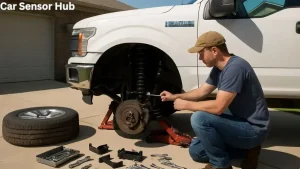
When you’re working on your Ford F-150, sometimes a simple job turns into a challenge. Removing a stuck O2 sensor is a perfect example. These sensors help your truck’s engine run efficiently, but over time, heat and rust can lock them in place. If you force it, you can break the sensor, strip the threads, or even crack the exhaust manifold. But with the right approach, you can remove a stubborn O2 sensor without damaging your truck or wasting hours in frustration.
Let’s go step-by-step through the safest and most effective methods. You’ll learn what tools you need, how to avoid common mistakes, and a few pro tips that most beginners miss.
Why O2 Sensors Get Stuck
The O2 sensor (oxygen sensor) sits in your F-150’s exhaust system, measuring how much oxygen is in the exhaust gases. This data helps the computer adjust fuel and air mixture for better performance and lower emissions. Because the sensor is exposed to extreme heat, moisture, and road salt, it often rusts or seizes in the exhaust pipe or manifold.
If you live in an area with heavy snow or near the ocean, you might notice sensors getting stuck more often. The longer a sensor stays in place without being changed, the harder it usually is to remove.
Tools And Supplies You’ll Need
Having the right tools can make the difference between a quick repair and a painful, expensive mistake. Here’s what you’ll want on hand:
- O2 sensor socket or a 7/8” (22mm) wrench (preferably a slotted style for wiring clearance)
- Penetrating oil (like PB Blaster, WD-40 Specialist, or Liquid Wrench)
- Breaker bar (long handle for extra leverage)
- Ratchet and extensions
- Torque wrench (for installation)
- Anti-seize compound
- Wire brush
- Heat source (propane torch)
- Gloves and safety glasses
You don’t need every tool for every sensor, but a good set helps prevent damage and frustration.
Preparing Your F-150 For Sensor Removal
Before you jump in, take a few minutes to get ready. First, let the engine cool completely. Working on a hot exhaust is dangerous—burns can happen fast.
Next, disconnect the negative battery terminal. This prevents accidental shorts or electrical issues while you work.
If your sensor is under the truck, consider using jack stands for safety. Never rely on a jack alone.
Step-by-step: Removing A Stuck O2 Sensor
1. Locate The Stuck Sensor
Your F-150 may have more than one O2 sensor. Common locations are:
- Before the catalytic converter (upstream)
- After the catalytic converter (downstream)
Follow the exhaust pipes and look for a sensor with an electrical connector.
2. Apply Penetrating Oil
Spray penetrating oil around the base of the sensor where it screws into the pipe or manifold. Allow 15–30 minutes for the oil to soak in. For very rusty sensors, spray again after 10 minutes.
Pro tip: Tap the sensor gently with a wrench to help the oil work into the threads. Don’t hit too hard—just enough to vibrate the area.
3. Disconnect The Sensor Wiring
Unplug the sensor’s electrical connector. This prevents twisting or breaking the wires as you turn the sensor.
4. Try Manual Removal
Fit the O2 sensor socket or wrench over the sensor. Make sure it seats fully to avoid rounding the sensor’s hex. Attach your breaker bar for extra leverage.
Apply steady, even pressure counter-clockwise. If it starts to move, great! If not, stop—forcing it can break the sensor or damage threads.
5. Use Heat (if Needed)
If the sensor won’t budge, heat the area around the sensor threads with a propane torch for 1–2 minutes. Heat expands the metal, often breaking the rust bond.
Safety note: Keep the torch away from wires, hoses, and fuel lines. Use gloves and eye protection.
After heating, try loosening again. Sometimes a few cycles of oil and heat are needed.
6. Remove The Sensor
Once the sensor starts to move, work it back and forth gently—don’t rush. If it feels gritty, add more penetrating oil.
If the sensor still won’t move, consider using a bolt extractor socket designed for rounded or stripped sensors.
7. Clean The Threads
Once the sensor is out, brush the threads in the exhaust pipe or manifold with a wire brush. This makes installation of the new sensor easier and prevents cross-threading.
8. Install The New Sensor
Apply a small amount of anti-seize compound to the threads of the new sensor (unless the sensor comes pre-coated). Screw it in by hand first, then tighten with your torque wrench to the manufacturer’s spec (usually 30–35 ft-lbs).
Reconnect the wiring, and you’re done.

Credit: www.reddit.com
Common Mistakes To Avoid
Removing a stuck sensor can be frustrating, but avoid these errors:
- Using too much force: Excessive torque can snap the sensor or damage threads.
- Skipping penetrating oil: This step is critical for rusted parts.
- Heating the sensor tip: Only heat the threaded area—don’t overheat the sensor tip or wiring.
- Stripping the sensor hex: Use the correct size tool and full contact.
- Not cleaning threads: Dirty threads can ruin your new sensor.
Comparison Of Penetrating Oils
Different products work at different speeds and strengths. Here’s a quick look:
| Product | Effectiveness | Time to Work | Best Feature |
|---|---|---|---|
| PB Blaster | Very High | 10-20 min | Breaks heavy rust |
| WD-40 Specialist | High | 15-30 min | Safe on electronics |
| Liquid Wrench | Moderate | 20-30 min | Low odor |

Credit: www.youtube.com
When To Seek Professional Help
If the sensor is still stuck after several attempts, it may be time to let a professional handle it. Signs you need help:
- Sensor is rounded off or broken
- Threads are stripped
- Sensor is in a hard-to-reach location
A mechanic has special tools (like induction heaters or extractor kits) and can often save you from expensive exhaust repairs.
How To Prevent Sensors From Getting Stuck
Here’s what many F-150 owners don’t realize: Anti-seize compound is your friend. When you install a new sensor, always use a small dab on the threads (unless the sensor is already coated—check the box). This makes future removal much easier.
Also, consider checking sensors every 50,000 miles or during major exhaust work. Early maintenance can save hours in the future.

Credit: www.reddit.com
Table: Symptoms Of A Faulty O2 Sensor
Wondering if your O2 sensor is actually bad? Here’s what to watch for:
| Symptom | Possible Cause | Related Warning Light |
|---|---|---|
| Poor fuel economy | Sensor reading rich/lean | Check Engine |
| Rough idle | Incorrect air/fuel mix | Check Engine |
| Failed emissions test | Sensor not switching properly | May or may not trigger |
| Black exhaust smoke | Too much fuel injected | Check Engine Light |
Alternative Methods For Extremely Stuck Sensors
Sometimes, rust and heat weld the sensor in so tightly that normal tools and heat won’t work. Here are a few advanced options:
- Impact wrench (use with care): Short, sharp bursts can free a stuck sensor, but can also break it if overused.
- Extractor sockets: Designed for rounded sensors, these grip tighter as you turn.
- Induction heater: Heats only the metal around the sensor, not the sensor itself. This tool is often used by professionals.
- Cutting and re-tapping threads: As a last resort, the sensor can be cut out and the threads cleaned with a tap. This is risky and should only be attempted if replacement of the exhaust part is an option.
Table: O2 Sensor Socket Types
Choosing the right socket helps prevent damage:
| Socket Type | Best For | Pros | Cons |
|---|---|---|---|
| Slotted Socket | Standard O2 sensors | Fits over wire, easy to use | May spread under heavy force |
| Crowsfoot Socket | Tight spaces | Works with extensions | Less torque than deep socket |
| Deep Socket | Stubborn sensors | Strong grip, more torque | Can’t fit over wire |
Real-world Example: 2011 F-150 5.0l
Imagine you have a 2011 F-150 with a 5. 0L engine. The upstream O2 sensor is completely seized. You spray PB Blaster, wait 30 minutes, and try a slotted socket with a breaker bar. No luck. You heat the manifold area for two minutes, let it cool slightly, and try again—this time the sensor begins to turn.
After removing it, you clean the threads and install the new sensor with anti-seize. The truck runs smoothly, and you avoid a $400 shop bill.
Non-obvious tip: Don’t forget to reset the engine computer (disconnect battery for 15 minutes) after installing the new sensor. This clears old fault codes and helps the computer learn the new sensor’s readings.
Frequently Asked Questions Of How to Remove Stuck F-150 O2 Sensor
What Is The Easiest Way To Remove A Stuck O2 Sensor On An F-150?
The easiest way is to spray penetrating oil, let it soak, then use the correct O2 sensor socket and a breaker bar for leverage. If it’s still stuck, apply heat to the threaded area, then try again.
Can I Drive With A Bad Or Stuck O2 Sensor?
You can, but it’s not recommended. A bad O2 sensor can cause poor fuel economy, higher emissions, and may eventually damage your catalytic converter.
Should I Use Anti-seize When Installing A New O2 Sensor?
Yes—unless the new sensor comes pre-coated from the factory. Anti-seize on the threads makes future removal much easier and prevents seizing.
What If My O2 Sensor Breaks Off In The Exhaust?
If the sensor breaks, you’ll need a sensor extraction tool or may have to remove the exhaust part for professional repair. Avoid drilling unless you’re experienced, as this can damage threads.
Where Can I Find More Information About O2 Sensors?
For more details on O2 sensor function and replacement, check out this Wikipedia article on oxygen sensors.
Dealing with a stuck O2 sensor on your F-150 takes patience, the right tools, and a bit of know-how. Take your time, follow these steps, and you’ll save yourself money and frustration. With the sensor replaced, your truck will run better—and you’ll be ready for the road ahead.
Disclosure: As an Amazon Associate, I may earn from qualifying purchases at no extra cost to you. Amazon and the Amazon logo are trademarks of Amazon.com, Inc, or its affiliates.
- Amazon, Amazon Prime, the Amazon logo and Amazon Prime logo are trademarks of Amazon. com, Inc. or its affiliates.

I am Sadman, the founder of CarSensorHub.com, where I share my passion for cars and technology. I specialize in writing detailed reviews and helpful guides on car gadgets, accessories, safety tools and many more. My mission is to help car owners discover the best products and tips to improve their driving experience and stay safe on the road.