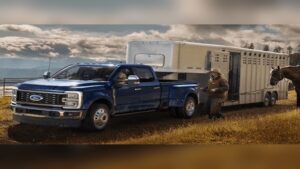
Driving a Ford Super Duty is all about power and reliability, but the stock infotainment system can feel dated. Upgrading to an Apple Carplay touchscreen brings your truck into the modern age. With the right Apple Carplay touchscreen upgrade for Ford Super Duty, you get seamless navigation, easy access to your favorite apps, and hands-free communication.
It makes every drive more enjoyable and convenient. Whether you’re on a long road trip or just running errands, a responsive touchscreen can make a huge difference. Let’s look at what makes a great upgrade and what to consider before making the switch.
Ford Super Duty Carplay Touchscreen
The Apple Carplay Touchscreen Upgrade for Ford Super Duty is ideal for drivers of 1999–2004 Ford F250 or F350 seeking modern connectivity and navigation.

This upgrade brings a 10. 1-inch touchscreen and wireless Apple Carplay to older Ford Super Duty trucks. It solves the common frustration of outdated infotainment and limited navigation options. The support for steering wheel controls stands out if you value easy access while driving.
Using the unit feels straightforward after setup. The interface is quick, and connecting your phone wirelessly saves time. I found navigation and music access reliable, with no lag or distractions. The backup camera integration makes parking feel less stressful.
What Daily Use Looks Like With This Upgrade
- Touchscreen is responsive and easy to read.
- Wireless Carplay connects without fuss.
- Steering wheel controls work as expected.
- Backup camera view is clear, especially in tight spaces.
- Bluetooth call quality is decent for hands-free driving.
- Navigation apps run smoothly, both online and offline.
Considerations Before Installing
If you want a simple plug-and-play solution, this unit may not suit you. Installation requires cutting wires and careful setup, which can frustrate those without DIY experience. Some features, like seat heating/cooling support, depend on your truck’s original equipment.
- Installation is not plug-and-play; expect extra effort.
- Older trucks without steering wheel controls may lose this benefit.
Choosing The Right Upgrade For Your Ford Super Duty
Owners who want modern features in their 1999–2004 Ford Super Duty and are comfortable with hands-on installation will get the most from this unit. If you value wireless Carplay and real-time navigation, it fills key gaps in older trucks.
Skip it if you are not willing to modify wiring or prefer a product that installs without hassle. Double-check your truck’s compatibility with steering wheel controls and air conditioning features before buying.
Take your time with installation and review the manual carefully. Once set up, the system is reliable and feels like a true upgrade. If you run into trouble, patience and methodical work will pay off.
Ford Super Duty Carplay Touchscreen
This Apple Carplay Touchscreen Upgrade for Ford Super Duty is ideal for truck owners who want a seamless way to modernize their driving experience.
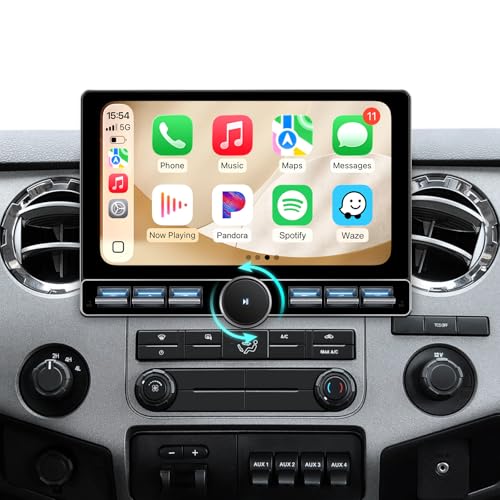
This touchscreen upgrade replaces the stock radio in Ford Super Duty trucks with a 10-inch QLED display and wireless Apple CarPlay. It solves the hassle of using outdated interfaces by offering a clear, sunlight-readable screen and a physical volume knob for easy adjustment on the go.
Daily use feels intuitive, even with gloves or while driving over rough roads. The integration with factory controls adds confidence that nothing is lost in the upgrade process.
What To Expect In Daily Driving
- Physical volume knob is easy to find without looking.
- Screen stays visible even in bright sunlight.
- Wireless CarPlay connects quickly, no cables needed.
- Steering wheel controls remain functional.
- Android system boots up fast with no lag.
- Custom fit makes installation less stressful.
If You Need A Reliable Truck Upgrade
This unit is a good choice if you use your Ford Super Duty for work and want simple, modern tech that won’t distract you. It’s best for those who value easy controls and a display you can read in any light.
If you want lots of advanced audio tuning or prefer touch-only controls, this model may feel basic. The physical knob is a plus for some, but not for everyone. If you rarely use CarPlay or Android Auto, the benefits will be less obvious.
Take time to double-check your truck’s year and trim for compatibility. Most owners will find setup straightforward with the included harnesses. The design should blend in with most factory dashboards, making it a calm upgrade rather than a flashy one.
Ford Super Duty Touchscreen Carplay Radio
This Apple Carplay Touchscreen Upgrade for Ford Super Duty is ideal for drivers who want modern connectivity and safer control in their 2008–2016 F-250 or F-350.
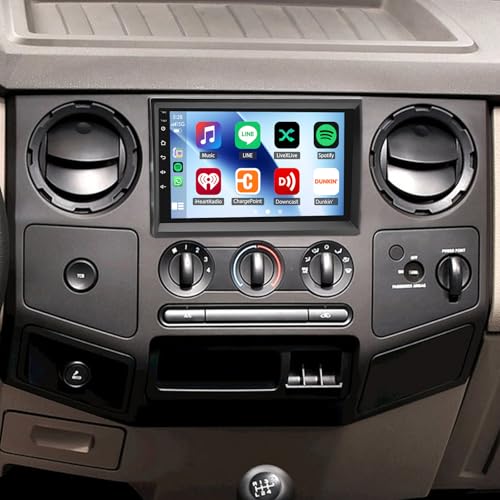
This upgrade replaces your original radio with a modern touchscreen that supports Apple Carplay and Android Auto. It solves the common problem of outdated controls and missing smartphone integration in older Ford Super Duty models. Wireless Carplay means less clutter and easier access to navigation or music while driving.
Using the touchscreen feels smooth and responsive. Voice control works for hands-free commands, and steering wheel buttons keep things safe. In daily use, Bluetooth calls and backup camera integration make the drive more relaxed. I found the interface easy to learn, so setup is quick.
Everyday Confidence With This Touchscreen
- Navigation is clear and fast with built-in GPS.
- Wireless Carplay lets you play music or take calls easily.
- FM radio and Bluetooth work reliably for daily driving.
- Steering wheel controls feel natural and don’t distract.
- Backup camera view is wide and helps with parking.
- Touchscreen is bright and readable, even in sunlight.
- Supports both iPhone and Android for flexibility.
Is This Touchscreen Worth Considering?
This radio is a solid choice for Ford Super Duty owners who want a safer and more connected driving experience. If your truck feels dated or you miss easy phone integration, this system addresses those needs. The installation is straightforward with no extra accessories required.
Skip it if you rarely use smartphone features or prefer the original factory look. Some may find the new interface a change from older controls. For best results, check that your steering wheel controls are compatible before installing. The upgrade feels reliable and brings modern convenience without fuss.
Ford Super Duty Carplay Touchscreen Stereo
This Apple Carplay Touchscreen Upgrade for Ford Super Duty is best for drivers of 1998–2008 Ford E-250 or E-350 who want modern features in an older vehicle.

This is a 10. 1-inch touchscreen stereo made for older Ford Super Duty vans. It brings Apple Carplay, Android Auto, and navigation to models that never had them. Wireless Carplay support is a standout—it cuts the need for cables and simplifies your daily drive.
Using the screen feels clear and simple. Bluetooth calls are easy. The backup camera view is large and sharp. You do need some time for installation, since wiring is required, but the upgrade makes an obvious difference in daily convenience.
Real-world Upgrade Factors
| Compatibility | Ford E-250/E-350 (1998–2008) |
| Carplay Type | Wireless & Wired |
| Screen Size | 10.1 Inches |
| Ease of Install | Wiring required, not plug-and-play |
| Backup Camera | Supported |
For Careful Upgraders
This stereo fits owners who want modern tech in an older Ford Super Duty and are comfortable with a more involved install. It’s for someone who values wireless Carplay, a bigger screen, and features like GPS and a backup camera.
If you want a plug-and-play system or are not comfortable with cutting wires, this is not the right fit. You may be better off with a simpler upgrade, since this model does require some installation skill. If you do choose it, plan time for careful wiring and setup.
The instructions help, and you’ll likely be pleased with the everyday results.
Ford Super Duty Carplay Touchscreen
The Apple Carplay Touchscreen Upgrade for Ford Super Duty is ideal for truck owners who want a modern infotainment system in their 2008–2016 F-250 or F-350.

This unit is a dedicated touchscreen radio upgrade for Ford Super Duty trucks. It replaces the older factory radio, adding wireless Carplay, Android Auto, and a simple GPS navigation system. The main benefit is hands-free access to maps, music, and calls—making daily driving and longer trips easier and safer.
Day-to-day, the interface feels straightforward and familiar if you already use a smartphone. The touchscreen is responsive, and switching between apps or radio and navigation is quick. I found installation manageable with some patience, and the system helps reduce distractions on the road.
Quick Check: Does It Fit Your Needs?
| Vehicle Compatibility | 2008–2016 Ford F-250/F-350 Super Duty |
| Wireless Carplay Support | Yes |
| Screen Size | 9.7-inch Touchscreen |
| Backup Camera Included | Yes |
| Operating System | Android 13 |
Practical Takeaways For Ford Owners
This upgrade works best for drivers who want to keep their older truck but value current technology. If you use Apple Carplay daily, or you want a backup camera for added parking safety, this is a solid fit. Anyone who prefers the stock radio look or wants steering wheel buttons to work out of the box may need to adjust expectations or spend time on setup.
For anyone worried about installation, take photos during disassembly for reference. The interface is simple, and most users will get comfortable quickly. If you mostly use AM radio or have little interest in smartphone integration, this may feel like more than you need.
Most Ford Super Duty owners will appreciate the upgrade in daily use.
How To Choose The Right Apple Carplay Touchscreen Upgrade For Your Ford Super Duty
Start by confirming the stereo fits your specific Ford Super Duty model year. Some units only work with certain trucks. Decide if you want wireless CarPlay or if a wired connection is fine. Consider if you use gloves or drive off-road—physical knobs may help.
Think about how much time you spend using navigation or music apps. Check if you want to keep steering wheel controls. Most people miss checking the installation difficulty—some kits need wiring skills.
The 30-second Checklist: Are You Picking The Right One?
- Does it match your Ford Super Duty’s year and dash shape?
- Will you use wireless CarPlay or is wired fine?
- Do you want to keep steering wheel audio controls?
- Can you install it yourself, or will you need a shop?
- Is the screen readable in bright sunlight?
- Do you want a backup camera included?
Common Regrets And How To Avoid Them
Regret #1: Choosing a unit that doesn’t fit your dash. Double-check compatibility lists for your exact Ford Super Duty year before you buy.
Regret #2: Losing steering wheel controls or climate functions. Always verify if the upgrade retains these features or if adapters are needed.
Regret #3: Struggling with installation. If wiring isn’t your thing, look for kits with plug-and-play harnesses or budget for professional help.
Quick Comparison Table: Apple Carplay Touchscreen Upgrade For Ford Super Duty
| If you want… | Look for this | Avoid this |
|---|---|---|
| Seamless factory look | Custom-fit bezel for your model year | Universal “one size fits all” units |
| Easy install | Plug-and-play wiring harness | Kits that require wire cutting |
| Glove-friendly controls | Physical volume knob and buttons | Touchscreen-only interfaces |
| Bright display in sunlight | QLED or anti-glare screen | Basic LCD screens |
| Retain steering wheel controls | Units that support SWC retention | Models with no mention of SWC |
Setup And Usage Tips For Ford Super Duty Touchscreen Upgrades
- Test-fit the unit in your dash before finalizing the wiring.
- Connect all harnesses and check steering wheel control function before reassembling the dash.
- Update the system firmware if prompted—this can fix bugs and improve CarPlay performance.
- Secure all wiring to avoid rattles, especially if you drive off-road.
- If adding a backup camera, route the cable away from moving parts and seal connections against moisture.
FAQs: Apple Carplay Touchscreen Upgrade For Ford Super Duty
Will These Carplay Touchscreen Units Fit My Ford Super Duty Exactly?
Most units are designed for certain model years and trims. Always check the compatibility notes for your truck’s year and dash shape.
Is Wireless Carplay Better Than Wired For Daily Use?
Wireless CarPlay offers less cable clutter and more convenience. Wired connections may be more stable, especially for long drives.
Can I Keep My Factory Steering Wheel Controls?
Many upgrades support steering wheel control retention. Make sure your chosen unit mentions this feature or includes the proper adapters.
Do I Need Professional Installation?
If you are not comfortable with car wiring, professional installation is recommended. Some kits require wire cutting or dash modification.
How Visible Are These Screens In Direct Sunlight?
QLED and anti-glare screens are easiest to see in bright conditions. Standard LCDs can be hard to read with sunlight streaming in.
What Happens If Something Goes Wrong With The Upgrade?
Check the return policy before you buy. Many sellers require all packaging and accessories for returns.
Will I Lose Other Features Like Backup Cameras Or Climate Controls?
Some units retain these features, but not all. Double-check product details and ask the seller if unsure.
Final Thoughts On Upgrading Your Ford Super Duty With Apple Carplay Touchscreen
Choosing an Apple Carplay Touchscreen Upgrade for Ford Super Duty can make driving more enjoyable and connected. Take a moment to match the upgrade to your truck’s year and your everyday needs for the best results.
If you’re undecided, pick the unit that requires the least modification to your dash. That simple rule often leads to the smoothest experience.
Disclosure: As an Amazon Associate, I may earn from qualifying purchases at no extra cost to you. Amazon and the Amazon logo are trademarks of Amazon.com, Inc, or its affiliates.
- Amazon, Amazon Prime, the Amazon logo and Amazon Prime logo are trademarks of Amazon. com, Inc. or its affiliates.

I am Sadman, the founder of CarSensorHub.com, where I share my passion for cars and technology. I specialize in writing detailed reviews and helpful guides on car gadgets, accessories, safety tools and many more. My mission is to help car owners discover the best products and tips to improve their driving experience and stay safe on the road.