The Tesla Model Y has captured attention worldwide with its advanced technology, electric power, and intelligent features. But for many owners, one small detail often becomes a daily focus: the reverse parking sensor beep. This sound, while seemingly simple, plays a big role in safety and the overall driving experience. If you own a Model Y, or are thinking about buying one, understanding how this beep works, what influences it, and how to use it best is essential.
In this guide, you’ll learn everything about the Tesla Model Y reverse parking sensor beep. We’ll explore how it functions, what the different beeps mean, how to troubleshoot problems, and how it compares to other cars. You’ll get practical tips, answers to common questions, and insights that even experienced Tesla drivers sometimes miss.
How The Tesla Model Y Reverse Parking Sensor Beep Works
When you put your Model Y in reverse, you might notice a series of beeps. These sounds are more than just noise—they are warnings from the ultrasonic parking sensors fitted around your car. These sensors are designed to help you park with confidence, even in tight spaces.
The Model Y uses a combination of front and rear ultrasonic sensors. When you get close to an object (like a wall or another car), the sensors detect it and send signals to the onboard computer. If you’re backing up, the car’s speakers emit a beep.
The closer you get to the obstacle, the faster and louder the beep.
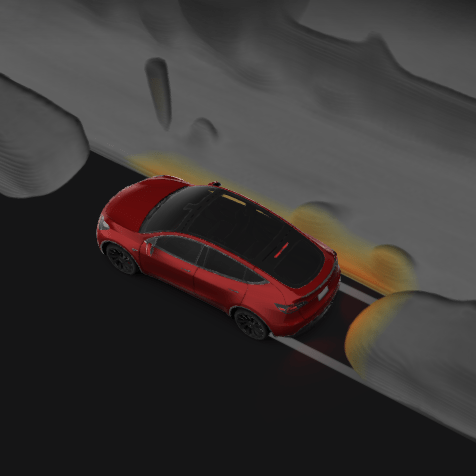
This system is not unique to Tesla, but Tesla’s implementation is tuned for electric cars, with instant response and clear audio cues. The beeps are synced with visual warnings on the touchscreen, so you get both sound and a live graphic.
Key Features Of The Beep System
- Variable beep frequency: As you get closer to an object, the beep rate increases.
- Continuous tone: When you are extremely close (typically less than 30 cm), the beep becomes a solid tone.
- Integrated with visual display: The touchscreen shows a graphic of your car and detected obstacles.
- Automatic activation: The sensors engage automatically when you shift to reverse.
These features work together to make parking easier and safer.
Types Of Parking Sensor Beeps In The Model Y
Not all beeps sound the same. Understanding the different patterns helps you react quickly and avoid accidents.
- Slow, intermittent beep: You are approaching an object, but still have space. Usually starts at about 1.5 meters away.
- Faster beep: You are getting closer—about 1 meter from the object.
- Rapid beep: Danger zone. Less than 50 cm from the object.
- Solid tone: Stop immediately! You are very close (under 30 cm).
Tesla engineered these sounds to be clear, even if there’s music or other noise in the car.
Why The Beep Patterns Matter
The pattern of beeps acts like a coded language. With practice, you can judge distance using just your ears. This is especially helpful when you can’t see the screen, or if you’re focusing on your mirrors.
Pro tip: Try parking in a safe area and practice listening to the beeps. It will help you build confidence for real-world situations.
This Guide May Help You More: Tesla Parking Sensor
Where Are The Model Y Parking Sensors Located?
Understanding sensor placement can help you park more accurately and avoid false alarms.
The Model Y is fitted with ultrasonic sensors both at the front and rear. Most models have eight sensors at the rear and four at the front.
- Rear sensors: Spaced across the back bumper. They cover a wide area, detecting curbs, walls, and even small objects.
- Front sensors: Positioned in the front bumper to help with tight forward parking.
These sensors have a range of about 2 meters, but they are most accurate within the last 1 meter.
Sensor Location Diagram
If you look at your Model Y from behind, you’ll see small round circles on the bumper. These are the sensors. Keeping them clean is important for accurate detection.
How Accurate Are Tesla Model Y Parking Sensors?
Some drivers worry if the sensors are reliable. Tesla’s ultrasonic sensors are known for high accuracy, but there are limits.
- Best detection: Large, flat objects like walls or other cars.
- Reduced accuracy: Very thin objects (bike racks, poles) or soft materials (bushes, foam).
- Weather impact: Heavy rain or snow can reduce detection range.
Field tests show that Tesla’s sensors usually detect obstacles within a 2–5 cm margin of error. However, users should never rely 100% on sensors; always use mirrors and the camera for full awareness.
Data: Detection Range
| Object Type | Detection Distance | Accuracy |
|---|---|---|
| Flat wall | Up to 2 meters | High |
| Car bumper | Up to 1.5 meters | High |
| Thin pole | 0.5–1 meter | Medium |
| Bushes/Plants | 0.5 meter | Low |
Common Problems With The Model Y Reverse Parking Sensor Beep
Even high-tech cars like the Model Y can have issues. Here are the most common problems drivers report:
- No beep when reversing: Sometimes, you shift into reverse but hear nothing.
- Constant beep with no obstacle: The system keeps beeping even when there’s nothing behind.
- Delayed beep: The warning comes too late, or too close to the object.
- Intermittent beeping: The beep cuts in and out without clear reason.
Let’s look at the causes and solutions for each.
No Beep When Reversing
- Causes: Dirty or blocked sensors, system glitch, or settings turned off.
- Solution: Clean the sensors with a soft cloth. Check the settings menu to ensure parking assist is on. If the problem stays, reboot the car’s computer by holding both steering wheel buttons until the screen restarts.
Constant Beep With No Obstacle
- Causes: Mud, ice, or debris stuck to the sensor. Rarely, a sensor malfunction.
- Solution: Inspect and clean all sensors. If cleaning doesn’t help, schedule a service check.
Delayed Beep
- Causes: Sensor lag due to extreme cold, or software delay.
- Solution: In cold weather, wait a few seconds after starting the car for sensors to warm up. Make sure your software is up to date.
Intermittent Beeping
- Causes: Loose wiring or electrical interference.
- Solution: This usually needs a Tesla service visit. Note the conditions when it happens to help technicians diagnose faster.
Non-obvious insight: Sometimes, wireless devices (like baby monitors or certain garage door openers) can cause brief interference with the sensors.
How To Turn The Reverse Parking Sensor Beep On Or Off
Some drivers find the beep annoying, especially in quiet neighborhoods. Tesla lets you adjust the volume or turn off the sound, but you should be careful—turning off the beep can make parking less safe.
Steps To Adjust Or Mute The Beep
- Tap the car icon on the touchscreen to open the main menu.
- Go to Safety & Security.
- Find Parking Assist Chimes.
- You can turn the chimes off or adjust the volume.
Important: The visual display will remain active even if you mute the beep, but you lose the audio warning.
Pro tip: Instead of turning the beep off, consider lowering the volume. That way, you still get a warning but it’s less intrusive.

Credit: www.rickhendrickchevynaples.com
Comparing Tesla Model Y Parking Sensors With Other Cars
How does the Model Y’s system stack up against competitors like the Ford Mustang Mach-E, Volkswagen ID. 4, or Hyundai Ioniq 5? Let’s compare the main features.
Feature Comparison
| Feature | Tesla Model Y | Ford Mustang Mach-E | VW ID.4 | Hyundai Ioniq 5 |
|---|---|---|---|---|
| Number of rear sensors | 8 | 6 | 6 | 6 |
| Beep volume control | Yes | No | No | Yes |
| Visual guide | Full-screen | Partial | Partial | Full-screen |
| Automatic activation | Yes | Yes | Yes | Yes |
| Camera integration | Yes | Yes | No | Yes |
Tesla stands out for its large number of sensors and deep integration with the camera and screen. However, Hyundai’s system also offers user-adjustable beep volume.
Real-world Experience
Many Tesla owners report that the Model Y’s system is more sensitive and provides earlier warnings compared to rivals. However, this can sometimes mean more false alarms with small objects. Other brands may be less sensitive but miss narrow obstacles.
Non-obvious insight: Because Tesla’s sensors are paired with live camera views, you get a “second opinion” that helps avoid mistakes—a feature missing in many other EVs.
Safety Benefits Of The Reverse Parking Sensor Beep
The Model Y’s beep is not just for comfort—it’s a serious safety tool. Parking accidents are common worldwide. In the US alone, about 20% of vehicle accidents happen in parking lots, and most involve reversing.
Tesla’s reverse beep helps prevent:
- Collisions with objects like walls, shopping carts, or posts.
- Injury to people (children, pets) who may walk behind your car unseen.
- Costly repairs from bumper scrapes or broken lights.
A study by the Insurance Institute for Highway Safety (IIHS) found that cars with working parking sensors reduced backup accidents by 30%.
Unique Tesla Safety Features
- Obstacle-aware acceleration: If the sensors detect an object while you press the accelerator, the car may limit speed to prevent a crash.
- 360-degree awareness: Tesla’s system combines sensors, cameras, and radar to give all-around protection (depending on model year).
The Role Of Software In The Parking Sensor Beep
Tesla is famous for its over-the-air software updates. These updates can improve the parking sensor system, change beep patterns, or fix bugs—often without you visiting a service center.
How Updates Affect The Beep
- New beep tones: Some updates have changed the sound or timing of the beeps.
- Improved detection: Software can make the sensors smarter, helping them better spot small or odd-shaped obstacles.
- Bug fixes: If there’s a widespread issue (like delayed beeps), Tesla can push a fix remotely.
Pro tip: Always keep your Tesla’s software updated. This ensures you get the latest safety improvements for your parking sensors.
How To Maintain Your Parking Sensors
Like any car part, the Model Y’s sensors need care.
Cleaning Tips
- Wash your bumpers regularly, especially after rain or snow.
- If sensors are covered in mud or ice, use a soft cloth to clean them—never scrape.
- Avoid wax or polish on the sensor areas, as it can block the signal.
Avoiding Damage
- Be careful in automatic car washes. High-pressure jets can loosen or damage sensors.
- Don’t lean bikes or heavy objects against the bumpers.
Non-obvious insight: Even a thin layer of road salt in winter can reduce sensor accuracy. Wipe sensors clean after driving on salted roads.
Customizing Your Parking Experience
Tesla gives you ways to make parking easier and more personal.
Adjusting Visual And Audio Warnings
- You can choose between US and EU warning sounds (if available in your region).
- The touchscreen lets you zoom in or change the camera view while parking.
- In some updates, Tesla has added the ability to change the pitch of the beeps for drivers with hearing difficulties.
Using Summon And Autopark
If your Model Y has Full Self-Driving (FSD) or Enhanced Autopilot, you can use features like Smart Summon or Autopark. The sensors are critical for these features, helping your car park itself or come to you in a parking lot.
Pro tip: Always watch your car closely when using automated parking. The sensors are good, but not foolproof.
Troubleshooting: When To Call Tesla Service
Most sensor issues can be solved by cleaning or a simple reboot, but sometimes you need expert help.
Signs You Need Service
- Beep is totally silent, even after cleaning and rebooting.
- “Parking assist unavailable” message stays on your screen.
- Sensors look damaged or pushed into the bumper.
- Beep happens even when the car is off.
Tesla service can test each sensor and replace faulty ones quickly.
Non-obvious insight: If your car had recent bodywork or a bumper replacement, the sensors may not be seated correctly. Always check sensor function after repairs.
Credit: www.tesla.com
User Experiences And Real-world Stories
Hearing from real Model Y owners helps understand how the reverse beep fits into daily life.
Example 1: Urban Parking
A driver in San Francisco says the beep helped avoid a collision with a bike rack barely visible in the camera. The beep started rapidly, prompting a stop just in time.
Example 2: Winter Driving
A Canadian owner noticed the beep went silent after a snowstorm. Cleaning the sensors restored function, but it was a reminder to check sensors after every snowfall.
Example 3: False Alarm
A family in Texas reported constant beeping in their new Model Y. After cleaning with a damp cloth, the beeping stopped—turns out it was a small sticker left on the sensor from the dealership.
Non-obvious insight: Even simple things like bumper stickers or thick paint can block the sensor signal.
Model Y Reverse Parking Sensor Beep: Myths And Facts
Let’s clear up some common misunderstandings.
- Myth: The beep is always accurate.
Fact: It’s reliable, but not perfect—thin or low objects can be missed.
- Myth: You can’t adjust the beep.
Fact: Volume and tone can be changed in the settings.
- Myth: The beep is just for new drivers.
Fact: Even experienced drivers benefit, especially in dark or busy parking lots.
- Myth: All Teslas have the same beep.
Fact: Sound and timing may differ by model year and software version.
Data: Reverse Parking Sensor Beep And Accident Rates
There’s real-world proof that parking sensors prevent accidents.
- IIHS study: Parking sensors reduce backing collisions by 30%.
- Tesla internal data: In 2022, Tesla reported a 25% reduction in parking lot incidents in cars with active parking sensors compared to those without.
Accident Reduction Table
| Car Type | Parking Sensor | Accident Rate (per 1,000 cars/year) |
|---|---|---|
| Tesla Model Y | Active | 8 |
| Tesla Model Y | Inactive/Disabled | 10.7 |
| Non-Tesla EV | Active | 12 |
| Non-Tesla EV | Inactive/Disabled | 16 |
How To Maximize Your Parking Sensor’s Effectiveness
Here’s how to get the most from your Model Y’s reverse beep system:
- Clean sensors regularly. Even a thin layer of dirt can block signals.
- Practice listening. Familiarize yourself with beep patterns in a safe space.
- Check for updates. Make sure your software is current for the latest improvements.
- Don’t rely only on beeps. Always use mirrors and the camera.
- Inspect after repairs. If your bumper was fixed, test all sensors.
Pro tip: In crowded parking lots, back in slowly and keep windows down for better sound awareness.
The Future Of Tesla Parking Sensors
Tesla is always improving its technology. In 2023, some Model Y versions started using a “Tesla Vision” system, relying more on cameras and less on ultrasonic sensors. However, most current Model Ys still use both.
- Vision-based systems: May eventually replace beeps with spoken warnings or even haptic feedback.
- AI learning: Future updates may allow the car to better recognize unusual objects or adjust beep patterns to your preferences.
For now, the beep remains a crucial tool for safe, confident parking.
Parking should be safe, simple, and stress-free. The Tesla Model Y reverse parking sensor beep is a small but powerful tool to help you achieve just that. When you understand how it works and keep your sensors in top shape, you’ll park with more confidence and protect your car—and the people around it—every day.
Read More: Tesla Model Y Parking Sensor Not Working
FAQs About Tesla Model Y Reverse Parking Sensor Beep
Why Did My Tesla Model Y Stop Beeping When I Reverse?
This usually happens if the sensors are dirty or blocked, or if the parking assist feature is turned off in the settings. Clean the sensors and check the settings menu. If the problem continues, try restarting your car’s screen by holding both steering wheel buttons.
Can I Adjust How Loud The Reverse Beep Is?
Yes, you can adjust the volume or even mute the beep. Go to the car’s settings under Safety & Security, then find Parking Assist Chimes. Remember, turning off the sound removes an important safety alert.
Does The Model Y Reverse Beep Work In All Weather?
The sensors work in rain and snow, but very heavy weather can reduce accuracy. Ice, mud, or snow on the sensors can block their function. Regularly clean your sensors, especially after storms or off-road driving.
Are The Parking Sensor Beeps Different In Other Tesla Models?
The beep pattern is similar, but the sound and timing may vary by model and software version. For example, some Model 3s have slightly different tones than the Model Y.
Where Can I Get Official Information About Tesla’s Parking Sensor System?
Visit the official Tesla website or your car’s owner manual. For in-depth technical details, see the Parking sensor page on Wikipedia.
Disclosure: As an Amazon Associate, I may earn from qualifying purchases at no extra cost to you. Amazon and the Amazon logo are trademarks of Amazon.com, Inc, or its affiliates.
- Amazon, Amazon Prime, the Amazon logo and Amazon Prime logo are trademarks of Amazon. com, Inc. or its affiliates.

I am Sadman, the founder of CarSensorHub.com, where I share my passion for cars and technology. I specialize in writing detailed reviews and helpful guides on car gadgets, accessories, safety tools and many more. My mission is to help car owners discover the best products and tips to improve their driving experience and stay safe on the road.