Parking Assist in a Mercedes can handle much of the steering in tight spaces, but it still depends on the right mode, enough room, low speed, clear sensors, and prompt driver input. Use it as a driving aid, not a self-driving system: monitor the area, control the pedals as instructed, and take over immediately if a person, vehicle, or obstacle enters the path.
Most systems require you to drive slowly past a potential space while the car measures it with ultrasonic sensors and, on some models, cameras. If the display says it cannot detect a parking space, the usual causes are excessive speed, poor alignment, an unsuitable gap, or blocked sensors.
Key Takeaways
- Check your owner’s screen. Parking Assist menu names vary by model year and software version.
- Go slow on approach. If you move too fast, the system may not calculate a parking path.
- Keep sensors clean. Dirt, ice, or mud on the bumpers can prevent detection.
- Follow prompts exactly. Stop and switch from D to R only when the system tells you to.
- Use hands-free steering carefully. Take over immediately if traffic, pedestrians, or obstacles appear.
- Try again with a better approach. If the system rejects the space, reposition and re-enter slowly.
Before Using Mercedes Parking Assist

Confirm which Parking Assist feature your Mercedes offers in the Car menu or driver assistance menu. Depending on the model and software version, the system may support parallel parking, perpendicular parking, or both. Use the display diagram to select the correct parking type before you begin.
Choose a safe area with enough room to stop or cancel the maneuver. Clear snow, mud, road grime, stickers, or temporary covers from the bumper sensor areas. You should also be ready to control the car immediately if a child enters the area, a vehicle pulls out nearby, or a curb or low obstacle appears late.
Do not force the system through an error message or repeated refusal. Correct your speed, alignment, or sensor condition first, then try again.
How Mercedes Parking Assist Works
Parking Assist does not press one button and park in any available space. Its success depends on the gap size, your approach speed, your position as you pass the gap, and the condition of the sensors. If one of those factors is wrong, the display may show “parking space not available,” “keep driving,” or a similar message.
The system generally works in three stages:
- It measures a potential parking space as you pass it.
- It gives instructions such as “stop,” “proceed slowly,” or a direction to select.
- It assists with steering while you control the brake, accelerator, and, on many models, the gear selector.
Treat the feature as a cooperative driving aid. Even when the car steers for you, you remain responsible for watching the surroundings and responding to the prompts.
How to Use Mercedes Parking Assist
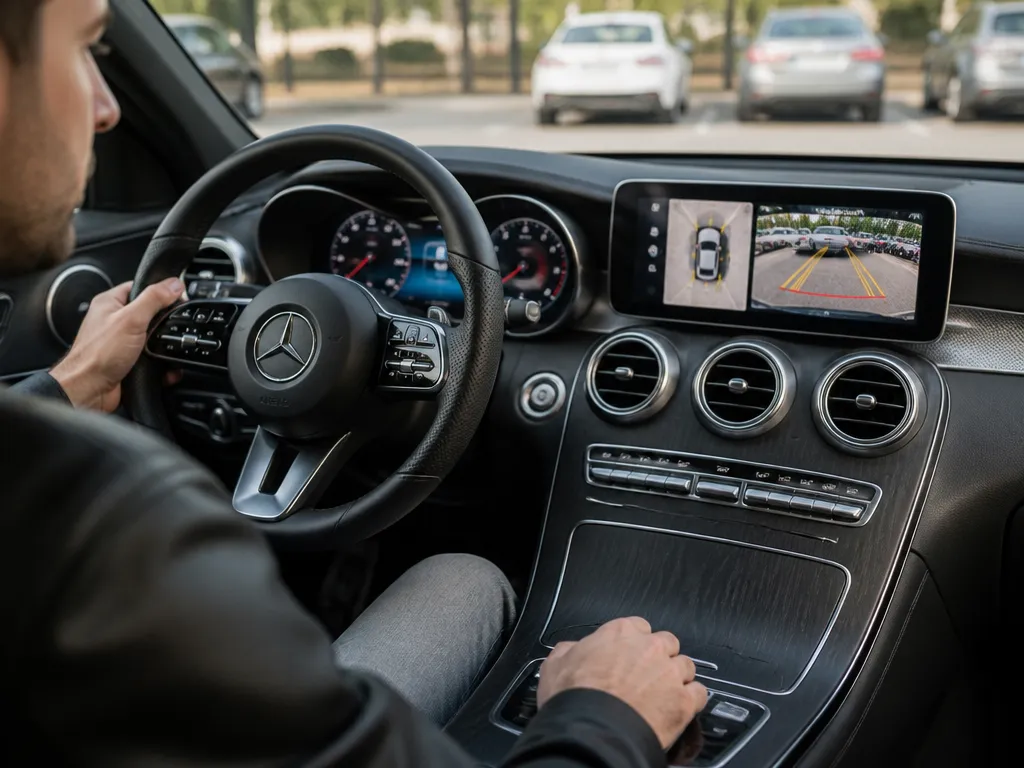
- Start in a safe approach lane.
Drive toward the parked cars or curb line that defines the space. Leave enough room behind you to reposition if the first attempt fails.
- Open the Parking Assist setting.
Go to the Car menu or driver assistance menu and select the Parking Assist function that matches the maneuver. Choose parallel or perpendicular parking if your system offers both.
- Pass the space slowly.
Drive at a walking pace or slower while moving alongside the empty space. Keep your path smooth and reasonably parallel to the parked cars or curb.
- Watch for the space-found prompt.
When the system detects a suitable gap, the display should change from searching to guided instructions. Reduce your speed further and prepare to stop.
- Stop and shift only when instructed.
If the display tells you to stop or change from D to R, do exactly that at the instructed point. Shifting early, shifting late, or creeping forward during the stop can cancel the maneuver.
- Follow the steering and pedal prompts together.
If the system controls the steering, keep your hands ready and brake smoothly. Follow instructions for moving forward or backward. If the car tells you to take over, take control immediately.
- Check the space when the maneuver ends.
Even after the car indicates that parking is complete, look around before moving again. Sensors may miss thin poles, bike wheels, low objects, or other hard-to-detect hazards.
Parallel Parking
When parallel parking between two cars, pass the opening at a slow, steady pace while staying roughly parallel to the curb. A consistent position helps the sensors measure the boundaries and calculate a path.
If the car does not detect the gap, do not speed up or swing sharply toward it. Reposition, keep the vehicle more parallel, and pass the space again slowly.
Perpendicular Parking
For a perpendicular space in a parking lot, approach so the vehicle points cleanly toward the row of spaces. A sharp approach angle may allow the system to detect the opening but leave it unable to calculate a suitable path.
Select the perpendicular parking mode when available, follow the display prompts, and be prepared to take over if another vehicle or pedestrian enters the lane.

Helpful pick
Parking Scene Display 1 64 Scale Car Display Case Model Lot Diorama with USB Strip Lights Acrylic Shell Two Parking Spots Pre Assembled Suitable for Collectors Office Desk Home Shelf
Practice your parking maneuvers in a controlled environment with this detailed diorama display, perfect for visualizing tight space navigation techniques.
Techniques That Improve Detection
The difference between a smooth attempt and an aborted maneuver usually comes down to positioning and timing.
- Stay centered beside the gap. Hugging one parked car can make the opposite boundary harder for the sensors to interpret.
- Keep the wheel position consistent. During assisted steering, avoid aggressive manual corrections. Repeated steering input can interrupt or override the calculated path.
- Choose the correct parking mode. Selecting parallel instead of perpendicular parking, or the reverse, can produce a “no space found” message even when the gap is large enough.
- Wipe the sensors, especially after rain, snow, or road dust.
- Choose a clear gap with distinct boundaries rather than unusual obstacles.
- Watch for pedestrians and crossing vehicles throughout the maneuver.
- Keep your hands ready to take over if the system requests it or the situation changes.
- Trying it at normal driving speed
- Creeping during a stop instruction
- Shifting outside the prompt sequence
- Ignoring blocked sensors
- Over-steering manually
- Assuming the system detects every hazard
| Hold still at the stop point. When the display says stop, stop completely. Creeping forward can prevent the system from completing the next stage. | Situation | Most common cause | Fix that usually works |
|---|---|---|---|
| “No parking space detected” | Approach speed too high or boundary missed | Slow down and re-enter, keeping your car parallel to the gap | |
| Space detected but it aborts | Timing mismatch during shifting or creeping | Stop exactly when prompted, then shift only on instruction | |
| Guidance feels “off” | Sensors are dirty or blocked | Clean the bumper sensor area, clear snow or ice, and try again | |
| Steering assistance struggles | Manual corrections overpower guidance | Hold steady, use gentle adjustments, and stop if prompted |
A Reliable Pre-Parking
Use the following routine before starting the detection process.
Use this checklist before starting the detection routine:
Parking Assist works best when the space is clearly defined, the lines or parked vehicles are easy to distinguish, and nearby traffic is predictable. After you learn the prompt sequence, you can use it in tighter spaces, but attention remains essential.

Helpful pick
Custom “Parking” metal signs and designated parking space signs. (24×18) Reflective, pre-drilled, Logo customization, use in private residences, property management, factories, and commercial premises. Made of aluminum,outdoor use.
While keeping your sensors clean is vital, clearly marked parking spaces can also help your vehicle’s system identify boundaries more effectively.
Mercedes Parking Assist Mistakes to Avoid
Parking Assist needs slow, stable positioning. Moving too quickly past the gap can prevent the sensors from measuring its boundaries.
If the system tells you to stop before changing maneuver stages, remain stopped. Even a small movement can break the sequence and cause an abort.
Many Mercedes systems expect a gear change at a specific point. Shifting early or late can interrupt the maneuver.
Mud, snow, ice, a bumper sticker, or a temporary cover can interfere with detection.
Constantly turning the wheel while the system is guiding it can override the planned path and cause the system to cancel or struggle.
Parking Assist may not recognize every thin, low, or fragile object. Continue scanning the path and take over when necessary.

Helpful pick
Gisafai 6 Pack 4ft Black U Channel Sign Post Heavy Duty Steel with Enamel Coating, Pre-drilled Holes for Easy Mounting, for Parking Lots, Farms & Industrial Warning Signs, Fence Post
Avoid common parking mistakes by clearly defining your own private parking areas with these heavy-duty steel sign posts for better visibility.
Tips for Better Results
Use a two-pass rule while learning. If the first attempt fails, reposition slightly and try again instead of repeating the same approach. A small change in alignment can help the sensors identify the gap boundaries more clearly.
Practice the parking mode you use most. Parallel and perpendicular maneuvers have different approach angles and prompt sequences, so familiarity reduces mistakes such as shifting at the wrong time.
Parking Assist also works more predictably on level ground. On a steep slope, the sensor readings and trajectory calculations may be less reliable. If you use the system on a slope, be ready to take over early and finish manually.
Keep your expectations realistic. The feature can reduce steering effort, but it does not remove the need for timely pedal inputs, gear changes, and constant observation.
FAQ
How do I turn on Parking Assist on my Mercedes?
Open the Car menu or driver assistance menu, then select Parking Assist for the correct parking type. Choose parallel or perpendicular parking if that option is available. Start the detection routine while moving slowly alongside the target space, then follow the display prompts and stop only when instructed.
What speed should I use when the system searches for a parking space?
Use a walking pace or slower while passing the gap. If the car cannot detect the space, slow down further and keep your approach smooth and steady. Excessive speed is one of the most common reasons Mercedes Parking Assist fails to identify a gap.
Why does my Mercedes say it cannot detect a parking space?
The likely causes are dirty or blocked sensors, an unclear gap boundary, excessive approach speed, or poor alignment. Clean the bumper sensor areas, remove ice or snow, and approach the space again more slowly and centrally.
Can I use Parking Assist if the sensors are dirty?
You can try, but you should not rely on it. Dirty or obstructed bumper sensors commonly cause “space not available” messages or failed maneuvers. Wipe the sensor zones before running the routine again.
What is the most common mistake with Mercedes Parking Assist?
The most common mistake is ignoring the prompt sequence, especially by shifting early, shifting late, or creeping during a stop instruction. Follow the display timing exactly, and take over immediately if anything enters the maneuver path.
Disclosure: As an Amazon Associate, I may earn from qualifying purchases at no extra cost to you. Amazon and the Amazon logo are trademarks of Amazon.com, Inc, or its affiliates.
- Amazon, Amazon Prime, the Amazon logo and Amazon Prime logo are trademarks of Amazon. com, Inc. or its affiliates.

Hi, I am AKM Sad. I’m a car enthusiast and reviewer who loves exploring gadgets and accessories. I share honest reviews and practical tips to help you get the best products and enjoy a safer, smoother ride.