Imagine cruising down the highway in your Ram 1500 with your favorite tunes playing seamlessly or navigating effortlessly with real-time updates. How?
By pairing your phone with the Ram 1500’s Uconnect system. This isn’t just about connectivity; it’s about enhancing your driving experience. You deserve a ride where everything is at your fingertips, making each journey more enjoyable and safer. Wondering how to make this happen?
You’re in the right place. In this guide, you’ll discover the simple steps to connect your phone to Uconnect, ensuring you never miss a beat on the road. Whether you’re a tech enthusiast or just someone looking for convenience, mastering this connection will transform your driving moments. Let’s dive in and unlock the potential of your Ram 1500.
This Post May Help You: Best Wireless Phone Charger for Ram 1500
Benefits Of Pairing Your Phone
Pairing your phone with the Ram 1500 Uconnect system offers numerous benefits. It enhances your driving experience by integrating technology into your vehicle. With this connection, you enjoy seamless access to various features.
Improved Connectivity
Stay connected while on the road. Sync your phone with Uconnect to make calls hands-free. Access your contacts and dial numbers directly from the dashboard. This ensures you don’t have to fumble with your phone.
Enhanced Navigation
Pairing your phone improves navigation. Use your phone’s GPS on the Uconnect screen. Get real-time updates, traffic alerts, and alternate routes. Never miss a turn or exit again.
Entertainment Options
Enjoy your favorite music and podcasts. Connect your phone to stream audio directly. Browse playlists and adjust settings easily. This makes long drives more enjoyable.
📱 Pair Your Phone With Ram 1500 Uconnect
Connect seamlessly with your Ram 1500 Uconnect system! Enjoy hands-free calls, music streaming, and voice commands effortlessly. Ensure your drive stays safe and connected.
✅ Recommended accessories for seamless Uconnect pairing | Fast shipping | High-rated by users
Safety And Convenience
Pairing adds safety and convenience. Access voice commands to control various features. Keep your focus on the road and hands on the wheel. This reduces distractions significantly.
Access To Apps
Access apps right from the Uconnect interface. Use messaging apps, calendars, and more. Stay organized and informed without looking at your phone. It’s a helpful way to manage tasks while driving.
Read More: Ram 1500 Vs Ford F-150 Comparison
Requirements For Phone Pairing
Pairing your phone with the Ram 1500 Uconnect system is easier than you might think. It’s all about ensuring you have the right tools and information before you start. Let’s dive into the essential requirements to make this process smooth and hassle-free.
Compatible Devices
To pair your phone, compatibility is key. Check if your phone supports Bluetooth connectivity. Most smartphones today, whether Android or iOS, have this feature. If your phone is older, verify its compatibility with Uconnect.
Is your phone model on the list of devices supported by Uconnect? This list is available on the official Ram website. Having a compatible device will save you from unnecessary frustration.
Software Updates
Ensure your phone’s software is up to date. Software updates often improve Bluetooth connectivity and fix bugs. Go to your phone’s settings and check for any pending updates.
Updates can also enhance the Uconnect system. Sometimes, the vehicle’s software needs updating for optimal performance. Visit your dealership or check online for any Uconnect system updates.
Ever tried connecting a device only to find it’s not working due to outdated software? Avoid this pitfall by keeping everything updated. You’ll thank yourself later.
Are you ready to pair your phone successfully? Just ensure these requirements are met, and you’re on your way to enjoying seamless connectivity in your Ram 1500. What could be easier than starting your drive with your favorite playlist or making hands-free calls effortlessly?
This Post May Help You: Best Phone Mount for Ram 1500
Setting Up Uconnect System
The Ram 1500’s Uconnect system is your gateway to a connected drive. Setting it up is simple and enhances your driving experience. You can easily pair your phone for seamless integration. This connection allows hands-free calls, music streaming, and navigation assistance. Follow these steps to ensure a smooth setup process.
Accessing Uconnect Settings
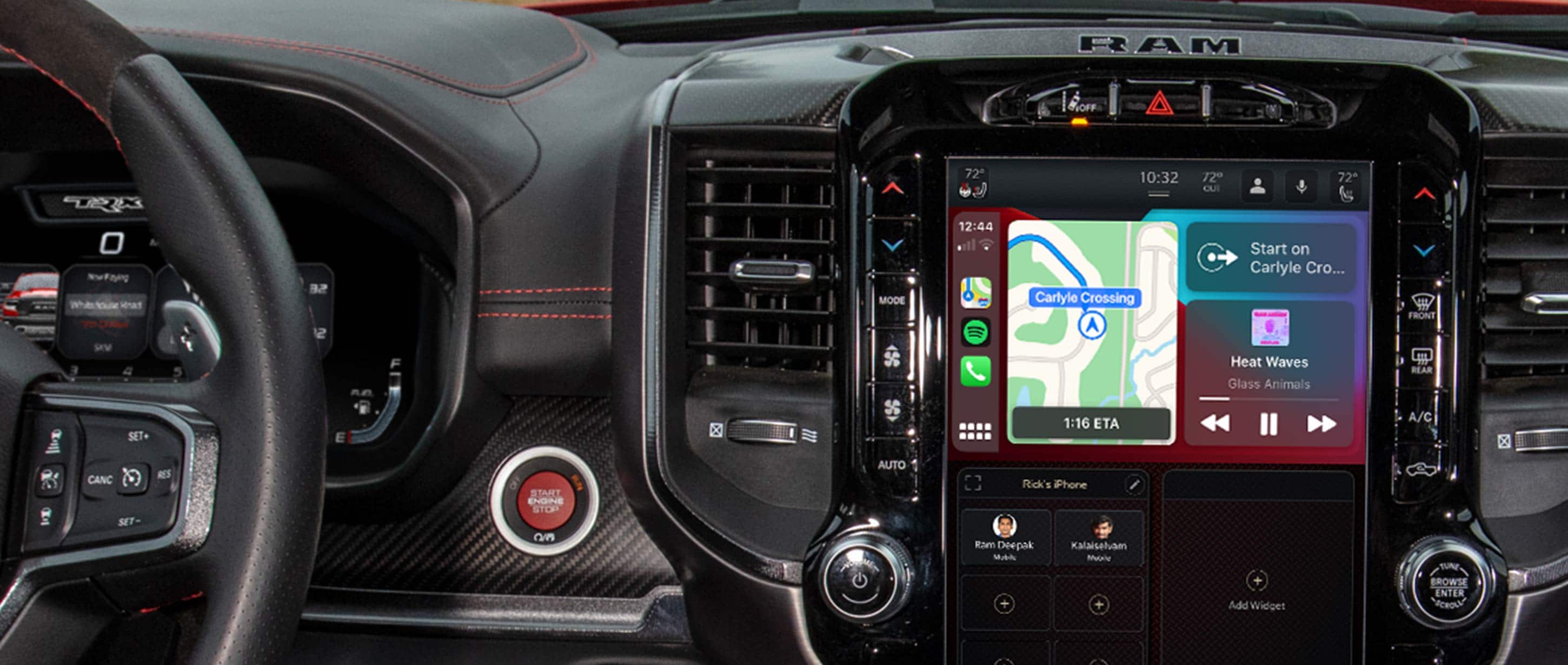
Start by turning on your Ram 1500. Locate the Uconnect touchscreen on your dashboard. Tap the ‘Settings’ icon to access the menu. Look for the ‘Phone/Bluetooth’ option. This will guide you to the pairing section. Ensure your vehicle is stationary for safety during setup.
Preparing Your Phone
Activate Bluetooth on your smartphone. This can be found in the settings menu. Make sure your phone is discoverable. This allows the Uconnect system to find it. Check that your phone’s battery is charged. Low battery can interrupt the pairing process. Keep your phone close to the Uconnect system during setup.
Credit: www.ramtrucks.com
Step-by-step Pairing Process
Pairing your phone with the Ram 1500’s Uconnect system can transform your driving experience, giving you hands-free access to calls, messages, and more. Whether you’re a tech-savvy driver or new to this feature, following a clear, step-by-step process ensures a seamless connection. Let’s dive into how you can effortlessly link your phone to the Uconnect system, making road trips and daily commutes much more enjoyable.
Activating Bluetooth On Your Phone
First, ensure Bluetooth is turned on in your phone’s settings. On most devices, you can swipe down from the top of the screen to access quick settings and toggle the Bluetooth icon.
Take a moment to make your device discoverable. This allows Uconnect to find and connect to your phone.
Connecting To Uconnect
Start by pressing the ‘Phone’ button on your Ram 1500’s Uconnect touchscreen. Select ‘Add Device’ to begin searching for your phone.
On your phone, you should see a list of available devices. Look for ‘Uconnect’ and tap to connect. If prompted, verify the PIN displayed matches on both your phone and the Uconnect screen, then confirm.
Once connected, you’ll have access to your contacts and media directly through the Uconnect system. Imagine the convenience of accessing your favorite playlist with just a tap!
Troubleshooting Connection Issues
Encountering issues? First, try turning Bluetooth off and on again on both your phone and the Uconnect system. This often resolves minor connection glitches.
If the problem persists, check if your phone’s software and the Uconnect system are up-to-date. Updates can fix bugs that might be causing connection issues.
Still facing problems? Consider deleting the Uconnect device from your phone’s Bluetooth list and starting the pairing process again. Have you ever wondered how a simple restart can sometimes solve the trickiest tech issues?
Connecting your phone to Uconnect doesn’t have to be a daunting task. With these straightforward steps, you’re well on your way to a more connected driving experience.
Utilizing Uconnect Features
The Ram 1500 Uconnect system offers a seamless integration with your phone. It enhances your driving experience. This technology provides multiple features that make driving safe and enjoyable. Pairing your phone with Uconnect opens a world of convenience. Discover hands-free calling, music streaming, and navigation assistance.
Hands-free Calling
Stay connected with Uconnect’s hands-free calling feature. It ensures safety while driving. Make and receive calls without taking your eyes off the road. Simply use voice commands to dial a contact. The system will do the rest. This allows you to focus on driving. Minimize distractions and maximize safety.
Music Streaming
Enjoy your favorite tunes with Uconnect’s music streaming. Connect your phone and access your music library. Stream songs directly from your device. Experience high-quality sound through the vehicle’s speakers. Uconnect supports various apps like Spotify and Apple Music. Enjoy endless entertainment on the go.
Navigation Assistance
Find the best routes with Uconnect’s navigation assistance. Access real-time traffic updates. Get turn-by-turn directions to your destination. Uconnect helps you avoid traffic jams. Save time and fuel. Use voice commands to search for nearby points of interest. Discover restaurants, gas stations, and more. Uconnect makes exploring easy and hassle-free.
Maintaining A Stable Connection
Pairing your phone with the Ram 1500 Uconnect ensures a stable connection for seamless communication. Access hands-free calls, music, and navigation effortlessly. Follow the simple steps in the vehicle’s settings to enhance your driving experience.
Pairing your phone with the Ram 1500 Uconnect system is just the beginning of a seamless driving experience. However, maintaining a stable connection is vital for uninterrupted access to your favorite features. A reliable connection ensures that your calls are clear and your playlists keep playing without a hitch. But how do you keep that connection stable? Let’s dive into some straightforward tips to make sure your Uconnect system is always in sync with your phone.
Regular Updates
Keeping your Uconnect system and phone updated is crucial. Manufacturers release updates to fix bugs and improve performance. Missing out on these updates might lead to connectivity issues. Make it a habit to check for updates monthly. Ensure that both your phone’s operating system and the Uconnect software are running on the latest versions. This simple step can prevent a lot of headaches down the road.
Reconnecting When Necessary
Sometimes, despite your best efforts, the connection might drop. Don’t panic. Simply try reconnecting your phone. It’s as easy as turning Bluetooth off and on again on your phone. If that doesn’t work, go into the Uconnect settings and remove your phone from the device list. Then, pair it again as you did initially. It’s like giving your devices a fresh start.
Have you ever noticed how your phone sometimes needs a reboot to function better? The same principle applies here. Staying connected is more than just a luxury—it’s a necessity for many drivers today. Are you ready to ensure that your drives are smooth and hassle-free?
🎶 Enhance Your Ram 1500 Entertainment
Upgrade your Ram 1500 Uconnect experience with top-rated accessories. Stream music, make calls, and enjoy smarter connectivity while keeping your hands on the wheel.
✅ Enhance calls & entertainment | Easy setup | Compatible with all Ram 1500 Night Edition models
Addressing Common Problems
Connecting your phone with the Ram 1500’s Uconnect system should be simple. But sometimes, things don’t go as planned. Understanding common problems can help you achieve a seamless pairing.
Interference Issues
Electromagnetic interference can disrupt your connection. Nearby devices may cause this interference. Keep electronic gadgets away during pairing. This reduces signal disruption. A clear area helps your phone connect smoothly.
Software Glitches
Outdated software can cause connection problems. Always update your Uconnect software. Your phone’s operating system should be current too. Regular updates fix bugs and improve performance. A simple update can solve many issues.
Device Compatibility
Not all phones are compatible with Uconnect. Check your phone’s compatibility online. Some models may not support certain features. Ensuring compatibility avoids pairing frustrations. A quick check saves time and effort.

Credit: www.youtube.com
Frequently Asked Questions
How Do I Connect My Phone To My Uconnect Ram 1500?
Enable Bluetooth on your phone. Access the UConnect menu on your Ram 1500’s touchscreen. Select “Phone” and then “Pair Device. ” Follow on-screen instructions to complete the pairing process.
How Do I Put Uconnect In Pairing Mode?
Press the “Phone” button on your UConnect system. Select “Settings” and then choose “Pair a Device. ” Follow on-screen prompts to pair.
Why Is My Phone Not Connecting To Uconnect?
Ensure Bluetooth is enabled on your phone. Verify compatibility with UConnect. Restart both devices and try reconnecting. Update UConnect software if necessary. Check for interference from nearby devices. Consult your vehicle’s manual or contact support for further assistance.
Why Won’t My Phone Connect To My Ram Truck?
Ensure Bluetooth is enabled on both devices. Check compatibility between your phone and the Ram truck’s system. Update software on both devices. Restart your phone and the truck’s infotainment system. Verify pairing instructions from the user manual for successful connection.
Conclusion
Pairing your phone with the Ram 1500 Uconnect is simple. Just follow the steps outlined above. You’ll enjoy hands-free calls and music streaming. It enhances driving safety and convenience. Always ensure your Uconnect software is updated. This ensures smooth connectivity.
Troubleshoot any issues with the Uconnect support team. Now, you’re ready for a connected driving experience.
Disclosure: As an Amazon Associate, I may earn from qualifying purchases at no extra cost to you. Amazon and the Amazon logo are trademarks of Amazon.com, Inc, or its affiliates.
- Amazon, Amazon Prime, the Amazon logo and Amazon Prime logo are trademarks of Amazon. com, Inc. or its affiliates.

I am Sadman, the founder of CarSensorHub.com, where I share my passion for cars and technology. I specialize in writing detailed reviews and helpful guides on car gadgets, accessories, safety tools and many more. My mission is to help car owners discover the best products and tips to improve their driving experience and stay safe on the road.