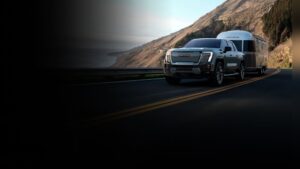
The GMC Sierra 1500 stands out in the world of pickup trucks, not just for its rugged power and stylish design, but also for its rich collection of tech accessories. For drivers who want more than basic transportation, these accessories transform the Sierra 1500 into a smart, connected, and safer vehicle.
Whether you use your truck for work, family, or adventure, understanding these tech features can help you get the most from your GMC Sierra 1500. This article breaks down the most important tech accessories, showing how they work, why they matter, and how they compare.
Infotainment Features
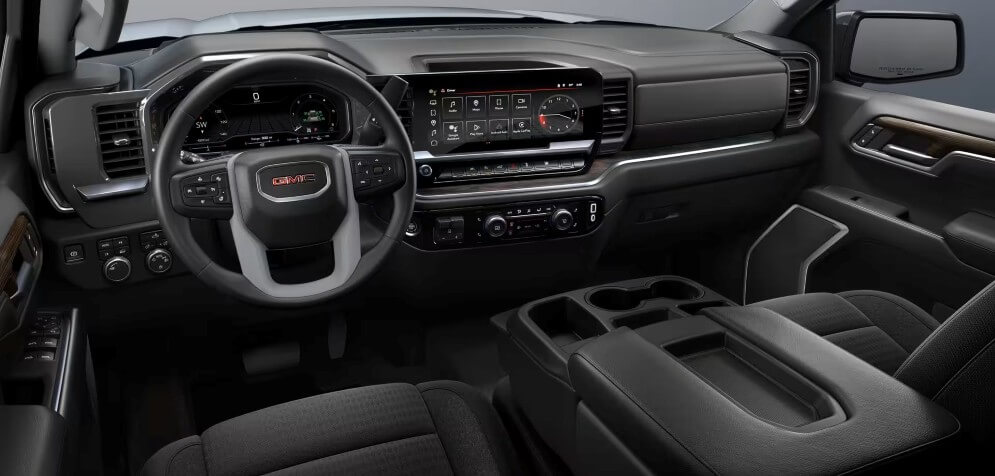
The heart of the GMC Sierra 1500’s tech is its infotainment system. This is more than just a radio; it’s your command center for navigation, entertainment, and connectivity.
- Touchscreen Display: Most Sierra 1500 models come with an 8-inch or larger touchscreen. It’s easy to use, with clear icons and simple menus.
- Apple CarPlay & Android Auto: Connect your smartphone and use apps, maps, music, and messaging hands-free.
- Bluetooth Connectivity: Wirelessly play music or take calls, keeping your hands on the wheel.
- Voice Commands: Control navigation, media, and phone calls without distraction.
- Navigation System: Built-in maps help you find routes, traffic updates, and points of interest.
Many drivers miss that navigation updates are sometimes paid and not automatic. Also, some advanced functions require a subscription, so check what’s included in your package.
Safety Tech Accessories
Safety is a top priority for the GMC Sierra 1500. The truck offers several smart systems to help prevent accidents and protect everyone inside.
- Forward Collision Alert: Warns you if a crash is likely, giving you time to react.
- Lane Keep Assist: Helps you stay in your lane by gently steering or warning you.
- Rear Cross Traffic Alert: When backing up, this system alerts you to cars crossing behind.
- Blind Spot Monitoring: Lets you know when a car is in your blind spot so you can change lanes safely.
- Automatic Emergency Braking: Applies brakes if a collision is about to happen and you haven’t responded.
A common mistake is assuming all safety tech is active by default. Some features must be turned on in settings, and not all are available on every trim.
Connectivity And Convenience
Staying connected on the go is important, and GMC makes it easier with several accessories.
- 4G LTE Wi-Fi Hotspot: Turn your truck into a rolling internet zone for up to seven devices.
- Wireless Charging Pad: No need for cables; just place your phone on the pad.
- USB Ports: Multiple ports for charging and connecting devices.
- Remote Start System: Start your truck from outside to warm or cool the cabin.
- Keyless Entry and Push-Button Start: Unlock and start your truck without taking the key out of your pocket.
Many drivers overlook the Wi-Fi hotspot data limits. After a certain usage, speeds can drop. Also, wireless charging only works with phones that support it.
Audio Technology
Music and sound quality matter, especially on long drives or tough workdays. The Sierra 1500 offers premium audio choices.
- Bose Premium Sound System: Delivers clear, rich sound with multiple speakers.
- HD Radio: Access to higher quality radio broadcasts.
- Satellite Radio: More stations, better sound, and fewer ads.
- Steering Wheel Audio Controls: Change volume or station without taking your hands off the wheel.
The Bose system is only available on higher trims. Don’t forget to check speaker placement if you value sound quality.

Credit: www.clickliberty.com
Camera And Parking Tech
Parking a large truck can be challenging, but GMC’s tech accessories make it easier and safer.
- Rearview Camera: Gives a clear view behind you when reversing.
- 360-Degree Camera System: Shows all sides of your truck for easier parking and maneuvering.
- Trailer Camera Package: Lets you monitor your trailer and its surroundings.
- Front and Rear Parking Sensors: Warn you about objects close to your truck.
Some advanced camera systems require extra packages. Also, camera lenses can get dirty—regular cleaning is needed for best results.
Driver Assistance Features
Helping the driver is a big focus for GMC, with several smart tools.
- Adaptive Cruise Control: Keeps a set distance from the car ahead, automatically adjusting speed.
- Hill Descent Control: Helps manage speed on steep slopes.
- ProGrade Trailering System: Makes towing easier with checklists, monitoring, and guidance.
- Automatic Headlights: Turn on/off based on lighting conditions.
One insight many miss: Adaptive cruise control doesn’t work in every weather or traffic situation. Always stay alert.

Credit: www.amazon.com
Smart Storage And Utility Accessories
GMC knows pickup drivers need smart storage and utility solutions. Some accessories combine tech with practical features.
- Electronic Tailgate Release: Open and close the tailgate with a button or remote.
- Bed View Camera: Monitor cargo and trailer hitch from inside the cabin.
- Cargo Management System: Organize tools and equipment with modular storage.
Electronic tailgate releases are often only available with certain trims or packages.
Comparison: Infotainment And Connectivity Features
To help you choose, here’s a comparison of key infotainment and connectivity features by trim.
| Feature | Base Trim | Mid Trim | Top Trim |
|---|---|---|---|
| Touchscreen Size | 7-inch | 8-inch | 10-inch |
| Apple CarPlay/Android Auto | Standard | Standard | Standard |
| Navigation | Optional | Optional | Standard |
| Bose Audio | Not Available | Optional | Standard |
| Wi-Fi Hotspot | Optional | Standard | Standard |
Comparison: Safety Technologies
Safety tech varies between trims and packages. Below, see which features you get:
| Safety Feature | Base Trim | Mid Trim | Top Trim |
|---|---|---|---|
| Forward Collision Alert | Optional | Standard | Standard |
| Lane Keep Assist | Optional | Standard | Standard |
| Blind Spot Monitoring | Not Available | Optional | Standard |
| Automatic Emergency Braking | Optional | Standard | Standard |
Practical Tips For Choosing Tech Accessories
When picking tech accessories for your GMC Sierra 1500, think about your needs:
- Work Use: If you use your truck for business, focus on connectivity (Wi-Fi hotspot), camera systems for towing, and cargo management.
- Family Use: For family, look for entertainment features, rear seat USB ports, and safety tech.
- Adventure Use: If you travel or camp, navigation, wireless charging, and remote start are useful.
Don’t just pick the highest trim. Some accessories can be added to lower trims as options. Also, check compatibility—some tech features only work together in certain packages.
Data Table: Tech Accessory Availability By Model Year
Here is a look at how tech accessories have changed over recent GMC Sierra 1500 model years.
| Accessory | 2020 | 2021 | 2022 | 2023 |
|---|---|---|---|---|
| Apple CarPlay/Android Auto | Standard | Standard | Standard | Standard |
| Wireless Charging | Optional | Optional | Standard | Standard |
| 360-Degree Camera | Optional | Optional | Optional | Standard |
| Adaptive Cruise Control | Not Available | Optional | Optional | Standard |
Non-obvious Insights For Gmc Sierra 1500 Owners
Many new owners do not realize the following:
- Tech accessories often require software updates. Not updating can lead to glitches or missing features. Check for updates at least once a year.
- Some features use mobile data or subscriptions. Navigation, Wi-Fi, and satellite radio often come with trial periods. After that, you may need to pay for continued access.
- Accessory compatibility can change by model year. For example, wireless charging was optional in earlier models but is standard now. Always check your truck’s year and trim.
Where To Find More Information
For the most accurate information about GMC Sierra 1500 tech accessories, visit the official GMC website or consult your dealer. You can also find detailed specifications and reviews at GMC Trucks Official Site.
Frequently Asked Questions Gmc Sierra 1500 Tech Accessories Explained
What Tech Accessories Are Standard On The Gmc Sierra 1500?
Most Sierra 1500 models come with Apple CarPlay, Android Auto, Bluetooth, and a touchscreen display. Safety features like forward collision alert and lane keep assist are standard or optional, depending on trim.
Can I Add Tech Accessories To My Sierra 1500 After Purchase?
Yes, many accessories can be added later, such as wireless charging pads, camera systems, and audio upgrades. However, some features (like adaptive cruise control) may require factory installation and cannot be added afterward.
How Does The Wi-fi Hotspot Work?
The 4G LTE Wi-Fi hotspot lets you connect up to seven devices. You need a data plan, and there may be speed limits after certain usage. The hotspot is useful for work, travel, or streaming entertainment.
Are Tech Accessories Covered Under Warranty?
Most factory-installed tech accessories are covered under the GMC warranty. Aftermarket additions may not be covered. Always check with your dealer for details.
Which Tech Accessory Improves Safety The Most?
Automatic emergency braking and blind spot monitoring are among the most important for safety. They help prevent accidents by alerting you or taking action when danger is detected.
The GMC Sierra 1500’s tech accessories are more than just gadgets—they make your truck smarter, safer, and more enjoyable to drive. From advanced safety systems to entertainment and connectivity, these features add real value. Choose the accessories that fit your lifestyle and keep your tech up to date for the best experience.
Credit: www.lovelandbuickgmc.com
Disclosure: As an Amazon Associate, I may earn from qualifying purchases at no extra cost to you. Amazon and the Amazon logo are trademarks of Amazon.com, Inc, or its affiliates.
- Amazon, Amazon Prime, the Amazon logo and Amazon Prime logo are trademarks of Amazon. com, Inc. or its affiliates.

I am Sadman, the founder of CarSensorHub.com, where I share my passion for cars and technology. I specialize in writing detailed reviews and helpful guides on car gadgets, accessories, safety tools and many more. My mission is to help car owners discover the best products and tips to improve their driving experience and stay safe on the road.