Upgrading your Sierra 1500 with a wireless charger makes daily drives smoother and less cluttered. No more fussing with tangled cords or searching for the right cable. A good Wireless Charger Upgrade Sierra 1500 fits seamlessly into your truck and keeps your phone powered up.
It’s all about convenience. Just set your phone down and focus on the road. With so many options out there, it helps to know what sets the best choices apart. Whether you’re looking for faster charging, a sleek fit, or something that works with a case, finding the right wireless charger makes a real difference.
Simple Wireless Charging Tray For Sierra
The Wireless Charger Upgrade Sierra 1500 is for drivers of 2015–2018 GMC Sierra or Chevy Silverado trucks with a split bench who want cable-free phone charging in their center console.

Day-to-day Charging Experience
This tray replaces your factory jump seat insert and brings wireless charging to older Sierra and Silverado models. It solves the tangle of cables in your console, letting you just set your phone down and go. The charging pad works with most cases and includes visual indicators so you know when it’s working.
In daily use, it’s straightforward. Drop your phone on the pad and it starts charging, which means no fumbling with cords while driving. Install time is short, and the tray fits neatly into the split bench seat—so the original look of your truck is kept.
Charging slows as your battery fills, which keeps your phone from overheating.
Who This Suits And Who May Want To Skip
Truck owners who want a hassle-free way to keep their phone charged during drives will appreciate this tray. If you want to stop searching for the right cable, or if you use your phone for navigation and calls, this is a practical upgrade.
It’s especially good if you use a case on your phone, since the pad works through most cases.
If you have a full console or a different seat setup, this won’t fit. Also, if your phone is always plugged into CarPlay or Bluetooth while charging, you may notice it warms up and charges a bit slower. That’s normal, but it’s something to consider if you need the fastest charge possible all the time.
- Fits 2015–2018 Sierra/Silverado split bench only
- Works through most phone cases
- Easy install with included parts
Installation And Everyday Use Tips
This tray is a solid pick if you want wireless charging without changing your interior much. If you like things tidy and don’t want wires in sight, it does the job well. If you don’t have the split bench, or if you expect lightning-fast charging with Bluetooth and CarPlay always on, you might find it slower than you’d like.
After installing, check the indicator lights to confirm charging is normal. If you have questions, the maker offers support. For most drivers, it’s a calm, low-effort way to upgrade your Sierra or Silverado’s tech.
Silverado & Sierra Wireless Charging Tray
The Wireless Charger Upgrade Sierra 1500 is ideal for owners of 2019–2026 Chevy Silverado or GMC Sierra trucks who want cable-free phone charging in the center console.
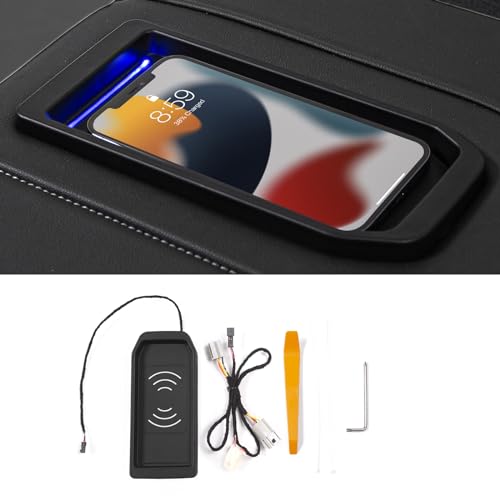
This is a wireless charging tray made for full-console Silverado and Sierra trucks from 2019 to 2026. It replaces the factory tray and solves the hassle of tangled cables, letting you charge your phone simply by setting it down. The 15W fast charging feature is practical if you often need a quick battery boost between drives.
In daily use, it feels seamless—just drop your phone in and charging starts automatically. The fit looks like it belongs in the truck, and installation uses free tools provided. I found the indicator light handy for knowing if charging is working or not, so there’s little guesswork.
Everyday Use: What To Know Before You Buy
- Easy to drop your phone and charge—no cables needed.
- Fits snugly in the original console spot if you have bucket seats.
- Indicator light makes charging status clear at a glance.
- Installation is straightforward with included tools.
- Does not block USB or lighter ports.
- Needs a flat phone case for best results.
- May require wiring workaround on certain 2022 models.
Practical Takeaway For Truck Owners
If you drive a Silverado or Sierra 1500 with a full console and want to keep your phone charged without cables, this tray will suit you well. It’s most useful for anyone who values a clean, factory look and automatic charging during commutes or workdays.
Skip it if your truck does not have the full console with bucket seats, or if you use thick or uneven phone cases, as these can block charging. For 2022 models without a cigarette lighter port, installation takes an extra step—watch the video or reach out for help to avoid frustration.
Most users will find the process calm and straightforward. If you’re unsure whether your truck fits, double-check before buying. The charging tray’s indicator light offers good peace of mind that your phone is charging as intended.
Console Wireless Charger For Sierra 1500
The Wireless Charger Upgrade Sierra 1500 is ideal for drivers of 2015–2018 GMC Sierra 1500 models who want a simple charging solution for their phones.

This wireless charger replaces the console pad in GMC Sierra 1500 trucks from 2015–2018. It eliminates the need for cables and makes charging your phone easier on the road. The 15W fast charging feature is useful if you need a quick power boost during your commute.
Using this charger feels straightforward. Just place your phone down and it starts charging automatically. It’s convenient, especially if you dislike fiddling with cords. Installation is supported by a video, and once installed, charging is simple and reliable.
Practical Use In Sierra 1500
- Charging starts automatically when you set your phone down.
- No cables are needed, so the console stays tidy.
- 15W fast charging reduces downtime for your phone.
- Works only with full console and bucket seat setups.
- Installation video helps avoid guesswork.
- Stops charging once the phone is full, preventing overcharging.
What To Expect If You’re Considering This Upgrade
If you want simple, cable-free charging and have a compatible Sierra 1500, this upgrade will suit you. It’s best for people who use their phone for navigation or calls while driving and need reliable charging.
Skip it if your truck doesn’t have the full console or bucket seats, or if you often use CarPlay while charging. Charging may slow and the phone can get warm during Bluetooth use. Check compatibility carefully before buying. If you install it, watch the video first for a smooth setup.
The charger does its job quietly and reliably, so you don’t have to worry about overcharging.
Low-profile Wireless Charger For Sierra
The Wireless Charger Upgrade Sierra 1500 is designed for GMC Sierra 1500 Double Cab owners seeking seamless device charging on the road.

This is a custom-fit wireless charging pad for the GMC Sierra 1500 Double Cab from 2018 to 2026. It solves the hassle of tangled charging cables and keeps your phone powered with a simple drop-in motion. The 20W high-power output stands out, as it delivers faster charging than standard in-car pads.
In daily driving, the pad blends into the center console and does not get in the way. Phones with larger cameras or thick cases rest securely thanks to its stepped design. There is no need to adjust your phone often, so charging feels effortless and reliable.
What To Expect In Everyday Use
- Fits the Sierra 1500 Double Cab dash with no extra tools.
- Charges most modern phones, even those with camera bumps.
- Stays put while driving, with minimal sliding.
- Low-profile design keeps your interior tidy.
- Works automatically once you set your phone down.
- No constant cable plugging and unplugging.
Who Will Appreciate This Upgrade
This charger suits Sierra 1500 drivers who want charging without fuss or clutter. If you often forget your cable or dislike messy wires, it will make daily routines simpler. Drivers using their truck for work or family trips will find the hands-free charging especially useful.
However, if you have a different Sierra model or need charging for tablets, this pad may not fit your needs. Those expecting support for older phones without wireless charging will also need to look elsewhere. The pad is best for users who already use wireless charging at home or work.
A tip: For the fastest results, pair it with a quality car adapter that supports 20W output. The integrated design means you can leave it installed year-round without worry. For owners who like a clean look and easy routines, this upgrade will quietly do its job in the background.
Magnetic Wireless Dash Charger Mount
The Wireless Charger Upgrade Sierra 1500 is ideal for drivers of newer Chevy Silverado HD and GMC Sierra 1500 trucks who want an easier way to charge and mount their phone.

This is a magnetic wireless charger and phone mount for the dash. It solves the common issue of juggling your phone while driving, offering a secure spot and fast charging for compatible Sierra and Silverado models. The strong magnetic grip makes it easy to attach and detach your phone without fiddling.
In daily use, the charger feels stable, and adjusting the angle is simple. Phone placement is quick, and I found navigation visibility improved. Installation is fast, and you don’t need to worry about damaging the dash.
Everyday Use: What To Expect
- Mounting and removing your phone takes seconds
- Phone stays firmly in place, even on rough roads
- Charging starts automatically and reliably
- Dashboard view and air flow are not blocked
- Easy to adjust for best visibility
- Works for any smartphone model
Is This The Right Fit For You?
If you drive a compatible Sierra 1500 or Silverado and dislike cable clutter, this mount is a smart upgrade. It suits those who use navigation often or need fast charging while on the road.
Skip it if your truck has an aftermarket dash or you want to move it between vehicles. The mount is specific to certain models and OEM dashboards. For best results, press the base firmly into place as instructed.
Once installed, the mount rarely needs adjustment and gives peace of mind. If your phone is heavy or you drive on very rough terrain, the magnets still hold strong. This is a practical choice for those wanting a tidy, reliable charging solution.
How To Choose A Wireless Charger Upgrade For Your Sierra 1500
Start by matching the charger to your Sierra 1500’s model year and seat configuration. Most options fit either the full console or jump seat, not both. Decide if you want magnetic mounts or tray-based pads based on your daily driving habits.
Look for power output—15W or 20W can make a difference if you charge often. Consider how the charger installs and whether you’ll need tools or extra wiring. Think about phone compatibility, especially if you use a case or have a larger device.
Most people miss checking if the charger blocks existing console features like USB ports.
30-second Checklist For Wireless Charger Fit
- Does your Sierra 1500 have the correct console style?
- Is your phone compatible with wireless charging?
- Will the charger fit with your phone case on?
- Do you use CarPlay or Bluetooth while charging?
- Can you access USB or cigarette lighter ports after install?
- Is installation possible without professional help?
Avoiding Common Regrets With Sierra 1500 Wireless Charger Upgrades
Regret #1: The charger doesn’t fit your console. Always confirm your seat and console type before buying. If unsure, check your vehicle manual or look for product fit charts.
Regret #2: Charging slows or stops with your phone case. If your case is thick or has uneven surfaces, test wireless charging beforehand or choose a charger with stepped or adjustable pads.
Regret #3: You lose access to USB or other ports. Before installing, look at the charger’s design to see if it covers any ports you use daily. Choose models that allow port access or offer alternative connections.
Quick Pick Table: Wireless Charger Upgrade Sierra 1500 Decision Guide
| If you want… | Look for this | Avoid this |
|---|---|---|
| Fast charging | 15W or 20W output | Older, lower wattage pads |
| Easy installation | Plug-and-play trays | Models needing complex wiring |
| Magnetic phone mounting | Magnetic holder design | Flat charging pads only |
| Compatibility with thick phone cases | Stepped or adjustable pad | Flat, small surface area chargers |
| Access to console ports | Low-profile or port-accommodating designs | Trays that cover USB/cigarette lighter ports |
Real-life Setup And Use Tips For Sierra 1500 Wireless Chargers
- Test wireless charging with your phone case on before full installation.
- Check your console layout for port placement to avoid blocking key features.
- If you use CarPlay via cable, charging wirelessly may heat your phone—monitor during first use.
- Use included installation tools and follow video guides if available.
- Clean the console surface before installing to ensure secure placement.
FAQs: Wireless Charger Upgrade Sierra 1500
Will These Chargers Fit All Sierra 1500 Models?
No. Each charger matches specific model years and seat types. Check product details for compatibility.
Can I Use My Phone Case With These Chargers?
Most chargers work with slim cases. Thick or rugged cases may reduce charging efficiency. Stepped pads help with raised cameras.
Do I Lose Access To Console Usb Or Lighter Ports?
Some chargers cover these ports. Choose designs that leave ports open if you need daily access.
Is Installation Difficult?
Most trays are easy to install with basic tools. Magnetic mounts usually install quickly. Follow instructions or watch provided videos.
Will Wireless Charging Work While Using Carplay Or Bluetooth?
Charging may slow and your phone can heat up if using CarPlay or Bluetooth. Monitor device temperature during use.
Are These Chargers Safe For Daily Use?
Chargers with certifications like CE, RoHS, FCC are tested for safety. Avoid low-quality models without these marks.
How Do I Maintain The Charger?
Keep the pad clean and dry. Avoid dropping or bending the charger. Check connections regularly for wear.
Final Thoughts On Wireless Charger Upgrade GMC Sierra 1500
Wireless charger upgrades for the Sierra 1500 bring added convenience, but matching the right model to your vehicle is key. Take time to check your console style, phone compatibility, and daily habits before choosing.
If torn between two options, choose the one that keeps your console ports accessible. This single detail can make daily use much easier and more flexible.
Disclosure: As an Amazon Associate, I may earn from qualifying purchases at no extra cost to you. Amazon and the Amazon logo are trademarks of Amazon.com, Inc, or its affiliates.
- Amazon, Amazon Prime, the Amazon logo and Amazon Prime logo are trademarks of Amazon. com, Inc. or its affiliates.

I am Sadman, the founder of CarSensorHub.com, where I share my passion for cars and technology. I specialize in writing detailed reviews and helpful guides on car gadgets, accessories, safety tools and many more. My mission is to help car owners discover the best products and tips to improve their driving experience and stay safe on the road.