When comparing a wired vs wireless backup camera, the biggest difference is how the video reaches your monitor. A wired backup camera sends its picture through a physical cable, while a wireless backup camera uses a radio connection between the rear camera and the display. Both systems still need power, so wireless does not always mean a completely wire-free installation.
I’ve compared the two setups based on signal reliability, installation effort, picture performance, maintenance, and long-term value. The goal is simple: help you choose the right rear-view camera system for your car, truck, RV, or trailer without paying for features you do not need.
List of Wired vs Wireless Backup Camera Differences
⚡ Quick Verdict
Choose a wired backup camera if you want a consistent video connection for a permanent installation and can route the cable safely. Choose a wireless backup camera if running a long video cable is difficult, especially on a truck, RV, or trailer. Just remember: a vehicle-powered wireless camera still needs power at the rear, and its signal should be tested in your actual vehicle before you finish the installation.
Analysis: Wired Backup Camera System
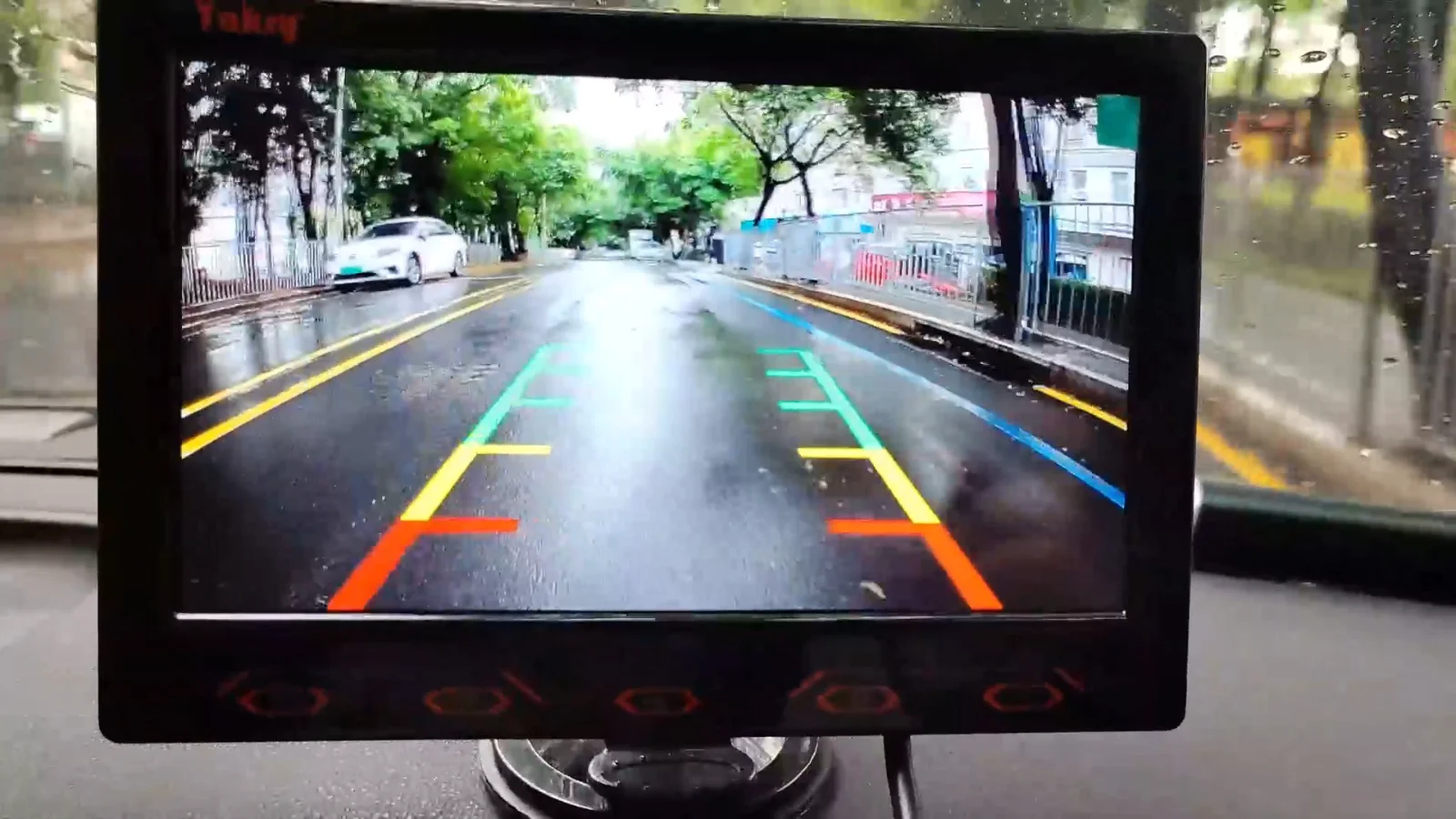
A wired backup camera uses a physical video cable to connect the rear camera to the monitor. This gives the system a direct signal path without depending on a wireless transmitter and receiver. The Yakry Y16 7-inch wired backup camera is one example, with a 1080p video specification, infrared night vision, and adjustable parking guidelines.
The main advantage is signal consistency. Once the cable is installed correctly, the camera does not need to maintain a radio connection with the monitor. That makes a wired system a practical option for a vehicle that uses the same camera setup every day. It can also be easier to diagnose because the main video path is a physical connection that you can inspect.
The trade-off is installation work. You must route the video cable from the rear of the vehicle to the monitor, often along the door sill, A-pillar, or dashboard. The Yakry Y16 manual lists a 23.5-foot video cable, while the product’s installation information explains that the cable runs from the rear camera toward the front display. Always measure the actual route before choosing a kit.
Build Quality & Design
A wired system has fewer wireless components, but its cables and connectors become important parts of the installation. The video cable should be secured away from sharp metal edges, moving hinges, hot surfaces, and areas where water can collect. Use suitable grommets where a cable passes through a panel, and avoid leaving loose wiring where it can rub or become trapped.
Performance & Speed
A direct cable connection avoids the radio transmission step used by wireless cameras. That removes one possible source of signal interruption. However, a wired camera is not automatically clearer or faster than every wireless model. The camera sensor, video format, monitor, cable condition, and power supply all affect the final picture. A damaged or poorly connected cable can still cause a blank, flickering, or distorted image.
Features & Functionality
Wired backup cameras can offer the same useful features found on wireless models, including HD video, infrared night vision, adjustable parking lines, and wide-angle lenses. The connection type does not determine image resolution by itself. Check the camera and monitor specifications separately, and confirm that the system supports the video input on your existing display if you do not plan to use the monitor included in the kit.
User Experience
The installation takes more planning because you need to hide and secure the cable. After the setup is complete, daily use is straightforward: the monitor receives video through the physical connection, and the reverse trigger or power arrangement controls when the image appears. For drivers who plan to keep the camera in one vehicle, the extra installation effort may be worthwhile.
Value for Money
A wired backup camera can offer strong long-term value when the vehicle has a practical cable route and the installation is done properly. You do not need to manage a camera-to-monitor radio link, and vehicle-powered models do not require a separate camera battery charge routine. Still, include installation labor, cable length, adapters, and monitor compatibility when comparing the total cost.
✅ Advantages
✓Direct video connection does not depend on a wireless radio link.
✓A consistent choice for permanent installations in cars, vans, and trucks.
✓No camera-to-monitor pairing process is required.
✓Vehicle-powered systems avoid routine camera battery charging.
❌ Disadvantages
✗Requires a video cable route from the rear camera to the display.
✗Installation can involve removing trim and routing cable through tight spaces.
✗A pinched, worn, or loose cable can interrupt the picture.
✗Moving the system to another vehicle may require a new cable installation.
Analysis: Wireless Backup Camera System
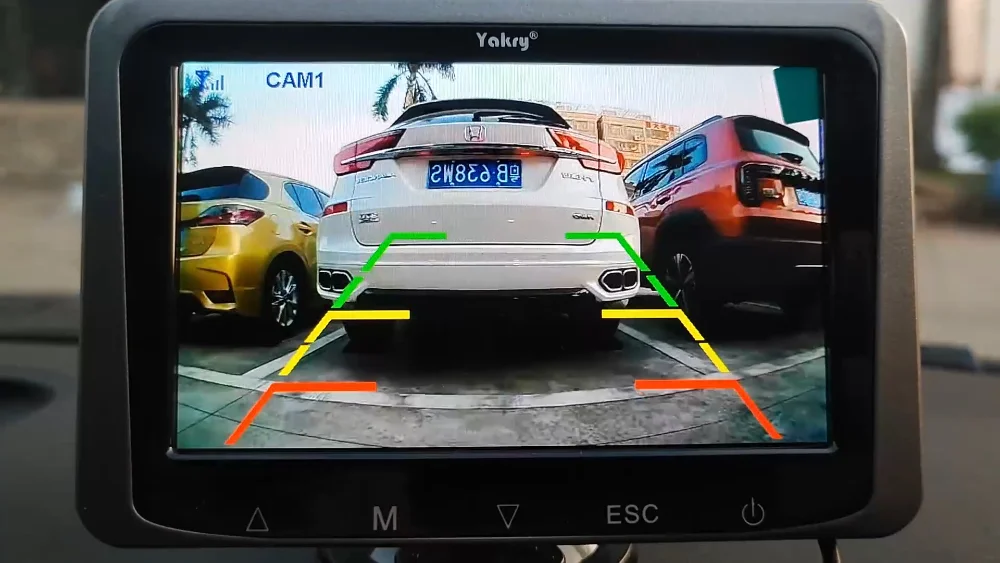
A wireless backup camera sends video from the rear camera to a compatible monitor through a radio connection instead of a long video cable. The Yakry Y25 5-inch wireless backup camera is one example. Its listed features include a 1080p video specification, infrared night vision, adjustable parking lines, and a wireless camera link.
The biggest benefit is reduced video-cable routing. You do not need to run a long signal cable from the back of the vehicle to the dashboard. This can make a wireless backup camera easier to retrofit, particularly when the vehicle has limited space for cable routing or when a trailer needs a removable camera setup.
However, wireless does not automatically mean no wiring. A fixed wireless camera commonly needs a suitable power and ground connection at the rear, while the monitor needs its own power source. Battery-powered or solar-assisted cameras can reduce permanent wiring, but they introduce charging and battery-management tasks.
Build Quality & Design
Wireless systems remove the long video cable, but they still have physical components that need protection. Check the camera mount, antenna connection, power leads, and weather sealing. If you choose a rechargeable camera, make sure the battery compartment and charging port are suitable for outdoor use and easy to access when charging is needed.
Performance & Speed
Wireless performance depends on the camera, receiver, distance, antenna placement, vehicle structure, and nearby radio activity. A manufacturer’s open-area range is not a guarantee of the same performance through a vehicle body or a loaded trailer. For example, Furrion lists its Vision S+ system as using a proprietary 2.4 GHz connection tested up to 100 feet while driving and up to 492 feet in open areas. Those figures apply to that specific system, not every wireless backup camera.
Features & Functionality
Wireless backup camera systems are available with features such as multiple camera channels, split-screen viewing, infrared night vision, rechargeable batteries, solar charging, and recording. These features vary by model. A wireless camera does not automatically include a recorder, smartphone connection, or compatibility with your factory infotainment screen. Check the exact kit contents and supported display before ordering.
User Experience
For many drivers, the installation feels simpler because there is no long video cable to hide inside the cabin. The camera and monitor still need to be powered, paired when required, and mounted in suitable positions. Before securing everything permanently, test the live image with the camera and monitor in their intended locations and with the trailer or usual cargo attached.
Value for Money
A wireless backup camera can be worth the extra cost when it saves difficult cable routing or provides the flexibility you need for towing. Compare the full package, including the monitor, transmitter and receiver, power accessories, mounting hardware, and any replacement battery. A rechargeable model may reduce installation work but will need charging over its lifetime.
✅ Advantages
✓No long video cable needs to run through the cabin.
✓Can be easier to retrofit when cable routing is difficult.
✓Useful for many trucks, RVs, campers, and trailer setups.
✓Some models offer removable, rechargeable, or solar-assisted cameras.
❌ Disadvantages
✗The radio signal can be affected by distance, obstacles, and the vehicle environment.
✗Vehicle-powered models still need a power connection at the rear.
✗Some systems require pairing or antenna-position adjustments.
✗Rechargeable models need regular charging and battery care.
Major Factors to Consider
Choosing between a wired and wireless backup camera comes down to your vehicle, installation route, and how dependable the image needs to be. Here are the main factors to check before buying.
🎯
Performance
Do not judge a backup camera by the connection type alone. Resolution, sensor quality, lens angle, night vision, monitor brightness, and image processing all affect what you can see. A well-matched wireless kit can provide a clear picture, while a low-quality wired kit can still produce a poor image.
⚡
Speed & Efficiency
A wired video path avoids radio transmission, while wireless systems depend on the performance of their transmitter and receiver. Check startup behavior and image response on the exact model. The camera should display a usable image promptly when you select reverse, and the monitor should remain stable during the maneuver.
💰
Price & Value
Compare the complete installation cost, not just the camera price. A wired kit may need more installation labor or cable accessories. A wireless kit may cost more for its radio hardware, multi-camera support, or rechargeable battery. The better value is the system that fits your vehicle without unnecessary extras.
🔧
Build Quality
Look for secure camera mounts, weather-resistant housings, sealed connectors, and a monitor that stays firmly in place. On wired models, inspect the cable jacket and connector quality. On wireless models, check the antenna, receiver, and camera power connections.
🎨
Design & Aesthetics
Think about where the camera and monitor will sit. A wired installation can hide most of the cable for a clean, permanent look. A wireless system reduces cabin cable routing, but the camera, antenna, and power lead still need neat placement. Make sure the monitor does not obstruct your road view or interfere with airbags.
🔋
Durability
Both systems need protection from water, vibration, heat, and road debris. Wired systems need cables protected from abrasion and moving panels. Wireless systems need stable power, secure antenna placement, and a signal that remains usable with the vehicle or trailer in its normal configuration.
Feature Comparison
This table compares the main differences between wired and wireless backup camera systems. Use it as a starting point, then check the exact camera and monitor specifications before you buy.
| Feature | Wired Backup Camera | Wireless Backup Camera |
|---|---|---|
| Video Connection | Physical cable | Radio transmitter and receiver |
| Long Video Cable | ✓ Required | ✓ Not required |
| Camera Power | Vehicle power or supported battery | Vehicle power or rechargeable battery |
| Signal Stability | No radio link to interrupt | Depends on signal and installation |
| Installation | More cable routing | Less video-cable routing |
| Pairing | ✓ Usually not needed | May be required |
| Battery Maintenance | Not needed on vehicle-powered models | Needed on rechargeable models |
| Best Use | Permanent vehicle installation | Difficult cable routes, trailers, flexible setups |
| Main Trade-Off | Installation effort | Wireless signal and power arrangement |
Specifications Comparison
These example systems show how two products can use different connection methods while offering similar core camera features. They are not a controlled head-to-head test: screen size and product configuration differ, and specifications can change by model or package.
| Specification | Yakry Y16 (Wired) | Yakry Y25 (Wireless) |
|---|---|---|
| Connection Type | Wired video cable | Wireless video link |
| Monitor Size | 7 inches | 5 inches |
| Video Resolution | 1080p listed | 1080p listed |
| Night Vision | Infrared | Infrared |
| Parking Guidelines | Adjustable | Adjustable |
| Camera Power | Vehicle reverse-light connection | Vehicle reverse-light connection |
| Monitor Power | USB power listed | 12V socket listed |
| Video Cable | 23.5 ft listed in manual | No long cabin video cable |
| Best Fit | Permanent wired installation | Reduced video-cable routing |
Specifications are based on the manufacturers’ product information and the Y16 user manual. Confirm the current package contents and model revision before purchase.
🏆 Winner: Wired Backup Camer
🏆 BEST CHOICE FOR PERMANENT INSTALLS
Score Breakdown
Editorial fit scores for a permanent, vehicle-mounted setup. These are not laboratory test results.
Overall Fit8.8/10
Signal Stability9.5/10
Performance9.2/10
Features8.4/10
Value8.7/10
User Experience8.2/10
A wired backup camera wins for a permanent installation when a protected cable route is available. Its direct video connection avoids depending on a wireless signal, which is a meaningful advantage for drivers who want a predictable everyday setup. Wireless remains the more practical choice when cable routing is the main obstacle.
Choose Wireless Backup Camera If…
Difficult Cable Routing
If your vehicle has limited access behind trim, a difficult tailgate route, or a long distance between the camera and monitor, wireless video can save a lot of installation work. Confirm that the camera still has a suitable power source.
RV and Trailer Use
If you tow a camper or trailer, a wireless camera may be easier to install than a long video cable between the two vehicles. Check the manufacturer’s supported distance, camera channels, antenna placement, and power arrangement. Test the complete setup with the trailer connected.
Flexible Installation
If you want to avoid routing a long signal cable or may need to reposition the camera, a compatible wireless kit offers more flexibility. Make sure the camera and monitor are designed to work together; wireless products are not universally interchangeable.
Rechargeable or Solar Options
If you do not want a permanent rear power connection, consider a rechargeable or solar-assisted model. Compare battery capacity, charging access, expected runtime, weather protection, and how often you will need to remove the camera for charging.
🎯 Final Recommendation
If you drive a car, van, or pickup and can route the video cable safely, a wired backup camera is a strong choice for a permanent everyday installation. If you own an RV, tow a trailer, or want to avoid a long cable run, a wireless backup camera may be more convenient. The best choice is the one that provides a stable image in your actual vehicle, has a suitable power arrangement, and works with your monitor. Do not choose by the word “wireless” alone.
Summary
- A wired backup camera sends video through a physical cable between the rear camera and monitor.
- A wireless backup camera uses a radio link, reducing the need for a long video cable.
- Wireless does not always mean wire-free because fixed cameras and monitors still need power.
- Wired systems are a practical choice for permanent installations where cable routing is possible.
- Wireless systems can be more convenient for trailers, RVs, and difficult cable routes, but the real-world signal must be tested.
- Resolution, night vision, lens angle, weather protection, and monitor compatibility matter regardless of connection type.
- A backup camera is an extra visibility aid, not a replacement for mirrors, direct observation, or checking behind the vehicle.
Frequently Asked Questions Of Wired vs Wireless Backup Camera
Which is better overall, wired or wireless backup camera?
A wired backup camera is often the better fit for a permanent installation when you can route the cable safely. A wireless backup camera is more convenient when a long video-cable run is difficult, such as on some trucks, RVs, and trailers. The best option depends on your vehicle and installation.
Is a wired backup camera more reliable?
A properly installed wired system avoids radio signal interruptions because the video travels through a cable. However, cable damage, loose connectors, poor grounding, or power problems can still affect performance. Installation quality matters for both types.
Does a wireless backup camera still need wiring?
Many vehicle-powered wireless cameras still need a power and ground connection at the rear, and the monitor needs power inside the vehicle. Wireless describes the video connection, not necessarily the power supply. Rechargeable or solar-assisted models can reduce permanent wiring but need battery maintenance.
Can a wireless backup camera work with an RV or trailer?
Yes, if the camera system is designed for the vehicle length and the manufacturer supports the required range and camera configuration. Test the image with the trailer attached and in its normal loaded condition. Check camera power, antenna position, and monitor compatibility before relying on it.
Do wireless backup cameras have a delay?
Some wireless systems may introduce a delay or experience an unstable image, while other models are designed for near-real-time viewing. Performance varies by camera, transmitter, receiver, distance, and installation. Check manufacturer specifications and test the system in the actual vehicle.
Can I connect an aftermarket backup camera to my factory screen?
Sometimes. Your factory display must support the camera’s video input and signal format, and some vehicles need a compatible interface or wiring adapter. Check your exact vehicle year, make, model, trim, and head-unit specifications before buying. A connector that physically fits does not guarantee compatibility.
Do backup cameras replace mirrors or checking behind the vehicle?
No. A backup camera shows only the area visible within its lens and can miss objects outside that view. Continue using mirrors, looking around the vehicle, and checking for pedestrians or obstacles before reversing. Treat the camera as an additional visibility aid.
Disclosure: As an Amazon Associate, I may earn from qualifying purchases at no extra cost to you. Amazon and the Amazon logo are trademarks of Amazon.com, Inc, or its affiliates.
- Amazon, Amazon Prime, the Amazon logo and Amazon Prime logo are trademarks of Amazon. com, Inc. or its affiliates.

Hi, I am AKM Sad. I’m a car enthusiast and reviewer who loves exploring gadgets and accessories. I share honest reviews and practical tips to help you get the best products and enjoy a safer, smoother ride.