Parking sensors on Tesla cars are mounted in the front bumper, rear bumper, or both, depending on the model and configuration. Look along the lower bumper edge for small circular or oval sensor faces embedded in the fascia. Rear sensors sit across the lower rear bumper, usually in left, center, and right zones; front sensors follow the same pattern along the lower front bumper.
If you cannot see any sensor faces, your Tesla may use camera-based parking features, or the sensors may be hidden by a trim variation or sensor-delete configuration. The parking assist graphic and proximity tones provide a second way to confirm whether the system is active.
How to Find Tesla Parking Sensors Quickly
- Front sensors: Look along the lower edge of the front bumper for small sensor lenses.
- Rear sensors: Check the lower rear bumper edge for multiple lenses across the width.
- Sensor shape: Tesla sensors often look like small circular or oval dots in the bumper fascia.
- Model year: Production changes and trim differences can alter their exact placement and visibility.
- Screen check: The car’s parking assist graphic can confirm whether the system is active.
- When sensors are hard to find: Check your exact model’s option set or ask a Tesla service center or dealer to confirm the hardware.
Where Tesla Parking Sensors Are Mounted
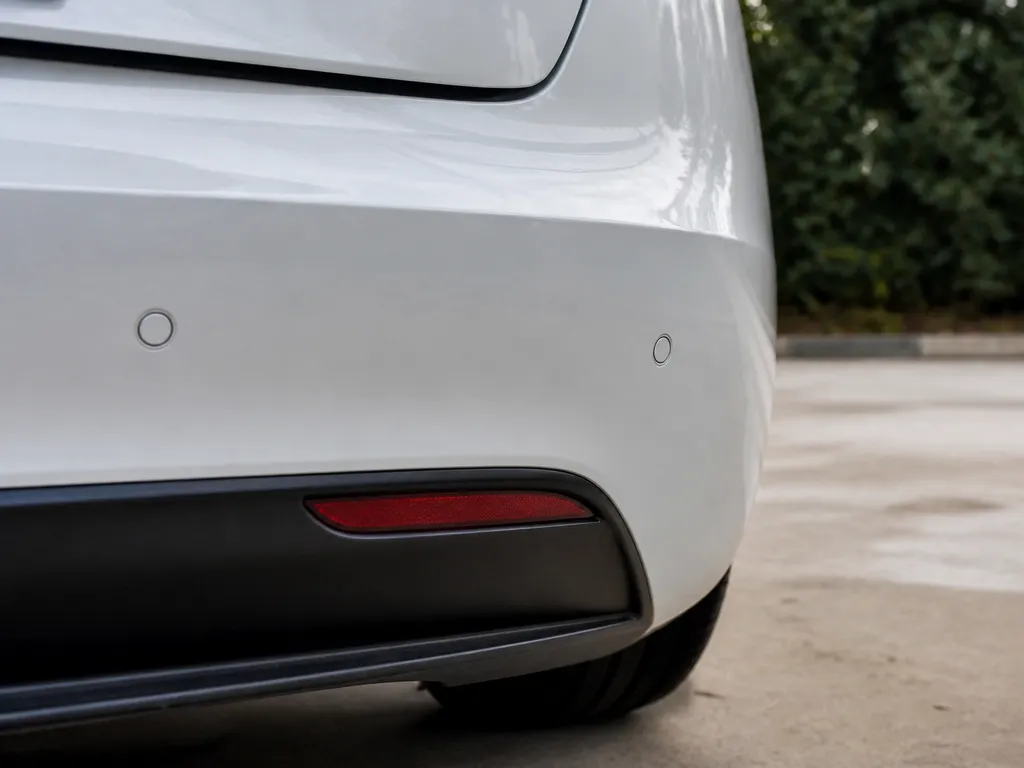
Tesla parking sensors are built into the bumper covers, not the doors, mirrors, fenders, or wheel wells. On models equipped with them, the sensor faces sit low on the front bumper, rear bumper, or both.
The exact appearance varies by model and year. Some sensors look like obvious dark circles, while others appear as subtle ovals that blend into the bumper’s texture and paint. A flashlight can help, especially on a dark-colored car or when the bumper is dirty.
Front and Rear Sensor Locations
Front parking sensors sit low along the front bumper fascia, usually near the lower edge and around the bumper lip area. Rear parking sensors sit in the same general position on the lower rear bumper. In many setups, several sensors are spaced across the bumper rather than grouped in one spot.
Do not assume that a barely visible sensor is missing. Bumper curvature, paint color, surface texture, glare, and dirt can all make the small sensor faces difficult to see. Check the full lower bumper from one corner to the other instead of looking only at the center.
How to Inspect the Bumper for Sensors
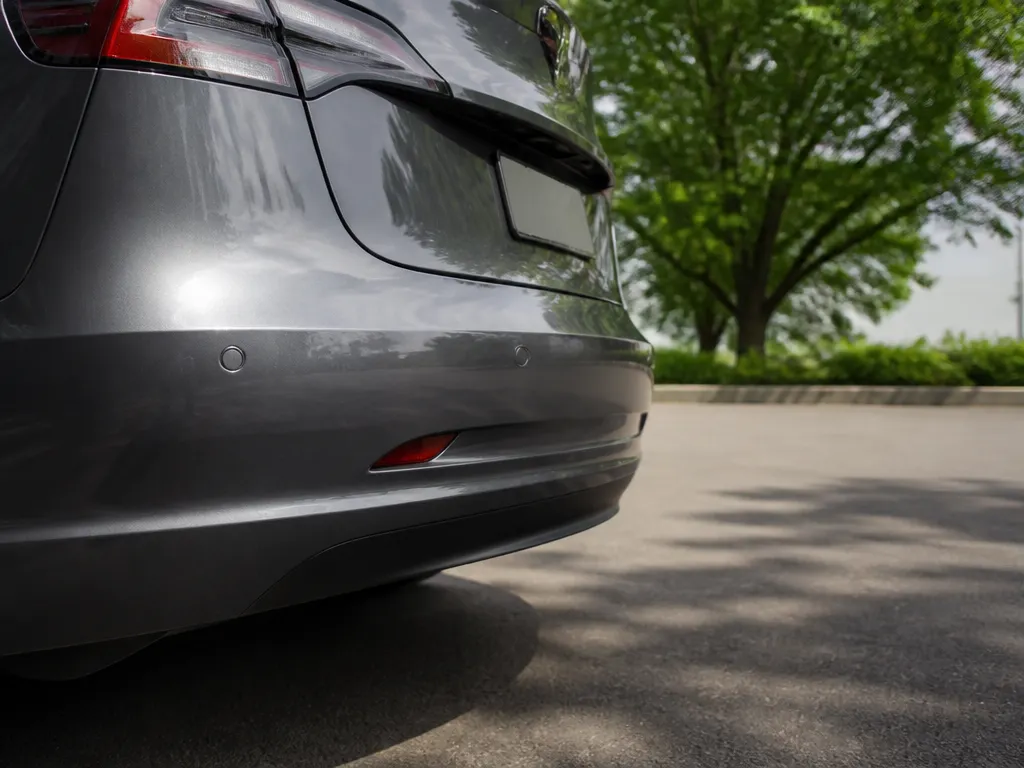
Start with a clean bumper and a flashlight. Dust, mud, road film, and stickers can hide the sensor faces or make them look like ordinary marks in the paint. Move the light across the bumper rather than pointing it straight at the surface, since glare can obscure the edges.
Run your hand lightly along the bumper edge if you still cannot see the lenses. You may feel slight recesses or seam-like borders around the sensor locations, although you should not press hard on the bumper or sensor faces.
Scan from left to right. Many Tesla setups place multiple sensors across the bumper width, so finding only one visible face may mean you have not checked the full fascia.
What Tesla Parking Sensors Help You Detect
Bumper-mounted sensors help judge the distance to nearby obstacles without relying entirely on mirror angles or the backup camera. Their low position is useful for objects in the bumper-height zone, including curbs, parking blocks, concrete edges, trailer hitches, and shopping carts.
They also reduce uncertainty when parking in tight spaces. A car can be centered in a parking space and still scrape a low curb or misjudge the distance to a wall. The sensors provide proximity information while the camera shows the object’s shape and position.
Use both systems together. The camera gives you a wider view and helps with trajectory, while the sensors provide a direct distance cue. Reflections, unusual lighting, and object colors can make camera-based guidance less clear, so sensor feedback can be useful when the conditions are difficult.
Tesla Configurations Without Visible Ultrasonic Sensors
Tesla parking sensors may be installed at the front, rear, or both, depending on the model and configuration. Some Teslas use camera-based parking features with few or no traditional ultrasonic sensor faces visible in the bumper.
That means a lack of visible circles does not automatically prove that parking assistance is missing. Your car may be using different hardware, or the sensor faces may blend into the bumper so closely that they are difficult to spot.
If the car provides no parking guidance and you cannot find any sensor faces, check the exact model and configuration. A Tesla service center or dealer can confirm which hardware your vehicle has.

Helpful pick
MEILICACY 1PC-Radar on the Inside Side Front and Rear Parking Sensor Backup Parking Assist Sensor Pdc Parking Sensor Bumper for 2021-2024 Tesla Model S X Y OEM:2525002-01-D 2525002
For newer Tesla configurations, this radar-style parking sensor helps maintain advanced driver assistance features when factory sensors require a direct replacement.
What to Check After a Bumper Repair
A replacement bumper cover must match the car’s sensor system. If the cover is incompatible, the sensors may be physically present but poorly aligned, or the wiring may not be connected correctly.
After a minor impact, inspect more than the visible cracks. Check whether each sensor face sits centered in its bumper recess and whether any lens looks dull, discolored, loose, or pushed inward. Even a small change in alignment can affect distance readings.
Use this troubleshooting order:
- Clean the bumper faces thoroughly. Dust, mud, and stickers can interfere with sensor operation.
- Look for bumper damage, gaps, or misalignment around the sensor locations.
- Check the car for a “parking assist unavailable” or similar alert.
- Verify that the sensors are mounted correctly and that their wiring is connected before replacing parts.

Helpful pick
1127503-12-C Parking Sensor W/Connector 1127503 Compatible with 2018-2021 Model 3 2016-2021 Model S 2020-2021 Model Y
If your troubleshooting reveals a faulty unit, this replacement parking sensor with connector is a reliable choice for Model 3, S, and Y.
Practical Ways to Locate Tesla Sensors
To find the rear sensors before backing out of a tight driveway, stand behind the car and crouch slightly so you are looking parallel to the rear bumper. Scan the lower edge from the left corner to the right corner. You should see several small sensor faces spaced across the width if the car has rear sensors.
To check for front sensors, do not look under the hood or around the wheel wells. Inspect the lower front bumper fascia, usually above the airflow openings and along the bumper lip, where the sensor faces are embedded.
When buying a used Tesla, inspect the car in person if possible. Sensor lenses can disappear in photos when the car is dark-colored or photographed from an angle. With the car parked, shift into Reverse and watch the parking assist visualization. Then shift out and repeat the check to see whether the system behavior changes.
After a minor front bumper impact, inspect the sensor faces for cracks, discoloration, or misalignment. A bumper can look mostly intact while a sensor has been pushed out of position.

Helpful pick
1127502-01-D Parking Assist Sensor Model 3 2017-2023 Front Rear Bumper
Once you have located your sensors, use this high-quality parking assist sensor to ensure your Tesla maintains accurate obstacle detection performance.
FAQ
How can I tell if my Tesla actually has parking sensors?
If the sensors are active, shifting into Reverse or using parking assist usually triggers on-screen proximity guidance and/or audible alerts. Visually, look for small circular or oval sensor faces along the lower front bumper, rear bumper, or both.
If you see no sensor faces and parking assist guidance never appears, your Tesla may use different hardware or may not have the expected sensor configuration. Check the exact model and configuration for confirmation.
Where exactly are the parking sensors on the front bumper?
Front parking sensors are mounted low in the front bumper cover, typically along the lower fascia edge and spaced across the width. Look for multiple small sensor “eyes” that appear as circles or subtle ovals embedded in the bumper surface.
The exact pattern varies by Tesla model and year, but the consistent location is the lower front bumper area.
Where exactly are the parking sensors on the rear bumper?
Rear parking sensors are mounted in the rear bumper cover along the lower edge. In many setups, you will see more than one sensor face across the left, center, and right zones.
If you cannot spot any, check whether your car uses a camera-based parking approach or whether the bumper trim makes the lenses difficult to see.
Do parking sensors help more than the backup camera?
Parking sensors are better for judging distance at bumper height, especially around low obstacles such as curbs, parking blocks, and shopping carts. The backup camera provides wider context and shows the vehicle’s trajectory, but its perspective can make distance difficult to judge.
Using both gives you the clearest view: the camera shows the object’s shape and position, while the sensors indicate how close it is.
What is the most common mistake when looking for Tesla parking sensors?
The most common mistake is checking the wrong area, such as the fender, wheel well, door, or tailgate, instead of the lower front and rear bumper covers. Another common problem is failing to clean the bumper, since mud and glare can hide the sensor faces.
Start at one lower bumper corner, scan across to the other side, and then confirm activity on the parking assist screen.
Disclosure: As an Amazon Associate, I may earn from qualifying purchases at no extra cost to you. Amazon and the Amazon logo are trademarks of Amazon.com, Inc, or its affiliates.
- Amazon, Amazon Prime, the Amazon logo and Amazon Prime logo are trademarks of Amazon. com, Inc. or its affiliates.
Hi, I am AKM Sad. I’m a car enthusiast and reviewer who loves exploring gadgets and accessories. I share honest reviews and practical tips to help you get the best products and enjoy a safer, smoother ride.