Are you ready to unlock the full potential of your Ford F-150’s Sync system? Pairing your phone with this smart technology not only enhances your driving experience but also keeps you connected, entertained, and safe on the road.
Imagine effortlessly accessing your favorite playlists, making hands-free calls, and receiving important notifications without taking your eyes off the road. Sounds convenient, right? In this guide, you’ll discover simple steps to seamlessly connect your phone to the Ford F-150’s Sync system.
Let’s ensure your ride is as smart as it is powerful, giving you the ultimate driving experience you deserve. Ready to get started? Dive into the details and transform the way you drive today.
Understanding Ford F-150 Sync System
Understanding the Ford F-150 Sync System can transform your driving experience. This system is more than just a tech feature; it’s a gateway to seamless connectivity. If you’ve ever wished for a smoother way to integrate your phone with your truck, the Sync system is your answer.
Features And Capabilities
The Ford F-150 Sync system is packed with features that make driving more convenient and enjoyable. Imagine controlling your music, navigation, and calls with simple voice commands. This system allows you to keep your hands on the wheel and your eyes on the road.
Bluetooth connectivity is a standout feature. You can easily stream your favorite playlists or podcasts without the hassle of cords. The system also supports hands-free calling, which means you can answer calls effortlessly while driving.
Another impressive capability is the integration with various apps. Whether it’s listening to audiobooks or accessing real-time traffic updates, Sync has you covered. It’s like having a personal assistant in your vehicle.
Compatibility Requirements
Before pairing your phone with the Ford F-150 Sync system, ensure compatibility. Not all devices are created equal, and some might not support all features. Check that your phone’s operating system is up to date for optimal performance.
Most smartphones, including iPhones and Android devices, work well with Sync. However, it’s crucial to verify the compatibility list provided by Ford. This step saves you from potential connectivity issues and ensures a smooth pairing process.
Have you ever tried to connect a device only to find it’s not supported? Avoid this frustration by doing a quick compatibility check. It’s a small step that can make a big difference in your Sync experience.
Pairing your phone with the Sync system can enhance your driving experience significantly. Why not take a few minutes to set it up and enjoy the benefits? After all, a connected drive is a smarter drive.
This Article May Help You More: Pair Phone With Ford F-150 SYNC + Top Accessories
Preparing Your Phone
Getting ready to connect your phone with the Ford F-150 Sync system is a simple process, but it requires a few preparatory steps. To ensure a smooth pairing experience, you need to make sure your phone is fully prepared. This involves checking Bluetooth settings and compatibility. You might be surprised how often a small oversight can lead to a big headache when trying to connect devices. Let’s dive into the essentials of preparing your phone.
Ensuring Bluetooth Is Enabled
First things first, your phone’s Bluetooth needs to be turned on. It’s easy to forget this step, especially if you usually have Bluetooth off to save battery life. Swipe down on your phone’s screen to access settings, and ensure the Bluetooth icon is highlighted. If you’re unsure whether it’s enabled, try connecting to another nearby device to test it.
Bluetooth allows your phone to communicate wirelessly with the Ford F-150 Sync system. Without it, pairing is impossible. Think of Bluetooth as the bridge connecting your phone to your car’s system. Have you ever missed a call because your Bluetooth was off? Avoid such surprises by double-checking now.
Checking Phone Compatibility
Not all phones are compatible with every car system, so it’s crucial to verify if your phone can connect to the Ford F-150 Sync. Check your phone’s manual or the manufacturer’s website for compatibility details. If your phone is older, it might not support the latest Bluetooth standards needed for Sync.
Wouldn’t it be frustrating to spend time troubleshooting only to find your phone isn’t compatible? Save yourself the hassle and check first. If you have a relatively new phone, chances are it’s compatible, but it’s always good to be certain.
Preparing your phone is the first step toward a seamless driving experience with your Ford F-150. With Bluetooth enabled and compatibility confirmed, you’re on your way to enjoying hands-free calls and music streaming. Have you prepared your phone yet? If not, take these steps and dive into the world of connected driving.
Read More: Ford F-150 Truck Bed Storage Ideas
Activating Sync On Ford F-150
Activating the Sync system on your Ford F-150 can transform your driving experience, making it easier to stay connected while on the road. Whether you’re streaming music, navigating your routes, or keeping in touch with loved ones, Sync offers a seamless integration between your smartphone and your vehicle. It’s not just about technology; it’s about enhancing your journey. But how do you get started? Let’s dive into the process and see just how simple it can be.
Accessing The Sync Menu
First things first, you need to access the Sync menu on your Ford F-150. Look for the ‘Phone’ button on your dashboard display. Pressing this will lead you directly to the Sync menu. It’s your gateway to a world of connectivity.
Don’t worry if you’re not tech-savvy. The menu is designed to be user-friendly. Once you’re in, you’ll see several options. These include settings for phone pairing, audio streaming, and more.
Have you ever wondered how many features your vehicle can offer? Exploring the Sync menu might surprise you with its capabilities!
Navigating Settings
Once you’re in the Sync menu, it’s time to navigate the settings. Look for the ‘Settings’ option, usually located in the top corner. Click on it to access a list of customizable features.
Here, you’ll find options to pair your phone, adjust audio settings, and even manage your contact list. It’s all about tailoring your driving experience to suit your needs.
Curious about what else you can do? Try experimenting with different settings to find what works best for your lifestyle.
Connecting your phone might seem daunting, but with the Sync system, it’s a breeze. Have you ever struggled with pairing devices? Share your experiences below and let’s learn together.
Sync isn’t just a feature; it’s a tool that keeps you connected, safe, and entertained. Ready to activate it on your Ford F-150?
Pairing your phone with the Ford F-150 Sync is a straightforward process. It enhances your driving experience by integrating your smartphone with your vehicle.
Whether you drive a Ford F-150 or another compatible model, understanding how to connect your phone can be beneficial. This guide will walk you through the essentials of pairing your phone with your Ford vehicle. We’ll also explore some useful phone mounts, ensuring your device is secure while driving.
From magnetic mounts to custom-fit holders, these accessories improve convenience and safety. Regardless of your phone type, these mounts keep it accessible and stable. Learn how to make the most of your Ford F-150’s Sync system and explore options for safely mounting your device.
Easeord Phone Mount

The EASEORD Phone Mount is ideal for Ford F-150 owners from 2015-2020, Expedition drivers from 2018-2021, and Super Duty enthusiasts from 2017-2021. If you’re someone who spends a significant amount of time in your vehicle and needs a reliable solution for mounting your smartphone, this product is designed for you. Whether you’re using an iPhone or an Android device, this mount ensures your phone is securely attached while offering 360-degree rotation for optimal viewing angles.
Pros:
-
Compatible with multiple vehicle models
-
360-degree rotation for flexible viewing
-
Made from durable aluminum
-
Easy to install and use
Cons:
-
Limited compatibility to specific Ford models
-
May require adjustments for larger phones
The EASEORD Phone Mount boasts impressive features that cater to the needs of modern drivers. Its 360-degree rotation capability allows users to seamlessly switch between portrait and landscape orientations, providing flexibility whether you’re navigating or streaming media. The durable aluminum construction ensures that the mount withstands daily use and varying temperatures, making it a long-lasting addition to your vehicle’s interior.
Furthermore, the mount’s easy installation process means you can set it up without any specialized tools, enabling quick adjustments as needed. The vent cell phone holder design keeps your phone securely in place, reducing distractions and maintaining focus on the road. This is particularly beneficial for users who prioritize safety and convenience while driving, enhancing the overall driving experience.
To buy this product, click here.
Rubigrid Metal Dash Mount Phone Holder

The Bulletpoint RubiGrid Metal Dash Mount Phone Holder is designed for drivers of 2015-2020 Ford F-150 and 2017-2022 Super Duty vehicles who value convenience and safety. It is ideal for those who rely on their phones for navigation, music, or hands-free communication while driving, ensuring that their device is securely mounted and easily accessible.
Pros:
-
Durable metal construction for longevity and reliability.
-
Custom compatibility with specific Ford models for a perfect fit.
-
Easy installation with minimal tools required.
-
Adjustable angle for optimal viewing.
Cons:
-
Limited compatibility to specific vehicle models.
-
Higher price point compared to generic phone holders.
The Bulletpoint RubiGrid Metal Dash Mount Phone Holder stands out due to its robust metal construction, which promises durability and strength, essential for withstanding the wear and tear of daily use. Its custom compatibility ensures a seamless fit with Ford F-150 and Super Duty models, providing a secure hold that prevents the phone from shifting or falling during drives. This tailored design means users can enjoy peace of mind knowing their phone is held securely, even on rough terrains.
One of the key features of this phone holder is its adjustable angle, allowing users to position their device for optimal viewing, reducing glare and improving visibility. This is particularly beneficial for drivers who frequently use their phones for navigation and need clear sightlines. Additionally, the easy installation process requires minimal tools, making it accessible for those who may not have technical expertise. However, potential buyers should note its limited compatibility to specific models and weigh the investment against its higher price point compared to generic holders.
To buy this product, click here.
Kaishengyuan Magnetic Vent Phone Mount

The Kaishengyuan Magnetic Vent Phone Mount is perfect for Ford F-150, Super Duty, and Expedition owners looking for a reliable and durable solution to keep their smartphones securely in place while driving. Ideal for those who frequently use their phone for navigation or hands-free calls, this full metal phone holder offers both stability and ease of use.
Pros:
-
Strong magnetic grip ensures phone stays secure.
-
Full metal construction for enhanced durability.
-
Easy installation on compatible Ford models.
-
Universal compatibility with all smartphones.
Cons:
-
Limited compatibility to specific Ford models.
-
Magnetic black color may not match all interiors.
This Kaishengyuan phone mount is crafted with high-quality metal, offering a robust design that withstands everyday use. The magnetic feature provides a strong hold, ensuring your smartphone remains in place regardless of road conditions. Users will appreciate the ease of use, as the mount allows for quick attachment and removal, making it convenient for those on the go.
The vent mount design is tailored for specific Ford models, ensuring a perfect fit that integrates seamlessly with your vehicle’s interior. This custom fit enhances both the aesthetic and functional aspects of your driving experience. Furthermore, the universal compatibility ensures that no matter what smartphone you own, this phone holder can accommodate it, providing peace of mind and versatility.
To buy this product, click here.
Customish Phone Holder For Ford F-150 2009-2014, Lincoln Mark Lt 2010-1014 – Custom Fit In Dash Pocket Phone Mount
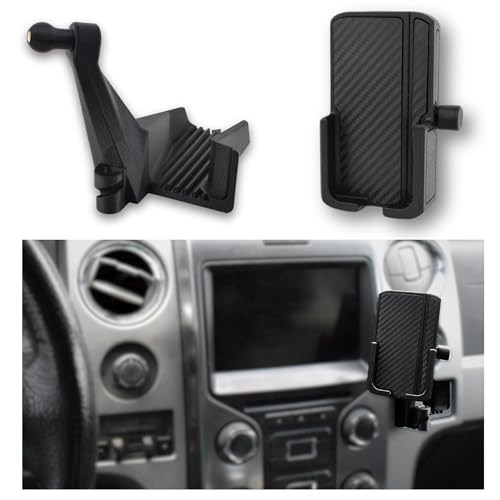
The CUSTOMish Phone Holder is perfect for drivers of Ford F-150 2009-2014 and Lincoln Mark LT 2010-2014 who seek a reliable and stylish solution to keep their phones secure while driving. This product is ideal for those who value a custom fit and want to enhance their driving experience with a seamless phone integration. Whether you frequently use navigation apps, take calls, or enjoy music on the go, this phone holder will cater to your needs, ensuring safety and convenience.
Pros:
-
Custom fit for Ford F-150 and Lincoln Mark LT models, ensuring a perfect integration.
-
Easy installation with no need for additional tools or modifications.
-
Durable construction that withstands daily use and road vibrations.
-
Secure grip that keeps your phone stable even on bumpy roads.
Cons:
-
Limited compatibility to specific vehicle models.
-
Might require some adjustment for larger phone models.
The CUSTOMish Phone Holder features a custom fit design that seamlessly integrates into the dash pocket of your vehicle, providing a stable and convenient location for your phone. This design ensures that your device is always within easy reach, allowing for hands-free operation while driving. The secure grip mechanism ensures that your phone remains in place, reducing distractions and enhancing safety on the road.
Constructed with high-quality materials, this phone holder is built to last, offering durability that can withstand daily wear and tear. Its easy installation process means you can quickly set it up without the need for complicated tools or professional help. This makes it an excellent choice for those looking to upgrade their vehicle’s functionality without the hassle of major modifications.
To buy this product, click here.
Dual Usb Interface Module

The HC3Z-19A387-B Dual USB Interface Module is ideal for Ford and Lincoln vehicle owners looking to upgrade their CarPlay and Sync 3 capabilities. If you drive a Ford F-150, F-250, F-350, F-450, F-550 Super Duty, or a 2017 Lincoln, and you want to enhance your in-car connectivity, this module is perfect for you. It is a great option for those who value seamless integration and reliable performance.
Pros:
-
Easy installation compatible with Ford and Lincoln models.
-
Improves connectivity for CarPlay and Sync 3.
-
Compact design that fits seamlessly into your vehicle’s console.
Cons:
-
Limited compatibility with vehicles outside the specified models.
-
Requires proper setup to ensure full functionality.
The HC3Z-19A387-B Dual USB Interface Module offers enhanced features for users, such as improved connectivity for CarPlay and Sync 3, making it easier to access apps, music, and navigation directly from your car’s interface. The black color and compact dimensions ensure that it integrates smoothly with the vehicle’s dashboard, maintaining the aesthetic integrity of your car’s interior.
With its easy installation process, this module is a user-friendly addition to your vehicle. It eliminates the hassle of complex setups, allowing you to enjoy advanced features without the need for expert assistance. This upgrade is perfect for those who frequently use smartphone apps while driving, offering a safer and more convenient way to stay connected on the road.
To buy this product, click here.
Elohei For Ford F-150 Phone Mount
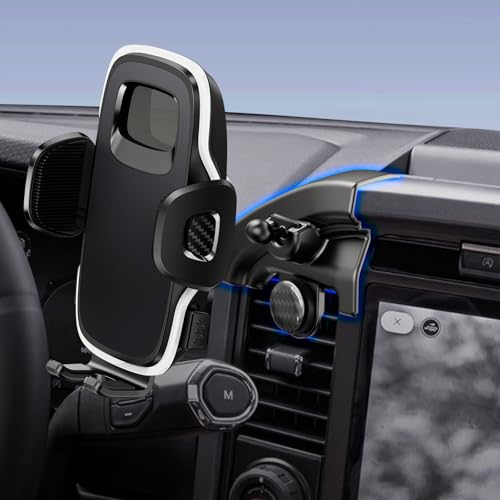
The ELOHEI for Ford F-150 Phone Mount is an ideal accessory for Ford F-150 owners from 2022 to 2025 who are looking for a custom fit phone holder that seamlessly integrates with their vehicle’s interior. This product is perfect for those who value convenience, safety, and style while driving. If you frequently use your smartphone for navigation, hands-free calls, or music streaming, this phone mount will enhance your driving experience without compromising your car’s aesthetics.
Pros:
-
Custom fit for Ford F-150 from 2022 to 2025, ensuring a perfect match with the car’s interior.
-
Sturdy construction provides reliable support for your phone during any drive.
-
Easy installation without the need for additional tools or modifications.
-
Adjustable angles allow for optimal phone positioning and visibility.
Cons:
-
Limited compatibility as it is specifically designed only for newer Ford F-150 models.
-
Color options are limited to black, which may not suit all interior styles.
The ELOHEI for Ford F-150 Phone Mount boasts an innovative design that fits seamlessly into the Ford F-150, making it a standout accessory for your vehicle. Its custom base ensures that the mount remains stable and secure, allowing you to focus on the road without worrying about your phone slipping or getting damaged. This feature is particularly beneficial for those who frequently drive on uneven terrains or make sharp turns, as the phone stays firmly in place.
Users will appreciate the adjustable angles that this phone mount offers, making it easy to find the perfect viewing position for their smartphone. Whether you need to glance at your navigation app, take a quick hands-free call, or change your music playlist, the mount’s flexibility enhances your driving experience. Additionally, the easy installation process means you can set up the mount within minutes, without any professional help or complicated tools, making it a practical choice for busy individuals.
To buy this product, click here.
Swiftgaze Universal Metal Phone Mount

The SwiftGaze Universal Metal Phone Mount is the perfect accessory for Ford F-150 and Ford Raptor owners, particularly those who frequently drive on off-road or bumpy roads. If you are looking for a stable dash mount holder that accommodates both iPhone and Android phones, ensuring your device remains secure during adventurous drives, this is the ideal product for you.
Pros:
-
Universal fit for 2021-2024 Ford F-150 and 2021-2023 Ford Raptor.
-
Made of durable metal construction.
-
Designed for off-road and bumpy road use.
-
Stable mounting for iPhone and Android devices.
Cons:
-
Weight might be on the heavier side at 3.2 pounds.
-
Color option limited to black.
The SwiftGaze Universal Metal Phone Mount boasts an impressive build quality, thanks to its robust metal construction. This ensures that your phone remains securely mounted, even during the most rugged and bumpy road adventures. The mount’s compatibility with both iPhone and Android devices makes it a versatile choice for tech-savvy users who require a reliable and stable dash mount holder.
Additionally, its universal fit caters specifically to owners of recent Ford F-150 and Ford Raptor models, making it an excellent addition for individuals who want to enhance their driving experience. Despite its slightly heavier weight, the security it offers is unmatched, providing peace of mind as you navigate through challenging terrains. The sleek black color complements the interior of these trucks, adding a touch of elegance to your vehicle’s dashboard.
To buy this product, click here.
Pairing Process Step-by-step
Connecting your phone to the Ford F-150 Sync is simple. It enhances your driving experience. Follow the steps below to ensure a smooth pairing. With these clear steps, you’ll be connected in no time.
Initiating Pairing Mode
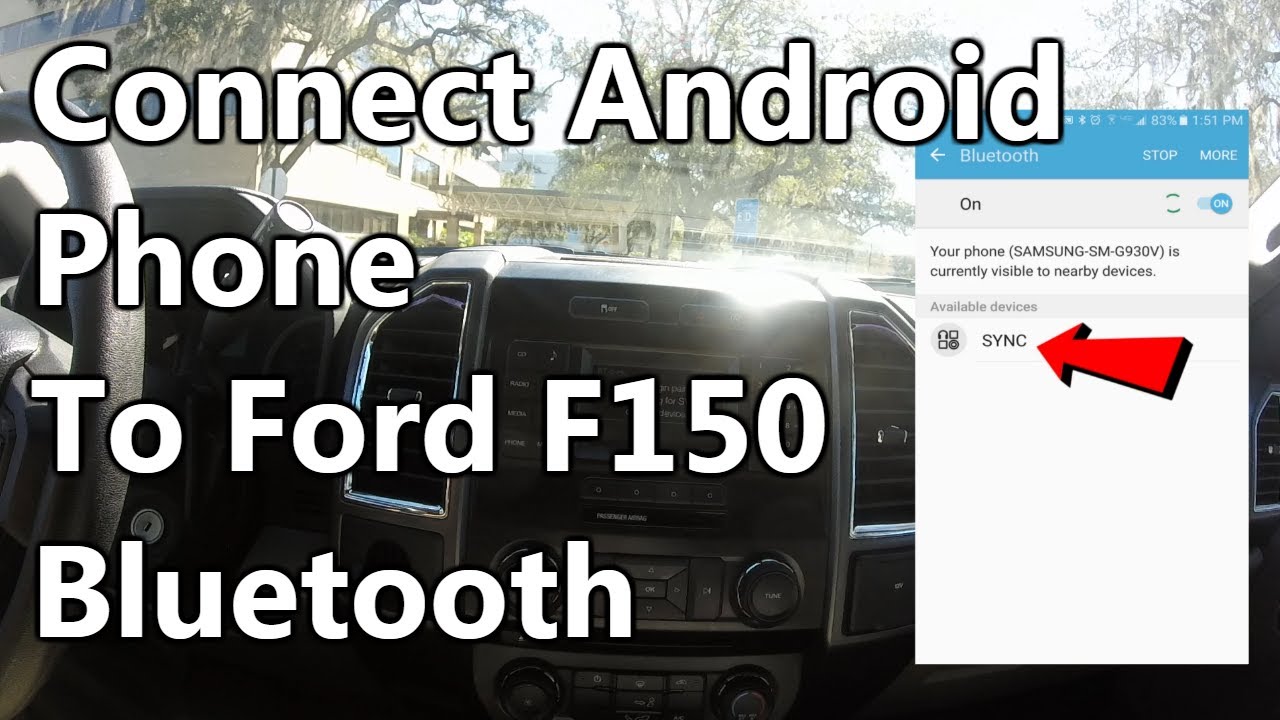
Start by turning on your vehicle. Ensure the Sync system is active. Navigate to the settings menu on your Sync screen. Select the “Bluetooth” option. Then, choose “Add Device” to begin pairing. Your Sync is now ready to connect.
Searching For Devices
Next, pick up your phone. Open the Bluetooth settings. Make sure Bluetooth is turned on. Your phone will start searching for devices. Look for “Sync” in the list of devices. Tap it to start the connection process.
Connecting And Confirmation
After selecting “Sync,” a prompt may appear. It will ask for a PIN. The PIN will display on your Sync screen. Enter this PIN on your phone. Wait for the connection to complete. Once connected, a confirmation message appears. You are now paired successfully with your Ford F-150 Sync.
📱 Struggling to SYNC Your Phone with Ford F-150?
Don’t let faulty cables or weak signals ruin your connection. Upgrade your accessories to pair fast and drive connected!
Whether it’s Bluetooth drops or compatibility issues, the right gear can make pairing smooth and frustration-free. These top-rated accessories are trusted by F-150 drivers.
- ✅ Lightning-fast USB-C & Lightning cables
- ✅ Strong Bluetooth receivers with auto-connect
- ✅ Noise-free AUX adapters for crystal-clear audio
🚘 Smart Sync Accessories on Amazon:
👉 View on Amazon & Buy Now
Fast charging + seamless SYNC pairing with Ford systems.
💡 Pro Tip: Always use high-quality, SYNC-compatible accessories to avoid pairing delays and dropped calls.
Troubleshooting Common Issues
Pairing your phone with the Ford F-150 Sync system can sometimes be tricky. Ensure Bluetooth is enabled on both devices. Follow on-screen prompts for a seamless connection.
Pairing your phone with the Ford F-150 Sync system can be a game-changer in terms of connectivity and convenience. Yet, like any tech process, it might not always go as smoothly as planned. Encountering issues is common, but don’t worry—you can often solve these problems with a few simple steps. Let’s delve into troubleshooting some common issues, so you can enjoy seamless integration between your device and your Ford F-150.
Connection Failures
Connection failures can be frustrating. Imagine being ready to hit the road but your phone refuses to connect. Start by ensuring your Bluetooth is enabled and your phone is discoverable. Restart both your phone and Sync system. This refreshes the connection and often resolves glitches. Check for updates. Sometimes, an outdated software version might be the culprit. Updating your Sync system and phone can solve compatibility issues.
Audio Problems
You’ve connected your phone, but the audio is missing or distorted. Have you ever experienced this? It can be quite annoying when you’re in the mood for your favorite playlist. First, check your volume settings on both the Sync system and your phone. You might find one is muted or set too low. Next, ensure the audio source is set correctly. Sometimes, the system defaults to a different input. Adjusting it to Bluetooth can resolve this. If the problem persists, try re-pairing the devices. This often clears any residual connection issues that affect audio. Have you tried these troubleshooting steps? If yes, what worked for you? Sometimes the simplest solution is the most effective.
Credit: www.youtube.com
Maximizing Sync Features
Easily pair your phone with Ford F-150’s Sync system. Access features like hands-free calling and music streaming. Just follow simple steps for a seamless connection.
Maximizing Sync Features Connecting your phone with the Ford F-150 Sync system opens up a world of possibilities. It’s not just about making calls or playing music—it’s about transforming your driving experience. Imagine having access to your favorite features without lifting a finger. Ford’s Sync is designed to make your life easier, and there’s no better way to experience it than by maximizing its capabilities. Let’s dive into how you can make the most of Sync with hands-free calling, music streaming, and seamless navigation.
Hands-free Calling
Have you ever missed an important call because you were driving? With Sync, you can make and receive calls without taking your eyes off the road. Simply pair your phone and use voice commands to dial numbers or answer calls. It’s like having a personal assistant in your truck. Think about the convenience of staying connected, safely. You can focus on driving while chatting with your friends or handling business calls. Isn’t it time you made your commute more productive?
Music And Media Streaming
Music can turn a dull drive into a joyful journey. Sync lets you stream your favorite tunes directly from your phone. Whether it’s Spotify, Apple Music, or your personal playlist, Sync makes it easy to play what you love. Imagine cruising down the highway, with your favorite song blasting through the speakers. It’s a simple pleasure that can brighten your day. Plus, with voice commands, you can switch between tracks or adjust volume without lifting a finger. What’s your road trip anthem?
Navigation And Apps Integration
Finding your way just got easier. Sync integrates with your phone’s navigation apps, providing turn-by-turn directions on the go. It’s like having a co-pilot who never gets lost. You can also access apps like Google Maps or Waze directly through Sync, making your travel more efficient. Have you ever been stuck in traffic and wished you had a better route?
Sync’s app integration can help you avoid those jams and get to your destination faster. Maximize the Sync features in your Ford F-150 and transform every drive into an experience. What are you waiting for? Connect your phone and discover the power of Sync today!
Frequently Asked Questions
How Do I Sync My Phone To My Ford F-150?
To sync your phone to a Ford F-150, enable Bluetooth on your phone. Access the SYNC menu in your truck’s infotainment system. Select “Add a Device” and choose your phone. Follow on-screen prompts to complete pairing. Ensure Bluetooth is active for automatic connection in the future.
How To Put Ford Sync In Pairing Mode?
Press the “Phone” button on your Ford Sync system. Select “Add a Device” on the display screen. Activate Bluetooth on your phone and search for devices. Choose “Ford Sync” from the list and enter the PIN if prompted. Follow instructions to complete pairing.
Why Is My F150 Not Connecting To My Phone?
Ensure Bluetooth is enabled on both devices. Check compatibility with your F150’s system. Restart both your phone and vehicle. Update software on your phone and vehicle if needed. Verify that your phone is not connected to other devices.
How Do I Get My iPhone To Work With Ford SYNC?
Enable Bluetooth on your iPhone. Pair it with Ford Sync via the vehicle’s settings. Follow on-screen instructions to complete the connection. Ensure your iPhone’s software is up-to-date for optimal compatibility.
Still can’t connect your phone? You might need a Bluetooth adapter for Ford F-150 SYNC to fix pairing issues on older models.
Conclusion
Pairing your phone with Ford F-150 Sync is simple. Follow these steps for a smooth connection. Start by turning on Bluetooth on your phone. Next, select Sync from your Ford’s screen menu. Then, confirm the pairing code on both devices.
Your phone connects instantly. Enjoy hands-free calling and music streaming. Troubleshooting tips are available if needed. Always ensure your Ford software is up to date. Regular updates enhance compatibility and performance. Stay connected and drive safely. Sync technology keeps you focused on the road.
Disclosure: As an Amazon Associate, I may earn from qualifying purchases at no extra cost to you. Amazon and the Amazon logo are trademarks of Amazon.com, Inc, or its affiliates.
- Amazon, Amazon Prime, the Amazon logo and Amazon Prime logo are trademarks of Amazon. com, Inc. or its affiliates.

I am Sadman, the founder of CarSensorHub.com, where I share my passion for cars and technology. I specialize in writing detailed reviews and helpful guides on car gadgets, accessories, safety tools and many more. My mission is to help car owners discover the best products and tips to improve their driving experience and stay safe on the road.