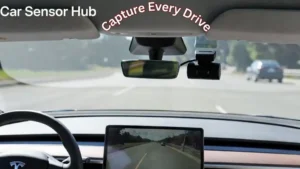
Protect your investment and secure undeniable evidence for every insurance claim. Do Tesla Model S need dash cams even with built-in cameras? Adding dedicated high-resolution recording ensures total coverage where standard systems might fall short.
Whether it’s protecting you from unexpected accidents or capturing important moments on the road, having a dash cam might be more important than you realize. Keep reading to discover why adding this simple device could be a game-changer for your driving experience—and your peace of mind.
Tesla Model S Camera Features
The Tesla Model S comes with advanced camera features. These cameras help improve safety and security. They also assist in driving and parking. Understanding these features helps decide if extra dash cams are needed.
Tesla uses multiple cameras and sensors around the car. This setup supports various functions that keep the driver informed and protected.
Built-in Cameras And Sensors
The Model S has several built-in cameras. They cover front, rear, and side views. These cameras work with sensors to detect obstacles and other vehicles. They help with autopilot and lane keeping. These cameras are always active while driving.
Sentry Mode Capabilities
Sentry Mode uses the cameras to watch the car while parked. It records any suspicious activity nearby. The system alerts the owner via the Tesla app. It captures video clips of incidents around the vehicle. This feature acts like a security guard for the car.
Dash Cam Functionality
The Model S can record driving footage. This dash cam records using the built-in cameras. It saves video automatically when driving or if an accident occurs. Drivers can review recordings to see what happened during events. This feature provides extra safety and evidence on the road.

Credit: www.tesla.com
Benefits Of Using Dash Cams
Using dash cams in a Tesla Model S offers many benefits. These small devices record video footage while driving. They provide valuable proof in various situations. Dash cams help protect you and your car.
Dash cams keep a clear record of events on the road. They capture important details. This can save time and reduce stress during conflicts.
Accident Evidence Collection
Dash cams record accidents from the driver’s viewpoint. Video proof shows what really happened. This helps avoid false claims. Clear evidence speeds up police and insurance reports. It protects your rights after a crash.
Theft And Vandalism Deterrence
Dash cams act as a warning to thieves. Visible cameras make thieves think twice. They reduce chances of break-ins or damage. Video footage can identify suspects. This helps police catch criminals and recover losses.
Insurance Claim Support
Dash cams provide clear proof for insurance claims. They show how accidents occurred. This reduces disputes with insurance companies. Claims process becomes faster and easier. It helps you get fair compensation.
Limitations Of Tesla’s Cameras
Tesla’s built-in cameras offer many safety features. They record the environment around the car. These cameras help with Autopilot and security functions. Yet, they have some important limits. Understanding these limits is key to knowing if dash cams are needed.
Storage And Recording Constraints
Tesla cameras store video on a USB drive. The storage size limits how long videos save. Old footage is overwritten by new recordings. This means you may lose important videos. Recording only happens when driving or when Sentry Mode is active. No continuous recording like some dash cams.
Blind Spots And Coverage Gaps
Tesla cameras cover many angles but not all. Some areas close to the car remain unseen. Cameras may miss objects in blind spots. This can affect accident evidence. Additional dash cams can fill these gaps. They offer wider or different views.
Privacy Concerns
Tesla records video data that may include personal details. Some users worry about who can access this data. Privacy laws vary by region and affect data use. Tesla stores data partly on its servers. This raises questions about data security and sharing. Users should know how their information is handled.
Aftermarket Dash Cam Options
Adding an aftermarket dash cam to a Tesla Model S offers extra security beyond the built-in features. These dash cams record video outside the car, protecting you from accidents or vandalism. Many drivers choose them to cover blind spots or capture incidents on the road.
Aftermarket options vary in features and price. Some provide high-resolution video, night vision, and wide-angle lenses. Choosing the right one depends on your needs and budget.
This Guide May Help You More: Dash Cam for Tesla Model S
Popular External Dash Cams
Several external dash cams work well with Tesla Model S. Models like the Nextbase 622GW and Garmin Dash Cam 67W offer sharp video and easy controls. They record both front and rear views. Some have GPS to log your speed and location.
These dash cams also support loop recording. When the memory is full, they overwrite old footage automatically. This feature ensures continuous recording without manual intervention.
Installation Considerations
Installing an aftermarket dash cam requires some care. Most cameras attach to the windshield with adhesive or suction cups. Make sure they do not block your view while driving.
Powering the dash cam can be done via the 12V outlet or by hardwiring to the fuse box. Hardwiring keeps the camera running even when the car is off. This helps capture events while parked.
Integration With Tesla Systems
Tesla’s built-in cameras and Sentry Mode offer strong security. External dash cams operate separately and do not connect directly to Tesla’s system. This means you manage footage and settings independently.
Some aftermarket cams can complement Tesla’s features. They add extra angles or better video quality. However, syncing footage with Tesla’s data is not possible yet.
Legal And Safety Regulations
Understanding legal and safety rules is key before using dash cams in a Tesla Model S. Laws vary widely by region. Knowing these rules protects drivers from fines and legal trouble. It also helps keep everyone’s privacy safe. Safety regulations ensure dash cams do not distract or block the driver’s view.
Compliance with these laws makes dash cam use responsible and secure. Tesla owners should stay informed about local requirements. This knowledge allows safe use of dash cams while respecting others’ rights.
Dash Cam Usage Laws By Region
Dash cam laws differ from place to place. Some regions require drivers to inform others that recording is happening. Others ban recording in public spaces or certain private areas. In some areas, dash cams must not block the windshield. Some places allow dash cams only for personal use. Others may restrict sharing videos publicly. Tesla owners must check local laws before installing a dash cam. Staying legal avoids penalties and legal problems.
Data Protection And Privacy Rules
Dash cams record personal data, which raises privacy concerns. Data protection laws often require consent before recording people. Storing and sharing dash cam footage must follow strict rules. Unauthorized sharing of videos may lead to legal issues. Some countries require data encryption and secure storage. Tesla owners should handle footage carefully to protect privacy. Respecting these rules builds trust and avoids fines.
Credit: www.blackboxmycar.com
Maximizing Tesla Model S Safety
Maximizing safety in the Tesla Model S involves more than just relying on built-in systems. While Tesla offers advanced safety features, adding a dash cam can enhance your security. It provides extra protection by recording your drive and surroundings. This helps in case of accidents or unexpected events.
Combining Tesla’s technology with a dash cam creates a stronger safety net. It keeps you prepared for situations where extra proof is needed. Let’s explore how to make the most of this combination.
Combining Tesla Features With Dash Cams
Tesla Model S has cameras and sensors for safety and autopilot. These capture data for Tesla’s system use. A dash cam records video continuously from inside and outside the car. This video can help clarify unclear incidents on the road.
Using a dash cam alongside Tesla’s features gives you a fuller view. It records what Tesla’s system might miss or not save. This is useful for insurance claims and legal proof.
Maintenance And Updates
Keeping your Tesla and dash cam updated is key. Tesla regularly releases software updates that improve safety. Dash cams also need updates to fix bugs and add features.
Check both systems often for new updates. Proper maintenance ensures they work well together. Clear your dash cam’s memory card regularly. This avoids missing important footage.
Driver Awareness And Best Practices
Even with tech, driver focus is vital. Watch the road and avoid distractions. Use Tesla’s alerts and warnings seriously. Always drive within speed limits and road rules.
A dash cam cannot prevent accidents but can record them. Stay alert and use all tools to keep safe. A smart driver plus good tech means safer trips.
Read More: Dash Cam Camera for Tesla Model Y

Credit: www.amazon.com
Final Thoughts
Tesla Model S comes with built-in cameras, but dash cams add extra protection. They record accidents and help prove fault quickly. Dash cams also capture unexpected events on the road. They offer peace of mind for many drivers. Installing one is simple and affordable.
For safer driving and clear evidence, dash cams make sense. Choose the option that fits your needs best. Safety first, always.
FAQs Of Do Tesla Model S Need Dash Cams
Do Tesla Model S Have Built-in Dash Cams?
Yes, Tesla Model S comes with built-in dash cams known as TeslaCam. It uses multiple cameras around the car to record footage while driving and parked. This feature helps in capturing incidents without needing additional hardware.
Why Should Tesla Model S Owners Use Dash Cams?
Dash cams provide extra security by recording accidents or vandalism. They offer evidence for insurance claims and legal disputes. Even with TeslaCam, some owners prefer third-party dash cams for enhanced features or backup recording.
Can Tesla Model S Dash Cams Record While Parked?
Yes, Tesla Model S dash cams can record while parked using Sentry Mode. This feature monitors surroundings and saves video if suspicious activity is detected. It helps protect the car from theft or damage when unattended.
How To Enable Dash Cam On Tesla Model S?
Dash cam activation is simple via the car’s touchscreen. Owners must insert a USB drive to save footage. Then, enable TeslaCam or Sentry Mode through settings to start recording automatically.
Disclosure: As an Amazon Associate, I may earn from qualifying purchases at no extra cost to you. Amazon and the Amazon logo are trademarks of Amazon.com, Inc, or its affiliates.
- Amazon, Amazon Prime, the Amazon logo and Amazon Prime logo are trademarks of Amazon. com, Inc. or its affiliates.

I am Sadman, the founder of CarSensorHub.com, where I share my passion for cars and technology. I specialize in writing detailed reviews and helpful guides on car gadgets, accessories, safety tools and many more. My mission is to help car owners discover the best products and tips to improve their driving experience and stay safe on the road.