Choosing between a 4K vs 2K dash cam is mainly about how much detail you want in your driving footage and how much you want to spend on the camera, memory card, and storage. A 4K model records more pixels and gives you more room to crop into distant details. A good 2K model can still produce sharp, useful footage while often costing less and creating smaller files. The right choice depends on your driving habits, the camera sensor, HDR performance, frame rate, and the conditions in which you normally drive.
⚡ Quick Verdict
Choose a 4K dash cam if you regularly drive on highways, want the highest available front-camera detail, or expect to zoom into footage to inspect road signs and possible license plates. Choose a 2K dash cam if you want clear everyday recording, a lower purchase cost, and a sensible balance between image quality and storage use.
Important: 4K does not automatically mean better footage in every situation. Sensor quality, exposure, HDR, bitrate, lens quality, and camera placement all affect the final video.
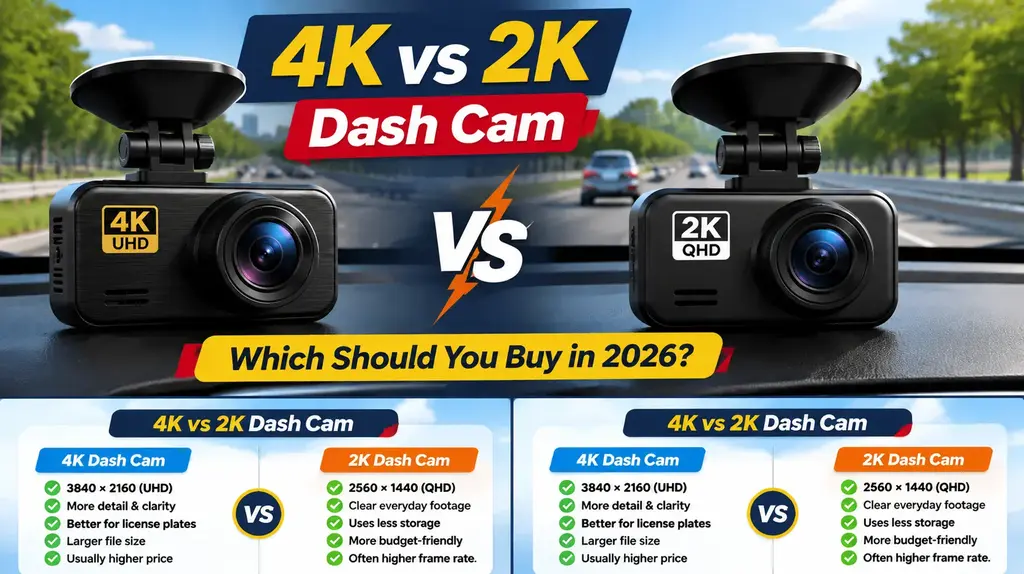
4K vs 2K Dash Cam: What Is the Difference?
Resolution describes how many pixels make up a video frame. More pixels can preserve finer detail, especially when you pause a clip or crop into a section of the image.
In the dash cam market, 4K UHD commonly means 3840 × 2160 pixels. Many consumer dash cams marketed as 2K use QHD resolution at 2560 × 1440 pixels. That means a 4K UHD frame contains about 2.25 times as many pixels as a 2560 × 1440 frame.
That extra detail can help when reviewing a road incident, reading a sign, or examining a vehicle farther ahead. However, it cannot overcome poor lighting, motion blur, glare, a dirty windshield, or weak image processing.
4K Dash Cam: Strengths and Drawbacks
A 4K dash cam is designed to capture a higher level of image detail. It can be useful for drivers who want more flexibility when reviewing footage or cropping into a particular part of the road scene.
✓ Pros
- Higher pixel count and finer recorded detail.
- More flexibility when cropping or zooming into footage.
- Useful for highway driving and evidence review.
- Can offer a more future-ready recording format.
✕ Cons
- Usually costs more than a comparable 2K model.
- Can create larger video files at similar compression settings.
- May require a higher-capacity, high-endurance memory card.
- 4K resolution alone does not guarantee better night footage.
2K Dash Cam: Strengths and Drawbacks
A 2K dash cam offers a useful middle ground between Full HD and 4K. A well-designed model with a capable sensor and HDR can record clear footage for everyday commuting, urban driving, and general road coverage.
✓ Pros
- Sharp video for many everyday driving situations.
- Often more affordable than a similar 4K model.
- Typically uses less storage at comparable recording settings.
- Some models offer higher frame-rate options at 2K.
✕ Cons
- Records less fine detail than a comparable 4K camera.
- Offers less flexibility when cropping distant objects.
- Small or distant number plates may be harder to inspect.
- Budget 2K cameras may use weaker sensors or processing.
4K vs 2K Dash Cam: Side-by-Side Comparison
Use this table as a starting point. Actual performance varies by model and recording mode, so compare the manufacturer’s exact specifications before buying.
| Feature | 4K Dash Cam | 2K Dash Cam |
|---|---|---|
| Typical resolution | 3840 × 2160 (UHD) | 2560 × 1440 (QHD, commonly marketed as 2K) |
| Pixel count | About 8.3 million pixels | About 3.7 million pixels |
| Fine detail | More detail when the sensor, lens, and bitrate are good | Clear detail, but less information for cropping |
| License plate review | More potential detail, especially in suitable light and at useful distances | Can capture plates clearly in favourable conditions; distance and motion matter |
| Night recording | Depends heavily on sensor size, exposure, HDR, and processing | A strong 2K sensor can outperform a weak 4K camera in difficult light |
| File size | Often larger at similar bitrate and compression settings | Often smaller at similar settings |
| Frame-rate options | Many models record 4K at 30 fps; check each model | Some models offer 2K at 60 fps; check channel and mode limits |
| Typical price position | Often higher | Often lower |
| Best for | Drivers prioritising maximum front-camera detail | Drivers prioritising value and strong everyday recording |
Real Product Comparison: VIOFO A229 Pro vs VIOFO A229 Plus
To make the resolution difference easier to understand, compare two real dual-channel models from the same manufacturer. These are specification-based examples, not a claim that we performed a hands-on test.
4K Example: VIOFO A229 Pro 2CH
4K front + 2K rear
The A229 Pro records the front view at 3840 × 2160 and the rear view at 2560 × 1440, both at 30 fps in the listed mode. Its front camera uses a Sony STARVIS 2 IMX678 8MP sensor; the rear uses an IMX675 5MP sensor. HDR is supported on both channels.
- Best fit for buyers who prioritise front-camera detail.
- Front 4K HDR recording at 30 fps.
- Rear 2K HDR recording at 30 fps.
- Up to 512GB microSD support listed by the manufacturer.
2K Example: VIOFO A229 Plus 2CH
2K front + 2K rear
The A229 Plus records both front and rear views at 2560 × 1440. The manufacturer’s listed modes include 2K front at up to 60 fps with 2K rear at 30 fps, as well as 2K at 30 fps on both channels. It uses Sony STARVIS 2 IMX675 5MP sensors front and rear, with HDR on both channels.
- Best fit for buyers who want 2K coverage on both cameras.
- Offers a 2K front 60 fps mode.
- 2K rear recording at 30 fps in the listed mode.
- Up to 512GB microSD support listed by the manufacturer.
Major Factors to Consider Before Buying
🎥
1. Image Sensor and Lens
Do not choose by resolution alone. Check the sensor model, lens aperture, field of view, and independent sample footage. A capable 2K sensor can produce more useful footage than a low-quality camera advertised as 4K.
🌙
2. Night Vision and HDR
Night footage is affected by exposure, shutter speed, sensor size, HDR processing, headlights, street lighting, and reflections. Look for real day and night sample clips rather than relying on a “night vision” label.
💾
3. Storage and Memory Card
Higher resolution can increase storage use, but bitrate, codec, frame rate, and number of active cameras also matter. Buy a high-endurance microSD card that is compatible with the exact dash cam. Check the maximum supported capacity before ordering.
⏱️
4. Frame Rate
Frame rate affects how smoothly motion is captured. A 2K camera that offers 60 fps may be useful for fast-moving scenes, while many 4K models prioritise 30 fps at their highest resolution. Confirm whether a high frame rate disables HDR or changes rear-camera recording.
🚘
5. Front, Rear, and Cabin Coverage
Check whether the advertised resolution applies to the front camera only or to every channel. A “4K dash cam” may record 4K in front and 2K or 1080p at the rear or inside the cabin.
💰
6. Total Cost of Ownership
Compare the camera price alongside a suitable memory card, hardwire kit, optional rear camera, and installation. A lower-priced 2K system may be the better overall purchase if it already includes the coverage and features you need.
Which Should You Buy: 4K or 2K?
Choose a 4K Dash Cam If:
- You want the highest available front-camera resolution.
- You often drive on highways or at higher speeds.
- You want more detail available when cropping footage.
- You are comfortable paying more and managing larger files.
- You have checked that the sensor, HDR, and night footage are also strong.
Choose a 2K Dash Cam If:
- You want sharp footage for everyday commuting.
- You prefer a lower purchase price.
- You want to reduce storage use at comparable recording settings.
- You find a model with a strong sensor, good HDR, and useful night footage.
- You value a higher frame-rate option more than maximum pixel count.
Final Recommendation
For drivers who want maximum front-camera detail and have the budget for a well-designed model, a 4K dash cam is the stronger choice. It provides more pixels for reviewing fine details and cropping into footage. The VIOFO A229 Pro is one example of a dual-channel system that records 4K in front and 2K at the rear.
For most everyday drivers who want a capable front-and-rear setup without paying for 4K, a good 2K dash cam can be the better value. The VIOFO A229 Plus is an example, with 2K recording on both channels and a listed 2K 60 fps front mode.
Whichever you choose, prioritise reliable recording, a suitable high-endurance memory card, clear night footage, and the right camera coverage. Those details matter just as much as the resolution printed on the box.
Summary
- 4K UHD commonly records at 3840 × 2160 pixels.
- Consumer dash cams marketed as 2K commonly record at 2560 × 1440 pixels.
- 4K offers more detail, while 2K can offer better value and lower storage use.
- Sensor quality, HDR, bitrate, exposure, and lens quality affect real-world footage.
- Check the resolution of each camera channel, not just the product name.
- Choose a compatible high-endurance microSD card.
Frequently Asked Questions Of 4K vs 2K Dash Cam
Is a 4K dash cam better than a 2K dash cam?
A 4K dash cam can capture more fine detail and gives you more flexibility when cropping footage. However, a well-made 2K camera can still provide clear, useful recordings. Sensor quality, HDR, lens, exposure, and bitrate also matter.
Is 2K resolution enough for a dash cam?
For many drivers, yes. A good 2K dash cam can record sharp everyday footage. Whether it captures a readable license plate depends on distance, lighting, vehicle speed, angle, focus, and image processing.
Can a 4K dash cam read license plates at night?
It may capture more detail, but 4K alone cannot guarantee readable plates at night. Glare, motion blur, exposure, shutter speed, sensor performance, and HDR can all affect the result. Review real night footage before buying.
Does a 4K dash cam use more storage than a 2K dash cam?
Often, yes, when bitrate and compression settings are comparable. Actual file sizes vary by model, codec, frame rate, bitrate, and whether front and rear cameras record together.
What size microSD card should I get for a 4K dash cam?
Follow the manufacturer’s capacity and speed recommendations. Choose a high-endurance card designed for continuous recording, and consider a larger capacity if you use high-bitrate 4K, multiple cameras, or parking mode.
Is 2K at 60 fps better than 4K at 30 fps?
It depends on your priority. 2K at 60 fps captures motion more smoothly, while 4K at 30 fps records more spatial detail per frame. Check whether the camera changes HDR or rear-camera settings when you select a different mode.
Should I buy a front-only 4K dash cam or a dual-channel 2K dash cam?
If rear incidents are a concern, rear coverage may be more useful than higher front resolution alone. Compare the complete system: front and rear resolution, night quality, parking mode, and total cost.
Disclosure: As an Amazon Associate, I may earn from qualifying purchases at no extra cost to you. Amazon and the Amazon logo are trademarks of Amazon.com, Inc, or its affiliates.
- Amazon, Amazon Prime, the Amazon logo and Amazon Prime logo are trademarks of Amazon. com, Inc. or its affiliates.

Hi, I am AKM Sad. I’m a car enthusiast and reviewer who loves exploring gadgets and accessories. I share honest reviews and practical tips to help you get the best products and enjoy a safer, smoother ride.


