If your Ford F-150 feels sluggish or burns more gas than usual, the problem might be a dirty MAF sensor. The Mass Air Flow (MAF) sensor measures air entering the engine. When it gets dirty, your truck can hesitate, stall, or use extra fuel. Cleaning the MAF sensor is simple, but you must do it carefully to avoid damage. This guide shows you the right steps, tips, and answers to common questions, so you can restore your truck’s performance without a trip to the mechanic.
Why Cleaning The Ford F-150 Maf Sensor Matters
The MAF sensor controls your engine’s air-fuel ratio. If it’s dirty, your F-150 may:
- Idle rough
- Lose power
- Have trouble starting
- Use more fuel
Studies show a dirty MAF sensor can increase fuel consumption by up to 10%. That means you could spend more money at the pump without realizing why. Sometimes, you might even see the Check Engine light on your dashboard, which can make you worry about expensive repairs. A dirty sensor also means your engine computer can’t adjust fuel flow properly, which can lead to even more problems over time, such as spark plug fouling or damage to the catalytic converter.
Regular cleaning helps keep your truck running smoothly and saves money on gas. By keeping the MAF sensor clean, you also help the engine stay within emission limits, which is important for passing inspection and protecting the environment.
Signs Your Maf Sensor Needs Cleaning
Watch for these symptoms:
- Engine stalling or hesitation
- Poor acceleration
- Higher fuel use
- Check Engine light
- Rough idle
- Trouble starting
If you notice these, it’s time to clean the sensor.
Some drivers also report “surging” at highway speeds, where the engine feels like it’s losing and regaining power. Another sign can be a sudden drop in miles per gallon, even if your driving habits stay the same. If your truck fails an emissions test, a dirty MAF sensor could be the reason.
Always check for other issues too, but cleaning the MAF sensor is a smart first step if you see these problems.
Credit: www.f150online.com
Tools And Materials Needed
Before you start, gather:
- MAF sensor cleaner (do not use regular carburetor or brake cleaner)
- Safety gloves
- Torx screwdriver or socket set (usually T20)
- Clean rag or paper towels
- Safety glasses
Never use soap, water, or compressed air on the sensor.
It’s important to use only MAF sensor cleaner because it’s designed not to leave residue. Some people try to save money by using other cleaners, but this can ruin the sensor and cost much more in repairs. Keeping a clean work area and having everything ready before you start will help you finish the job faster and reduce mistakes.
Preparing To Clean The Maf Sensor
Take these steps before cleaning:
- Turn off the engine and let it cool.
- Disconnect the battery to prevent short circuits.
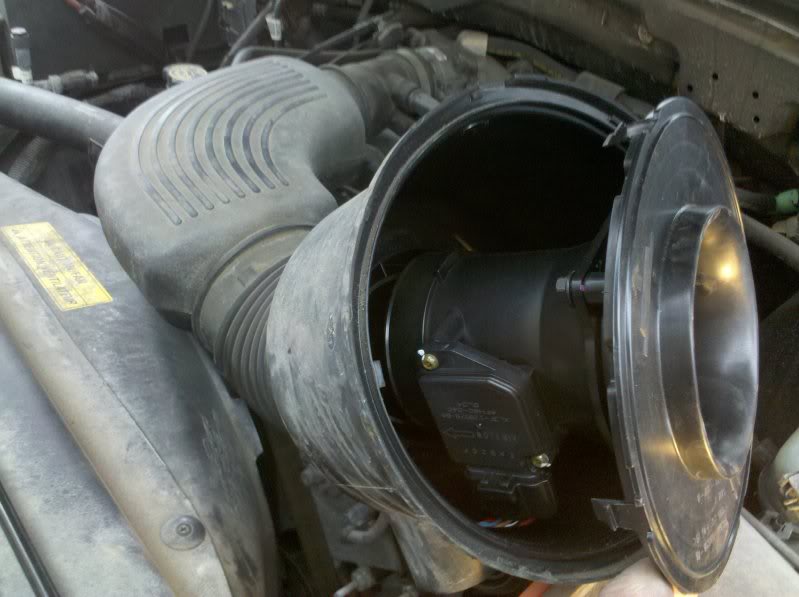
- Find the MAF sensor (usually between the air filter box and the throttle body).
Check your owner’s manual if unsure.
Some F-150 models may have covers or extra air hoses that you need to remove first. Make sure the engine is cool to avoid burns, especially if you’ve driven recently. If you’re not sure where the MAF sensor is, look for a small plug with wires connected to a tube near the air filter.
Taking a photo before removing anything can help you remember how to put it back together.
Step-by-step Cleaning Process
1. Remove The Maf Sensor
- Use the Torx screwdriver to loosen screws.
- Gently pull the sensor out.
- Handle only the plastic housing; avoid touching the wires.
Some sensors have clips instead of screws. Press the release tab carefully to avoid breaking it. If the sensor is stuck, wiggle it gently—never force it out. The sensor is sensitive to shock, so work slowly and don’t drop it.
2. Inspect The Sensor
Look for dust, oil, or grime. If it’s very dirty, cleaning will help.
Sometimes you may see a thin layer of oil or even tiny debris stuck to the sensor’s wire. If you notice black soot, this could be a sign of a failing air filter or oil from an aftermarket filter. Take note of any unusual smells, which could mean contamination from fuel vapors or oil leaks.
3. Spray The Maf Sensor Cleaner
- Hold the sensor over a towel.
- Spray MAF cleaner on the wires and sensor parts.
- Use short bursts; do not soak it.
- Avoid touching the wires—they are fragile.
Spray from different angles to reach all sensor surfaces. Use the spray’s straw if included, but don’t get too close. Usually, 10–15 short sprays are enough. The goal is to remove all visible dirt without flooding the sensor.
4. Let The Sensor Dry
- Wait at least 15 minutes.
- The cleaner evaporates quickly.
- Never use compressed air or wipe the wires.
Leaving the sensor to air dry is important. If you’re in a humid area, give it a few extra minutes. Don’t try to speed up drying with heat or fans—this could damage the electronics inside.
5. Reinstall The Sensor
- Place the sensor back in its slot.
- Secure with screws.
- Reconnect the electrical plug.
Make sure the sensor is seated the same way it was before. Tighten screws just enough—over-tightening can crack the plastic. Double-check the wiring harness is secure; a loose connection can cause error codes.
6. Reconnect The Battery
- Tighten the battery terminals.
- Start the engine.
If the engine runs smoothly, your cleaning worked.
After starting, let the engine idle for a few minutes. Sometimes the computer needs to adjust to the clean sensor. If you had a Check Engine light, it might clear itself after a few drive cycles.
Practical Tips For Success
- Clean the sensor every 12,000–15,000 miles or at every air filter change.
- Avoid using harsh chemicals; only use MAF sensor cleaner.
- Handle the sensor gently—damaged wires mean costly repairs.
- If you see oil on the sensor, check for leaks or a faulty air filter.
Many owners overlook regular sensor cleaning. It’s an easy way to save money and keep your F-150 running its best.
Another tip: If you drive off-road or in dusty conditions, check the sensor more often. Keeping records of when you clean the sensor helps spot patterns if problems return. If you use reusable air filters that require oiling, use as little oil as possible and let it dry completely before installing—extra oil can quickly foul the MAF sensor.
Common Mistakes To Avoid
- Using the wrong cleaner: Carburetor or brake cleaner can ruin the sensor.
- Touching the wires: The sensor wires are very thin and break easily.
- Reinstalling while wet: Always let the sensor dry completely.
- Skipping the battery disconnect: This can cause electrical issues.
- Cleaning too often: Over-cleaning can wear out the sensor; follow recommended intervals.
Other mistakes include forgetting to reconnect hoses or plugs, and dropping screws into the engine bay. Place small parts in a cup or tray so you don’t lose them. Always double-check your work before starting the engine.
Data: How Cleaning Affects Performance
Here’s a comparison of engine performance before and after cleaning:
| Condition | Fuel Economy (mpg) | Idle Smoothness | Acceleration |
|---|---|---|---|
| Before Cleaning | 14 | Rough | Sluggish |
| After Cleaning | 16 | Smooth | Responsive |
A clean MAF sensor can improve gas mileage by 2–3 mpg and restore smooth performance.
In some cases, acceleration improves enough that drivers notice the difference immediately, especially when merging onto highways or towing. Idle stability can also improve, making stop-and-go traffic less stressful.

Credit: www.youtube.com
Example: Ford F-150 Owner’s Experience
Jake owns a 2016 F-150. After noticing rough idling and poor acceleration, he cleaned the MAF sensor. His fuel economy improved from 13. 5 to 16 mpg. He said, “The engine is smooth again, and it starts right up. Cleaning the MAF was faster than I thought.
Many owners report similar results. It’s a simple fix that makes a big difference.
Another owner, Maria, drives her F-150 in dusty rural areas. She cleans her MAF sensor every 10,000 miles and says, “It’s amazing how much better my truck runs. Whenever I forget, I start to notice hesitation and worse mileage. Cleaning the sensor is now part of my regular maintenance.
How Often Should You Clean The Maf Sensor?
Most experts recommend cleaning every 12,000–15,000 miles. If you drive in dusty areas, clean it more often. If you use aftermarket air filters, check the sensor frequently.
If you tow heavy loads or drive in city traffic often, more frequent checks can help. Always clean the sensor if you see a sudden drop in performance, even if you haven’t reached the mileage interval.
Comparison: Professional Vs. Diy Cleaning
| Method | Cost | Time Required | Skill Level |
|---|---|---|---|
| Professional Service | $50–$100 | 1 hour | None |
| DIY Cleaning | $10–$20 | 20–30 minutes | Basic |
DIY saves money and is easy if you follow the steps carefully.
Professionals may check other parts during service, but if you’re comfortable with basic tools, doing it yourself is faster and more cost-effective. Plus, you learn more about your truck.
What To Do If Cleaning Doesn’t Help
If your F-150 still runs poorly after cleaning:
- Check for vacuum leaks
- Inspect the air filter
- Scan for error codes with an OBD-II tool
- Replace the MAF sensor if it’s faulty
Sometimes, cleaning isn’t enough if the sensor is damaged.
A cracked intake hose or clogged air filter can cause similar symptoms. If you see error codes like P0101 or P0102, these often point to MAF sensor problems, but always inspect related parts before buying a new sensor.
Extra Insights Beginners Often Miss
- Air filter quality matters: Cheap or damaged filters let dirt reach the MAF sensor faster.
- MAF sensor location varies: Some F-150 models place the sensor in different spots—always check your manual.
- Never use compressed air: Even low pressure can break the sensor wires.
- Resetting the ECU: After cleaning, disconnect the battery for 10 minutes to help the ECU relearn air flow values.
These tips can save time and prevent mistakes.
Another thing to remember: If your Check Engine light stays on after cleaning, drive for a few days. The computer may need time to adjust. If the light remains, consider getting a diagnostic scan.
Safety Precautions
- Wear gloves and safety glasses
- Work in a ventilated area
- Keep MAF cleaner away from skin and eyes
- Dispose of used towels safely
Take your time and keep all cleaners away from open flames, as many sprays are flammable. Store tools and chemicals out of reach of children.
Environmental Impact
MAF sensor cleaner is a chemical. Always dispose of used rags and empty cans according to local rules. Keeping your sensor clean also reduces emissions—helping the environment.
By keeping your engine running efficiently, you burn less fuel and pollute less. Small maintenance steps like this add up to a bigger environmental benefit over time.
Where To Buy Maf Sensor Cleaner
You can find MAF sensor cleaner at auto parts stores, online shops, or dealerships. Always buy products labeled for MAF sensors.
Some popular brands include CRC and Gunk. If you’re not sure, ask a store employee for help or check your owner’s manual for recommended products.
For more technical details about MAF sensors, visit Wikipedia.
Frequently Asked Questions on How to Clean Ford F-150 MAF Sensor
How Often Should I Clean The Maf Sensor In My Ford F-150?
Clean it every 12,000–15,000 miles or when you change the air filter. If you drive in dusty areas, clean more often.
Can I Use Regular Cleaner Instead Of Maf Sensor Cleaner?
No. Only use MAF sensor cleaner. Regular cleaners can damage the sensor and cause engine problems.
What Happens If I Touch The Maf Sensor Wires?
Touching the wires can break them. If damaged, the sensor won’t work and you’ll need a replacement.
Is It Safe To Drive With A Dirty Maf Sensor?
It’s not recommended. A dirty sensor causes poor performance, higher fuel use, and can damage other engine parts over time.
How Do I Know If The Maf Sensor Is Faulty And Not Just Dirty?
If cleaning doesn’t improve performance, scan for error codes. If codes point to the sensor, or if symptoms persist, you may need to replace it.
Cleaning your Ford F-150’s MAF sensor is a quick, cost-effective way to keep your truck running strong. Most owners see better performance and lower fuel costs right away. By following these steps, you’ll avoid common mistakes and protect your engine for years to come.
Disclosure: As an Amazon Associate, I may earn from qualifying purchases at no extra cost to you. Amazon and the Amazon logo are trademarks of Amazon.com, Inc, or its affiliates.
- Amazon, Amazon Prime, the Amazon logo and Amazon Prime logo are trademarks of Amazon. com, Inc. or its affiliates.

I am Sadman, the founder of CarSensorHub.com, where I share my passion for cars and technology. I specialize in writing detailed reviews and helpful guides on car gadgets, accessories, safety tools and many more. My mission is to help car owners discover the best products and tips to improve their driving experience and stay safe on the road.