There’s no single best wireless CarPlay adapter for Toyota Corolla because every car has a different system inside. The right choice depends on your model year, screen hardware, and whether you need Android Auto too. If you drive a 2020 or newer model, the Lugzix Corolla 2020-2023 offers fast speeds, while 2014-2019 owners often choose the autoabc Toyota Entune Kit or NAVIVOX Touch2 Decoder.
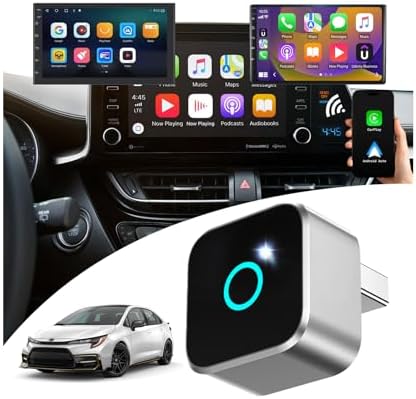
- Fits 2020-2023 Corolla with wired CarPlay
- Designed for Entune 3.0 Infotainment System
- 0.8in size weighs 0.32oz aluminum alloy
- Uses 5GHz WiFi 6 and Bluetooth 5.4

- Fits Toyota Corolla 2020 2021 2022 2023 2024
- Supports navigation music Siri calls messages
- Converts wired CarPlay to wireless instantly
- Uses Bluetooth 5.0 chip for auto-reconnect

- Some models limit input to 480P pixel
- Fits Toyota 2014-2019 with Touch 2
- Adds wireless CarPlay and Android Auto
- Supports original knob and steering controls
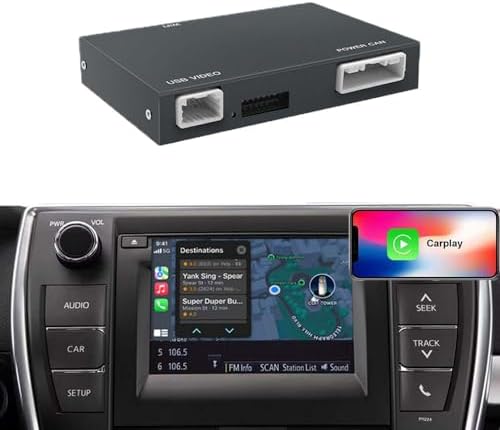
- Fits Toyota 2014-2019 with Touch2 systems
- Supports wireless CarPlay Android Auto Mirrorlink
- Works with original knob and steering buttons
- Not compatible with 360-degree camera systems

- Fits Toyota 2014-2019 with Touch2 Entune2.0
- Compatible with Highlander RAV4 Tundra Tacoma
- Connects phone wirelessly for CarPlay functions
- Supports steering wheel button and knob control

- Supports Corolla Tacoma Camry Avalon Prius
- Adds wireless CarPlay Android Auto Mirror Link
- Retains original console and steering controls
- Plug and play non-destructive installation

- Supports wireless and wired CarPlay modes
- Offers Bluetooth audio and AUX output
- Plays video files directly from USB drive
- Features latest Toyota-style UI design
1. Lugzix Corolla 2020-2023
Best for: Drivers with 2020-2023 Corollas wanting faster wireless speeds.
This adapter targets owners of newer Corolla models equipped with the Entune 3.0 Infotainment System. It uses WiFi 6 technology to create a wide channel that reduces interference from other devices in your car. The listing states it connects two phones at once, remembering both so you can switch between work and personal devices quickly.
The small aluminum body fits easily into the USB port without blocking nearby buttons or slots. It supports all your original controls like steering wheel buttons and voice commands through Siri or Google. Good if: you share the car with a partner who also needs wireless access, you hate tangled cables on your dashboard, or you want the latest WiFi standards for stability. Skip it if: your Corolla was made before 2020, your car lacks factory wired CarPlay, or you need to add CarPlay to a screen that never had it.
2. MZYLW Car Wireless CarPlay Adapter
Best for: Owners of 2024 Corollas needing simple plug-and-play setup.
This device covers a slightly wider range of years, including the 2024 model, for those who just bought a new car. It relies on Bluetooth 5.0 to pair your phone once and then reconnect automatically every time you start driving. The design is very compact and lightweight, taking up almost no space in your center console area. It maintains a stable connection for navigation and music without interrupting your audio stream while you drive.
You must ensure your vehicle has factory-wired CarPlay before buying, as this unit converts that existing feature to wireless. Good if: you own a 2024 Corolla, you prefer a black mini USB design that hides easily, or you want instant auto-reconnect without waiting. Skip it if: your car doesn’t come with wired CarPlay from the factory or you need to support multiple phones at the same time.
3. autoabc Toyota Entune Kit
Best for: Adding wireless features to 2014-2019 Corollas with older screens.
This kit serves drivers with older Toyota models featuring Touch 2 and Entune 2.0 systems that lack modern smartphone integration. It adds full CarPlay and Android Auto functionality to these vehicles, allowing access to maps, contacts, and music via voice control. The listing notes that some older car models only support 480P pixel input, so the picture might not look as sharp as newer OEM systems. It keeps your original knob and steering wheel controls working while adding these new smart features to your dash.
You can’t use this with certain specific units like the Fujitsu 7-inch display found in some Corollas or the large 11.6-inch screens in Prius models. It also supports mirror projection for iPhone, letting you watch videos from apps like Netflix or YouTube on your car screen. Good if: you drive a 2014-2019 Corolla without built-in smartphone mirroring, you want to watch videos via mirror projection, or you need to upgrade an older Entune 2.0 system. Skip it if: your car has a Fujitsu 7-inch display, you own a Lexus, or you expect high-definition clarity on an older low-resolution screen.
4. NAVIVOX Touch2 Decoder
Best for: Users wanting Mirrorlink and resolution adjustments on older Toyotas.
This decoder box fits Toyota vehicles from 2014 to 2019 with Touch2 and Entune2.0 systems, acting as a bridge for modern phone features. It supports wireless CarPlay, Android Auto, and Mirrorlink to link your phone fully with the car interface. The device allows you to adjust the screen resolution in the settings menu if the image looks offset or obscured on your display. It retains all original functions like voice control and real-time navigation while adding new connectivity options.
Installation requires checking that your WiFi antenna doesn’t touch the metal casing, which could demagnetize it and break the Bluetooth connection. This unit doesn’t improve the physical hardware limit of your original screen resolution but helps optimize what is there. Good if: you need to adjust screen resolution settings for a better fit, you require Mirrorlink support alongside CarPlay, or you have a 2014-2019 Toyota without a 360-degree camera. Skip it if: your car has a 360-degree camera system, you own a Pioneer host 4Runner, or you can’t manage the WiFi antenna placement carefully.
5. Carultra Wireless Carplay Android Auto Adapter
Best for: Drivers needing a complete kit with external WiFi antenna.
This adapter is designed specifically for Toyota models between 2014 and 2019 with Touch2 and Entune2.0 systems. It enables wireless connection for both CarPlay and Android Auto, giving you access to navigation and music through Siri or Google Assistant. The package includes a separate WiFi antenna, a USB line, and a power cord, ensuring you have all parts needed for installation. It supports your original steering wheel buttons and knob controls so you don’t lose any familiar driving habits.
You must verify your car model carefully because it doesn’t work with the Fujitsu 7-inch display or Pioneer hosts in some 4Runners. The inclusion of an external antenna may help maintain a stronger signal compared to units with internal antennas only. Good if: you want a kit that comes with a dedicated external WiFi antenna, you drive a 2014-2019 Tundra or Sienna, or you need dual-system support for Apple and Android. Skip it if: your Corolla has the Fujitsu 7-inch screen, you prefer a single tiny dongle without extra wires, or your car is newer than 2019.
6. Wireless Carplay Android Auto Adapter for Toyota with Entune2.0 2014-2019
Best for: Broad compatibility across many Toyota models and sizes.
This unit supports a wide list of Toyota vehicles including Corolla, Tacoma, Camry, and Land Cruiser from the 2014-2019 era. It adds wireless CarPlay and Android Auto while keeping the original Toyota system display and feel on your dashboard. The unit measures 5.03 inches long, so you should verify it fits your available console space. It offers plug-and-play installation that doesn’t require breaking any existing wires in your vehicle.
The adapter also supports Mirror Link and USB flash drive playback, expanding your entertainment options beyond just phone mirroring. It retains all original console functions so your climate controls and radio buttons keep working as usual. Good if: you drive a Land Cruiser or less common Toyota model, you need USB flash drive video playback, or you want a retrofit that feels like an OEM part. Skip it if: you have very limited space for a larger 5-inch box, your car is a 2020 model or newer, or you don’t need Mirror Link features.
7. AMGSTARTMG Toyota Dongle
Best for: Audiophiles wanting dual audio channels and USB video playback.
This dongle supports both wireless and wired connections, giving you the flexibility to choose the most stable method for your trip. It features dual-mode audio channels with Bluetooth audio and AUX output options. You can play video files directly from a USB drive, making it useful for passengers who want entertainment during long waits. The interface design follows a Toyota-style layout for a cohesive user experience.
Where These Overlap
Many of these adapters serve the exact same group of older Toyota owners, making the choice depend on small details rather than big differences. The autoabc Toyota Entune Kit, NAVIVOX Touch2 Decoder, carultra Entune Adapter, LEXXSON Toyota Adapter, and AMGSTARTMG Toyota Dongle all target the 2014-2019 Entune 2.0 market. They all claim to keep your original steering wheel controls and add wireless smartphone mirroring to cars that didn’t have it before. If your car fits this age range and lacks the excluded Fujitsu or Pioneer screens, any of these five could technically work for you.
The real decision comes down to specific needs like screen resolution adjustment, external antennas, or video playback from USB drives. For example, if you need to fix a blurry image, the NAVIVOX Touch2 Decoder offers settings that others don’t mention. If you want to play movies from a thumb drive, the AMGSTARTMG Toyota Dongle and LEXXSON Toyota Adapter list that feature clearly. Newer Corolla owners have fewer options, with the Lugzix Corolla 2020-2023 and MZYLW Corolla 2020-2024 being the primary choices for 2020 and later models. These two differ mainly in WiFi generation and the ability to remember multiple devices versus simple single-phone pairing.
Still Not Sure?
Will my older screen show clear images?
If you drive a 2014-2019 Corolla, adding new features may look less sharp on your old display due to a 480P pixel limit. The autoabc Toyota Entune Kit warns buyers about this limit upfront so you know what to expect. However, the NAVIVOX Touch2 Decoder lets you adjust resolution settings to fix offset or obscured images on your specific screen.
Do I need an external antenna for better signal?
Wireless connections inside a metal car can sometimes suffer from interference, leading to dropped calls or laggy maps. Most small dongles hide their antennas inside the plastic case, which might not be enough for every vehicle layout. The carultra Entune Adapter comes with a separate WiFi antenna and cable to place in a better spot for reception. Pick the carultra Entune Adapter if you want the security of an external antenna for a stronger link.
Can I watch videos from a USB stick?
Some drivers want more than just phone mirroring and wish to play media files directly from a storage device. Standard wireless adapters usually only handle phone data and don’t read external drives on their own. Both the LEXXSON Toyota Adapter and AMGSTARTMG Toyota Dongle state they support USB video playback for passenger entertainment. This feature allows you to play video files directly from a USB drive. Go with the AMGSTARTMG Toyota Dongle if you prioritize USB video playback along with high-quality audio options.
Choosing the right wireless CarPlay adapter for Toyota Corolla depends entirely on matching your car’s year and screen type to the product’s limits. Drivers with 2020-2023 models should look at the Lugzix Corolla 2020-2023 for its speed and memory that stores multiple devices. Owners of 2014-2019 vehicles with Entune 2.0 systems have several valid paths, such as the NAVIVOX Touch2 Decoder for screen tweaks or the AMGSTARTMG Toyota Dongle for media flexibility. Check your specific infotainment hardware against the exclusion lists before ordering to ensure a perfect fit. Visit the product page today to confirm your model compatibility and see the current details.
Frequently Asked Questions
Does this work with my 2018 Corolla Fujitsu screen?
Most adapters for older Toyotas explicitly exclude the Fujitsu 7-inch display found in some 2014-2019 Corolla models. The autoabc Toyota Entune Kit, carultra Entune Adapter, and AMGSTARTMG Toyota Dongle all list this specific unit as incompatible. You must confirm your head unit type before buying to avoid purchasing a non-working device.
How do I fix blurry text on my old Toyota screen?
Some older Entune 2.0 systems support only 480P pixel input, which may affect image clarity. While most adapters can’t change the physical pixels of your screen, the NAVIVOX Touch2 Decoder offers a software solution. It allows you to enter the AUTO AC Setting menu and select the correct resolution option for your actual car display. Select the NAVIVOX Touch2 Decoder if you need manual control over display scaling to improve readability.
Can I use Android Auto and CarPlay at the same time?
No single adapter runs both systems simultaneously for two users at the exact same moment. However, the Lugzix Corolla 2020-2023 remembers a pair of devices and lets you switch between them quickly upon entry. Choose this model if your household mixes iPhone and Android users, as it supports quick switching between protocols.
Will I lose my steering wheel volume controls?
One of the main goals of these retrofit kits is to keep your original car functions intact while adding new smarts. Every product listed here claims to support original knob and button controls for volume, tracks, and calls. These adapters are designed to layer new features over the old ones without replacing the entire dashboard computer.
Conclusion
Don’t let your search end here; take a moment to check your specific dashboard model before buying. You’ll want to confirm compatibility so you don’t waste money on the wrong gear. Once you’ve picked the right adapter, installing it is quick, and you’ll be enjoying wireless freedom in no time.
Disclosure: As an Amazon Associate, I may earn from qualifying purchases at no extra cost to you. Amazon and the Amazon logo are trademarks of Amazon.com, Inc, or its affiliates.
- Amazon, Amazon Prime, the Amazon logo and Amazon Prime logo are trademarks of Amazon. com, Inc. or its affiliates.

I am Sadman, the founder of CarSensorHub.com, where I share my passion for cars and technology. I specialize in writing detailed reviews and helpful guides on car gadgets, accessories, safety tools and many more. My mission is to help car owners discover the best products and tips to improve their driving experience and stay safe on the road.